
Revenue teams today use many tools. Nearly 70% of B2B teams say their data is still siloed across systems. Pipeline visibility remains unclear. More tools have not solved the problem.
When the GTM stack is not planned well, systems work in silos. Sales, marketing, and customer success use different data. Leads lose context. Reporting becomes unreliable. Scaling revenue gets harder over time.

The goal is not more tools. It is the right tools working together.
In this guide, we cover the top essential Go-to-Market (GTM) tools and software in 2026. You will learn what each tool should do and how to build a connected stack that supports real growth.
Our Best Picks (TL;DR)
| Tool | Best For | Starting Pricing | Key Strength / Unique Capability |
|---|---|---|---|
| LeadAngel | Lead routing & RevOps automation | Custom (mid-market pricing) | Advanced lead routing, account matching, real time lead assignment logic |
| Salesforce | Enterprise CRM & pipeline management | ~$25/user/month (basic, can scale heavily) | Massive data storage, customization, ecosystem integrations |
| HubSpot CRM | Startups & all-in-one GTM stack | Free → ~$90+/user/month | Unified CRM + marketing + automation in one platform |
| Gong | Sales conversation intelligence | ~$100–200/user/month | AI call analysis, deal insights, revenue forecasting |
| Clay | Data enrichment & workflow automation | Free → ~$149/month | Multi-source enrichment (75+ providers), AI personalization |
| Salesloft | Mid-market sales engagement | ~$75/user/month | AI-driven cadences + coaching + workflow automation |
| ZoomInfo GTM Studio | Enterprise data & GTM orchestration | ~$15K+/year | Massive B2B database + intent data + GTM campaigns |
| Demandbase | Enterprise ABM & intent marketing | ~$45K+/year | Account-based marketing + buyer journey tracking |
| Outreach | Enterprise outbound & sequencing | ~$100–200/user/month | Advanced sequencing, automation, deal intelligence |
| Clearbit | Marketing data & lead enrichment | ~$99/month → $12K+/year | Real-time enrichment, firmographics, website visitor intel |
What Are GTM Tools?
GTM tools are software platforms that help businesses plan, launch, and improve how they bring products to market. They support important tasks like understanding the market, generating leads, enabling sales teams, engaging customers, positioning GTM products, and forecasting revenue.
For B2B teams, a strong GTM stack makes things faster and smoother. It helps teams stay aligned, reduces delays in going to market, and supports steady, scalable growth.
The Ultimate Go-To-Market (GTM) Tools By Categories
Partner & Channel Sales (RevOps / lead routing focus)
LeadAngel
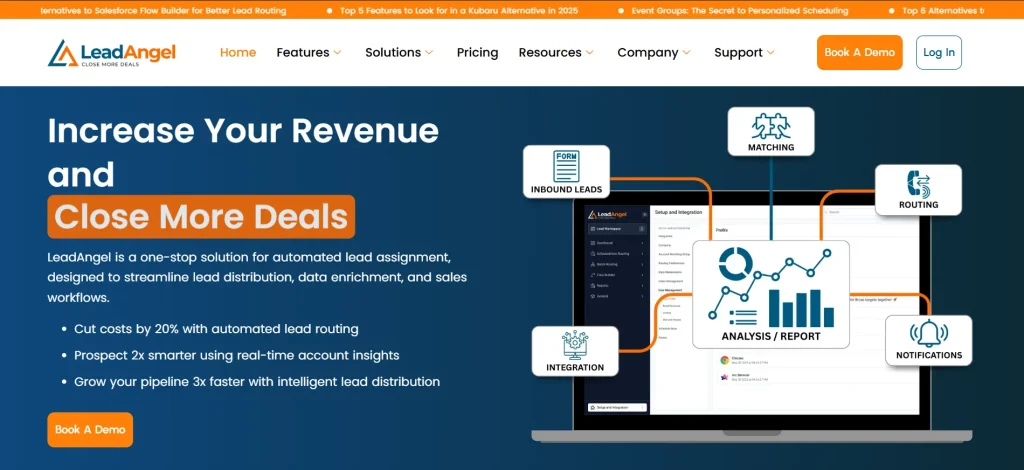
LeadAngel focuses on one of the most critical (and often broken) parts of GTM: how leads are assigned, distributed, and managed across teams. Instead of generating demand or running campaigns, it ensures every lead is routed to the right person, at the right time, with the right context.
While many platforms handle CRM, engagement, or data, LeadAngel sits at the core of execution, connecting marketing, sales, and partner teams through intelligent routing and automation.
Routing Engine: The Core of LeadAngel
At the center of LeadAngel is its advanced lead routing engine, designed to eliminate delays, manual errors, and missed opportunities.
How it works:
- Rule-Based Routing: Assigns leads based on territory, account ownership, company size, or custom logic.
- Round Robin Distribution: Fairly distributes leads among sales reps to balance workload.
- Account Matching: Matches incoming leads to existing accounts in CRM to maintain ownership consistency.
- Real-Time Processing: Instantly routes leads the moment they enter the system — no delays.
- Fallback Logic: Ensures no lead is left unassigned, even if conditions fail.
This ensures faster response times and better conversion rates.
Data Matching & Deduplication Layer
LeadAngel also solves a major GTM problem: messy CRM data.
Features:
- Lead-to-Account Matching: Connects leads with the right company records.
- Contact Deduplication: Removes duplicate entries to keep CRM clean.
- Fuzzy Matching Logic: Handles variations in company names or domains.
Clean data = better routing + better reporting.
Workflow Automation: Removing Manual Work
LeadAngel reduces dependency on ops teams by automating routing workflows.
What it automates:
- Lead assignment
- Reassignment rules
- SLA-based routing (speed-to-lead)
- Ownership updates
Sales teams focus on selling, not admin work.
Why LeadAngel Stands Out
• Deep specialization in lead routing & RevOps automation
• Handles both direct sales and partner ecosystems
• Real-time routing with complex conditional logic
• Strong data hygiene (deduplication + matching)
• Works seamlessly with CRMs like Salesforce
Best For
- B2B companies with high lead volume, multiple sales teams, or partner channels.
- Especially useful for RevOps teams looking to automate lead management and eliminate routing inefficiencies.
Pricing Plans
- Professional – Designed for growing teams needing core lead routing, lead-to-account matching, and scalable automation.
- Professional Plus – Built for advanced teams requiring multi-object routing, built-in deduplication, scheduling, and enterprise-level workflows.
Scales based on lead volume, users, and routing complexity. LeadAngel Pricing Page!
Analytics
Salesforce
Salesforce is a leading enterprise CRM that also serves as a powerful analytics engine for GTM teams. It centralizes customer data, tracks pipeline performance, and provides deep reporting and forecasting capabilities across the revenue lifecycle.
Pros:
• Advanced reporting & dashboards
• Scalable data storage
• Strong ecosystem & integrations
• Accurate pipeline forecasting
Cons:
• Complex setup and customization
• Expensive at scale
• Requires admin/RevOps support
• UI can feel overwhelming
Best For: Enterprise teams needing deep analytics, forecasting, and centralized GTM data management.
Marketing Automation
HubSpot CRM
HubSpot offers an all-in-one GTM platform combining CRM, marketing automation, and sales tools. It’s widely adopted by startups and mid-sized companies for its ease of use and unified approach.
Pros:
• Easy to use and quick setup
• Strong marketing automation
• Free CRM available
• All-in-one platform
Cons:
• Costs increase as you scale
• Limited customization vs Salesforce
• Advanced features locked in higher tiers
• Less flexible for complex enterprise needs
Best For: Startups and mid-market teams looking for a simple, unified GTM and marketing automation platform.
Market Research & Customer Insights
Gong
Gong captures and analyzes sales conversations to deliver deep customer insights. It helps teams understand buyer behavior, objections, and winning patterns using AI.
Pros:
• AI-driven conversation insights
• Improves sales coaching
• Tracks deal risks and trends
• Strong revenue intelligence
Cons:
• Expensive for small teams
• Requires call volume to be effective
• Limited outside sales conversations
• Setup takes time
Best For: Sales teams that want real customer insights from calls to improve messaging and close rates.
Sales Intelligence
Clay
Clay is a modern data enrichment and workflow tool that combines multiple data sources into one platform. It helps GTM teams build highly targeted prospect lists and automate personalization.
Pros:
• 75+ data source integrations
• Powerful enrichment workflows
• Highly customizable
• Strong for outbound personalization
Cons:
• Learning curve for new users
• Requires setup for full value
• Not a full GTM platform
• Can get expensive with usage
Best For: Growth and outbound teams needing flexible, multi-source data enrichment and automation.
Sales Enablement
Salesloft
Salesloft helps sales teams execute better outreach while also providing coaching and performance insights. It focuses on improving rep productivity and sales processes.
Pros:
• Strong sales workflows
• Coaching and performance insights
• Easy cadence management
• Good CRM integrations
Cons:
• Expensive for smaller teams
• Limited data capabilities
• Requires integration with other tools
• UI can feel rigid
Best For: Sales teams looking to improve rep efficiency, coaching, and structured sales execution.
Sales Intelligence
ZoomInfo GTM Studio
ZoomInfo GTM Studio provides one of the largest B2B contact databases along with intent data and orchestration tools. It helps teams identify and target in-market buyers.
Pros:
• Massive B2B contact database
• Strong intent data signals
• Built-in GTM workflows
• Accurate firmographic data
Cons:
• High enterprise pricing
• Data accuracy can vary.
• Heavy reliance on the database
• Requires integration for full workflow
Best For: Enterprise teams that rely heavily on data-driven prospecting and intent-based targeting.
ABM
Demandbase

Demandbase is a well-known platform in account-based marketing. It brings together intent data, account-based ads, and sales intelligence in one place. Its “One” platform connects marketing and sales data and shows everything at the account level with predictive scoring.
Pros:
• Strong support for account-based advertising
• Uses proprietary intent data
• Enables website personalization
• Includes sales intelligence and visitor identification
Cons:
• Expensive in pricing
• No autonomous AI agent workflows
• Limited multi-channel execution
• Setup can be complex and time-consuming
Best For: Large enterprise teams running mature ABM programs that need advertising, intent data, and account-level insights in one platform.
Sales Engagement
Outreach
Outreach is built for outbound sales execution. It enables teams to run multi-step outreach campaigns across email, calls, and social channels at scale.
Pros:
• Advanced sequencing
• Multi-channel outreach
• Strong automation
• Deal insights and tracking
Cons:
• Expensive for small teams
• Requires clean data to perform well
• Setup complexity
• UI can feel heavy
Best For: Sales teams focused on outbound prospecting and structured engagement at scale.
Market Research & Customer Insights
Clearbit
Clearbit provides real-time data enrichment and visitor identification. It helps marketing and sales teams understand who their prospects are and personalize engagement.
Pros:
• Real-time enrichment
• Website visitor identification
• Strong firmographic data
• Easy integration with tools
Cons:
• Expensive at scale
• Limited depth vs large databases
• Dependent on data accuracy
• Not a full GTM platform
Best For: Marketing teams that need better customer insights and real-time data for personalization.
How to Build and Update Your GTM Tech Stack
Building a strong go-to-market strategy starts with clarity, not just tools. The right go-to-market tech stack should align with your revenue model, buyer journey, and internal workflows. When done right, your GTM strategy for B2B becomes scalable, predictable, and efficient.
Step 1: Define Your Revenue Model
Your GTM process should begin with how your business generates revenue. This decides which go-to-market tools and GTM platform you actually need.
- Product-led growth (PLG): Focus on product analytics, in-app engagement, and usage signals
- Sales-led: Prioritize CRM, sales engagement, and forecasting tools
- Hybrid: Combine both, requiring alignment between product data and sales workflows
A clear model helps you avoid unnecessary GTM software and build a focused stack.
Step 2: Map the Buyer Journey
An effective go-to-market sales strategy depends on how well your tools support each stage of the buyer journey.
- Awareness: Demand generation and campaign tools
- Consideration: Lead nurturing and engagement tracking
- Conversion: CRM, sales tools, and forecasting
- Expansion: Customer success and product analytics
This ensures your GTM solutions cover the full journey without duplication.
Step 3: Audit Your Current Stack
Before investing in new go-to-market solutions, review your existing tools.
- Identify overlapping features
- Remove unused tools or licenses
- Fix integration gaps
- Eliminate tool sprawl
Many teams improve performance by optimizing their current GTM platform instead of adding more.
Step 4: Focus on Integration, Not Quantity
The best GTM automation platforms for B2B are not the ones with the most features but the ones that work well together.
- Use a central CRM to store data
- Sync marketing and sales systems
- Automate handoffs across teams
- Maintain consistent reporting
A well-integrated go-to-market tech stack improves efficiency and data accuracy.
Step 5: Align Teams Around Shared Metrics
A successful go-to-market strategy depends on alignment across teams.
Track shared KPIs like:
- Pipeline coverage
- Conversion rates
- Customer acquisition cost
- Revenue retention
- Forecast accuracy
When teams align on metrics, your GTM process becomes more effective.
Step 6: Build Workflows and Automation
Even the best go-to-market tools fail without execution. This is where automation matters.
- Automate lead routing and qualification
- Standardize outreach and account prioritization
- Define lifecycle stages clearly
- Build dashboards tied to revenue goals
- Continuously optimize based on performance
Strong execution turns your GTM software into a true revenue engine.
A go-to-market tech stack is not just a collection of tools. It’s a system that supports your entire GTM strategy for B2B.
When built and managed correctly, your GTM solutions help you move faster, stay aligned, and scale revenue with confidence.
How to Choose Go-to-Market Tools
Choosing the right go-to-market tools is not about picking the most popular software. It’s about solving real problems in your GTM strategy. Most teams waste budget because they buy tools first and figure out the use case later. The smarter approach is to start with clarity and then select tools that fit your workflow.
1. Identify Bottlenecks First
Before exploring any go-to-market software, understand what’s actually broken.
- Low lead volume?
- Poor data quality?
- Slow or ineffective outreach?
Each problem requires a different type of GTM solution. If you skip this step, you’ll end up with tools that don’t fix your core issue.
2. Define Your Ideal Customer Profile (ICP)
Your go-to-market strategy for B2B should focus on the right audience, not everyone.
- Clearly define your ICP (industry, company size, role)
- Choose tools that help you reach and engage those specific accounts
- Avoid tools that only expand reach without improving relevance
The goal is precision, not volume.
3. Prioritize Integration
Even the best GTM platform fails if it doesn’t connect with your existing stack.
- Make sure tools integrate with your CRM
- Ensure data flows smoothly between marketing and sales
- Avoid creating isolated systems (data silos)
A connected go-to-market tech stack improves efficiency and keeps your data reliable.
4. Focus on Actionable Data
Not all data is useful. The best go-to-market tools provide insights you can act on immediately.
- Look for high-intent signals (buying behavior, engagement)
- Choose tools with clean, usable data
- Prioritize simple interfaces that your team will actually use
Good data helps you make faster and better decisions.
5. Pilot and Validate Before Buying
Never commit based on demos alone. Test tools in real conditions.
- Run a 30-day trial
- Use real workflows and campaigns
- Measure if it saves time or improves conversions
If a tool doesn’t deliver results during testing, it won’t perform after purchase.
Why Lead Routing Is the Backbone of Any GTM Strategy
If lead routing feels like just another backend task or something you set once and forget, then it’s worth taking a closer look.
Umm! Let us make this simple for you.
Think of your GTM strategy like a journey. Leads are constantly coming in, teams are engaging, and conversations are moving forward. But without a clear path, the process starts to lose direction. That’s exactly where lead routing plays its role.
When routing is set up correctly, leads reach the right person at the right time. Follow-ups happen as expected, and the flow between teams feels natural. But when routing is not aligned with how your team actually works, issues begin to appear. Leads may remain unassigned, some may get reassigned multiple times, and others may not be followed up on at all.
What makes this more important is that routing reveals how your system truly operates. It shows whether your data is reliable, whether your teams understand ownership, and whether your process can handle growth. These are not always visible at first, but they become clear when you take a closer look.
This is where a simple self-tech audit becomes useful. By reviewing where leads come from, who they are assigned to, and how quickly they are contacted, you can identify gaps that may be slowing down your entire process.
It’s also important to remember that routing does not end at assignment. The process depends on reinforced handoffs, where each team knows exactly what to do next and when to act. This is what maintains momentum and keeps opportunities moving forward.
So while lead routing may not seem like the most visible part of your strategy, it plays a central role. It supports alignment, improves response time, and ensures your GTM system works the way it is intended to.
See How LeadAngel Can Transform Your Lead Management
Curious to experience the power of LeadAngel firsthand? We understand!
We're offering a complimentary trial so you can explore LeadAngel's features at your own pace. Once you request a free trial, we'll schedule a personalized onboarding session to ensure you maximize the value of LeadAngel.
Ready to take your lead management strategy to the next level? Request your LeadAngel trial today!
In addition to exploring the platform, we recommend visiting our LeadAngel Help Center for in-depth guidance. Our dedicated customer support team is also available to answer any questions you may have at sales@leadangel.com.
FAQs
A Go-to-Market (GTM) strategy is a plan for how a company reaches customers, sells its product, and generates revenue. It covers target audience, channels, messaging, and sales process.
To manage data, automate workflows, track pipeline, and align teams. Without tools, processes become manual, slow, and inconsistent.
CRM stores and manages customer data. GTM tools go beyond that, they handle marketing, outreach, routing, analytics, and automation across the full revenue process.
In sales, GTM is how reps find prospects, engage them, and close deals using defined processes, channels, and tools.
There is no single tool. The best solution is a combination of CRM, lead routing, sales engagement, data enrichment, and analytics tools working together.
CRM, marketing automation, lead routing, sales engagement, data enrichment, analytics, and customer success tools.
It is the set of tools used across marketing, sales, and customer success to manage the entire revenue process.
They automate follow-ups, route leads instantly, provide context, and track behavior—so teams respond faster and more accurately.
Lead routing is the process of assigning leads to the right sales rep based on rules like territory, expertise, or priority.

