
Offline Scheduling for Salesforce SDR-to-AE Handoff
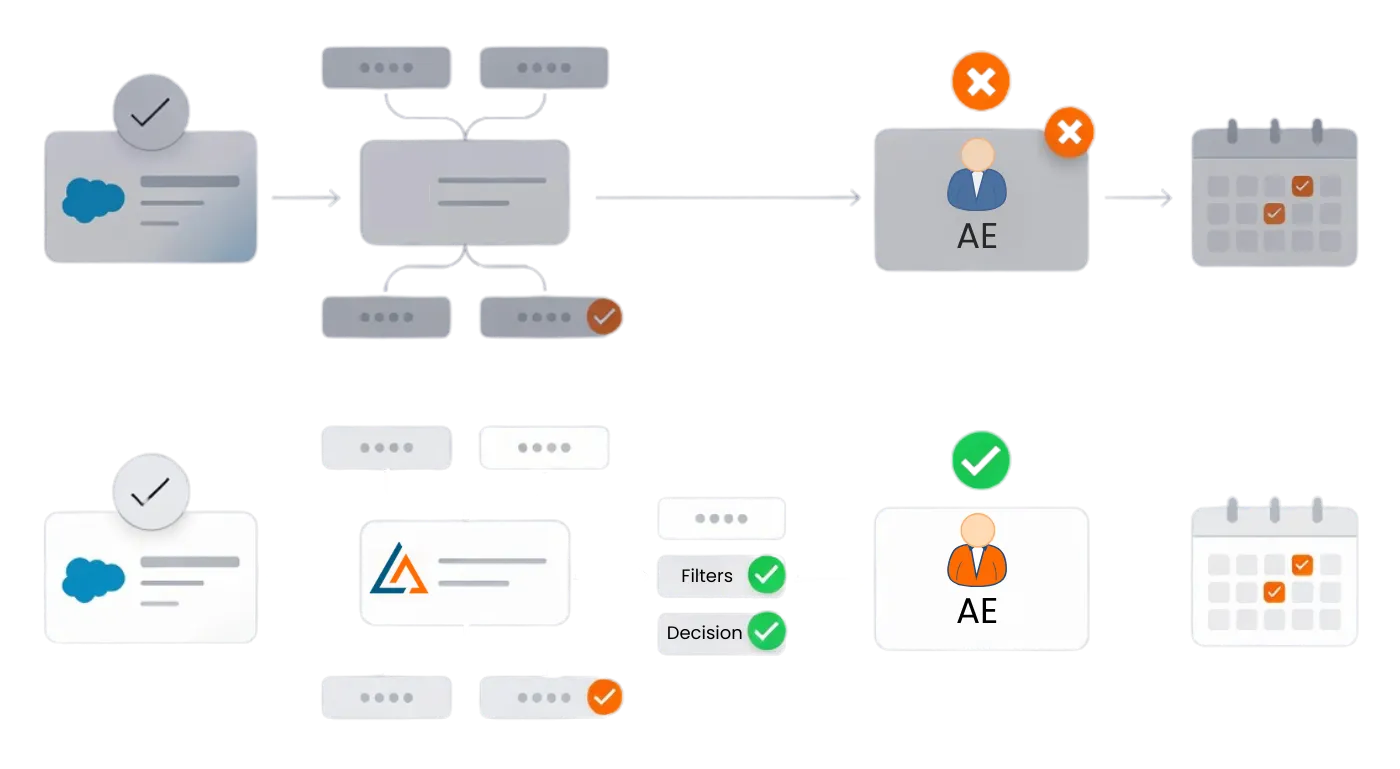
Sales teams using Salesforce often run into handoff issues when meetings are scheduled before lead ownership is properly assigned.
LeadAngel fixes the order: match → route → assign → schedule.
So the meeting goes to the right AE, not just the first available calendar.
Why Salesforce SDR → AE Handoff Falls Short
These issues show up in many Salesforce environments as lead volume and speed increase.
1
Meetings get scheduled before ownership is finalized
Most of the time, Salesforce workflows and scheduling occur before the routing logic is fully complete. As a result, meetings get booked with an available AE rather than the account executive best suited to close the deal.
2
Account ownership isn’t always enforced during scheduling
Native workflows don’t reliably apply account ownership rules at the time of scheduling. This can cause meetings to bypass existing account relationships.
3
SDRs rely on manual coordination
When ownership is unclear, SDRs use Slack or email to coordinate with AEs. This introduces delays and creates dependency on manual follow-up
4
Delays reduce response effectiveness
Scheduling delays increase the time between qualification and first AE interaction. This reduces the likelihood of engaging prospects while interest is highest.
5
Round robin logic is limited
Basic round robin can distribute leads evenly, but it doesn’t account for activity history, rep capacity, or eligibility rules. Edge cases require manual correction.
6
Scheduling tools operate independently of Salesforce routing
Many scheduling tools focus on availability, not Salesforce data integrity. Routing, ownership, and scheduling often function as separate steps.
< 1 min
Time to assign the right Account Executive
24×7
Offline scheduling availability
0
Misrouted meetings
infinite
Routing rules supported
From Qualification to Booking: Automating SDR-to-AE Handoffs in Salesforce
See it in action →

How It Works
How LeadAngel Offline Scheduling Works with Salesforce
We focus on scheduling that works natively inside Salesforce. Whether you’re supporting SDRs, AEs, or complex sales motions, LeadAngel gives your scheduling the structure it needs to scale cleanly.
What It Does
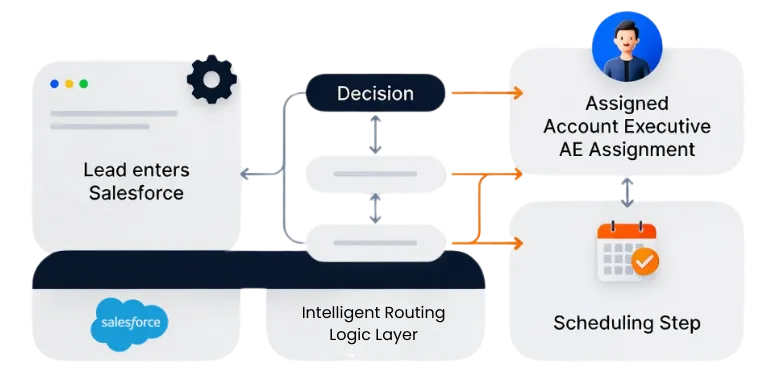
LeadAngel adds an offline scheduling layer on top of Salesforce to support SDR-to-AE handoffs when meetings cannot be booked in real time.
Instead of relying only on immediate calendar availability, LeadAngel applies Salesforce routing logic first to determine who should own the meeting, then manages scheduling as a follow-up step.
Salesforce remains the system of record.
LeadAngel controls assignment and sequencing.
What Happens During an Offline Booking
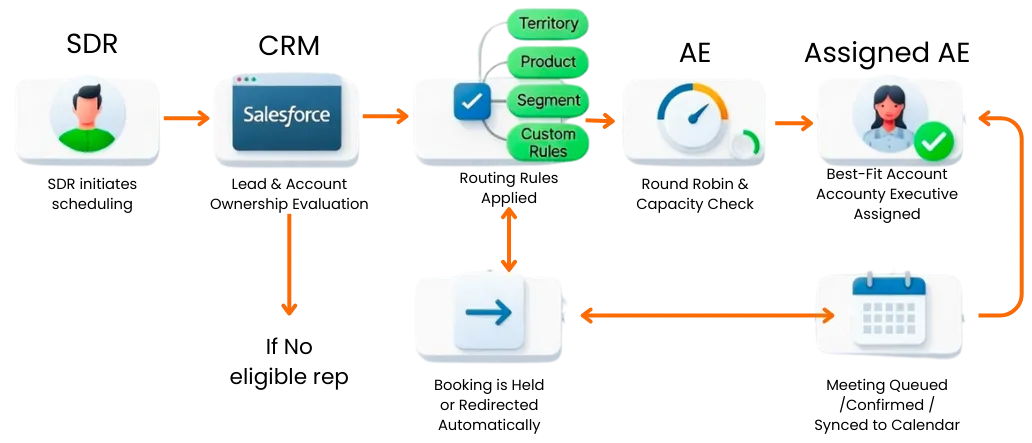
When an SDR qualifies a prospect and initiates scheduling:
LeadAngel evaluates lead and account ownership in Salesforce.
Routing rules apply based on territory, product, segment, and custom conditions.
Round robin and capacity limits are enforced.
The best-fit Account Executive is assigned and reserved.
The meeting is queued, confirmed, or synced to the calendar once conditions are met.
If no eligible rep is available, LeadAngel holds or redirects the booking automatically.
Benefits of Offline Scheduling
This approach prevents common Salesforce scheduling issues:
Meetings booked before ownership is finalized
Bookings that override account ownership rules
Manual SDR-to-AE coordination
Uneven workload distribution across AEs
Delayed follow-ups caused by calendar dependencies
Scheduling remains consistent even when real-time booking isn’t possible.
What Teams Experience
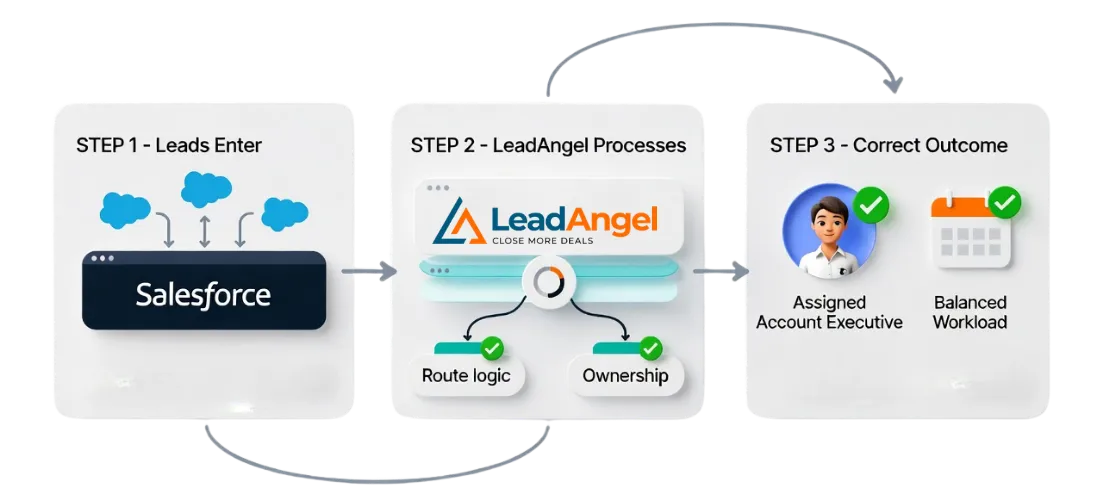
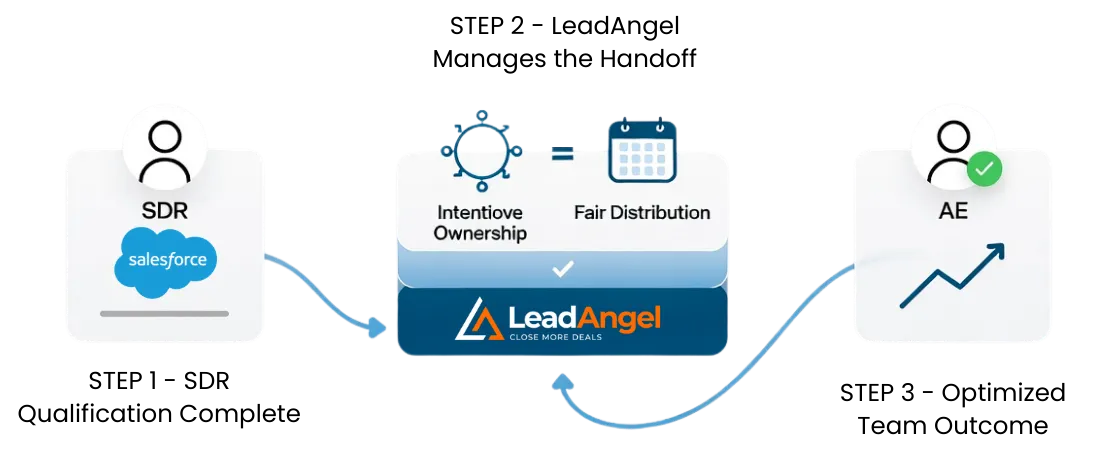
Once the SDR completes qualification in Salesforce, LeadAngel manages the handoff in the background.
Ownership is assigned intentionally.
Meetings are distributed fairly across AEs
Calendars remain balanced.
Manual reassignment is minimized.
Sales teams move faster without losing control.
Why It Matters for Salesforce Teams
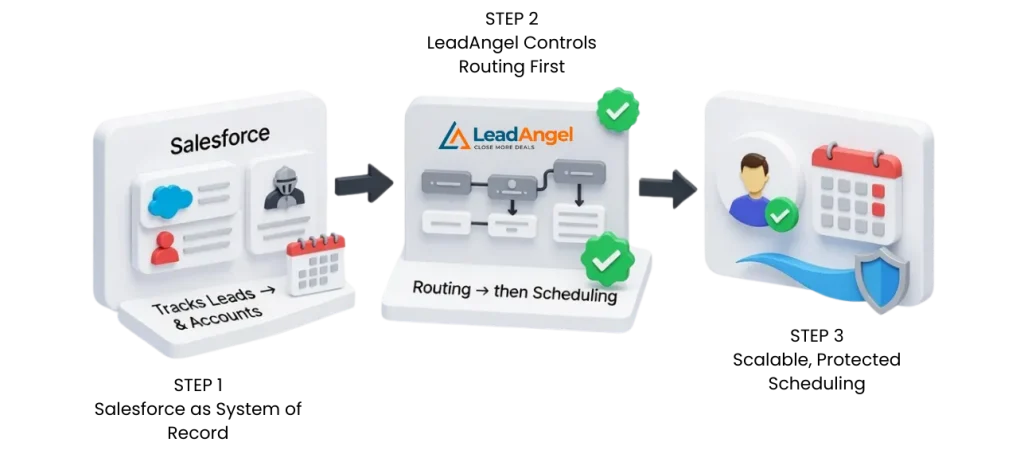
Salesforce tracks leads and accounts effectively.
But it doesn’t control scheduling orders or enforce ownership at the moment a meeting is booked.
LeadAngel ensures that routing happens before scheduling, not after.
Together, Salesforce and LeadAngel create an offline scheduling process that scales, protects ownership, and reduces operational friction.
Comparison
Compare Offline Scheduling for Salesforce SDR-Led Teams
Not all offline scheduling is built for SDR-led sales. Compare how Salesforce native options and scheduling platforms support SDR-led teams, then choose what fits your workflow.
| Capability | Native Salesforce Scheduling | Basic Calendar Tools | LeadAngel Scheduling |
|---|---|---|---|
| Routing before scheduling | ✕ | ✕ | ✓ |
| Uses Salesforce ownership rules | Limited | ✕ | ✓ |
| Account & activity matching | ✕ | ✕ | ✓ |
| Book meetings on behalf of AEs | Limited | Limited | ✓ |
| Offline scheduling support | ✕ | ✕ | ✓ |
| Real-time calendar check | Limited | ✓ | ✓ |
| Prospect date & time preferences | Limited | ✓ | ✓ |
| Time-of-day & SLA rules | ✕ | ✕ | ✓ |
| Round Robin assignment | Basic | Basic | ✓ |
| Weighted routing & performance boosts | ✕ | ✕ | ✓ |
| Capacity & overload protection | ✕ | ✕ | ✓ |
| Prevents reassignment conflicts | ✕ | ✕ | ✓ |
| Salesforce record accuracy | Medium | Low | High |
| Manual cleanup required | High | Medium | None |
| Built for complex sales motions | ✕ | ✕ | ✓ |
Get started
Ready to supercharge your business?
Grow sales and stay ahead in the competitive market by being among the first to benefit from our game-changing solutions.
Read Our Blogs

Leads are the foundation of every growing business. Why? Because speed matters, 78% of deals go to the first responder.

Bad B2B data isn’t just annoying.It’s expensive. It slows down sales.Confuses marketing.And quietly kills revenue. Which is why so many

You’ve explored plenty of tools before, and you know how overwhelming it feels to choose the right one (or even

We used to think our CRM issues were just part of the job: slow pipeline updates, missed follow-ups, and messy

Your round robin lead assignment system is not just a routing rule but a critical engine behind how your sales

Multiple Sales Reps Working on the Same Lead is Disastrous. It rarely starts as a visible problem. A lead enters
Fequently asked questions

Offline scheduling in Salesforce is when an SDR books a future meeting with an AE after qualification. The handoff happens with context, not pressure. It avoids forcing instant availability just to keep speed high.
Round robin only rotates ownership. Offline scheduling confirms who should take the meeting and when. It prioritizes fit and timing over fairness alone.
Yes, when done right. Meetings are scheduled with the correct account owner or aligned AE. This prevents reassignment and follow-up confusion.
Yes. SDRs can lock in the right AE before finalizing the meeting. No double booking. No last-minute swaps.
Absolutely. Leads are matched to accounts first. Scheduling follows the account, not the form fill.