Ever wondered why teams talk so much about data deduplication?
There’s a good reason for it.
Today, almost everything important lives inside our systems. Emails. Documents. Revenue reports. Customer records. Activity logs. Backups keep all of it safe—and that part is critical.
But backing up the same data again and again? That’s where trouble begins.
For revenue operations teams, data flows in from everywhere. CRMs. Marketing tools. Sales platforms. Automated integrations quietly save, copy, and resave records without anyone noticing. Over time, duplicate contacts and accounts pile up, creating serious data storage and management challenges.
That’s why deduplication has become such a big deal.
In this guide, we’ll walk through the real challenges of cross-system data management, explain what data deduplication is, how it works, how to choose the best data deduplication software, and the options worth considering—clearly, calmly, and without the clutter.
What Is Data Deduplication?
Data deduplication is the process of removing repeated data. It keeps only one accurate version of the same information. Extra copies are deleted, and all references point to that single record.
The main purpose of deduplication is to reduce storage usage and keep data clean. By eliminating duplicates, organizations can manage data more efficiently, improve accuracy, and avoid unnecessary clutter in their systems.
Why Data Deduplication Is Important for Businesses
Duplicate data sneaks into systems more easily than most teams expect. Files get copied for new projects. Records are recreated by different departments. Backups, integrations, and format changes add even more versions of the same data. Over time, this turns into one of the most common duplicate data problems businesses face.
At first, extra data may not seem like a big deal. Storage feels unlimited. Systems keep running. But behind the scenes, the costs add up. More data means more storage. More storage means higher spend, more maintenance, and more effort to manage it all.
This is where business data deduplication becomes essential. By keeping only one clean, accurate version of each record, organizations reduce waste and regain control. Storage stays lean. Systems stay faster. Teams stop working with outdated or conflicting information.
The data deduplication importance goes beyond saving space. It directly improves trust in data. Fewer duplicates lead to fewer data quality issues, better reporting, and clearer decision-making across teams.
In short, data creation isn’t the problem. Unchecked duplication is. Deduplication helps businesses scale without the clutter, confusion, and unnecessary cost.
Best Data Deduplication Software for Business & CRM Data in 2026
Clean data just feels better. Everything runs more smoothly. Reports make sense. Teams stop questioning which record is the “right” one. The right data deduplication software makes that possible—quietly working in the background while businesses focus on growth.
Here’s a closer look at some of the best data deduplication tools and data deduplication solutions businesses rely on in 2026.
1. LeadAngel
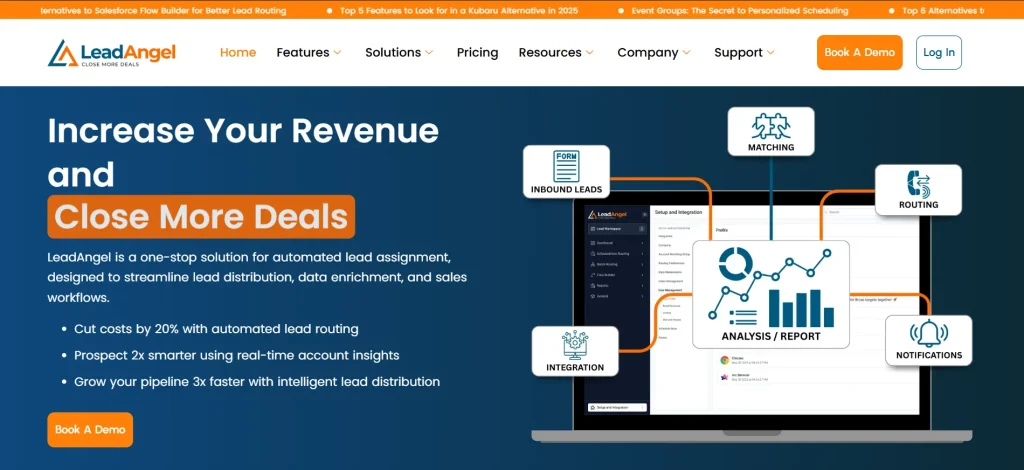
LeadAngel is designed for modern revenue teams that operate within CRMs. It focuses on maintaining accurate lead, contact, and account data while supporting complex routing and matching needs.
Designed for Salesforce and HubSpot environments. Keeps CRM data clean while supporting advanced lead-to-account matching.
Features
- Smart lead, contact, and account deduplication
- Advanced matching rules
- Real-time and scheduled cleanup
- Native CRM integrations
Pros
- Strong CRM focus
- Handles large datasets well
- Improves routing accuracy
Cons
- Best suited for CRM-heavy teams
- Not a general-purpose ETL tool
Pricing
Custom pricing based on usage and CRM size
2. TIBCO Clarity
TIBCO Clarity is built for organizations managing data across many systems. It helps create a consistent view of records across platforms.
Enterprise-grade data quality and matching solution.
Features
- Cross-system data matching
- Rule-based and fuzzy logic deduplication
- Data standardization
Pros
- Scales well for large enterprises
- Strong governance support
Cons
- Complex setup
- Higher learning curve
Pricing
Enterprise pricing on request.
3. DemandTools
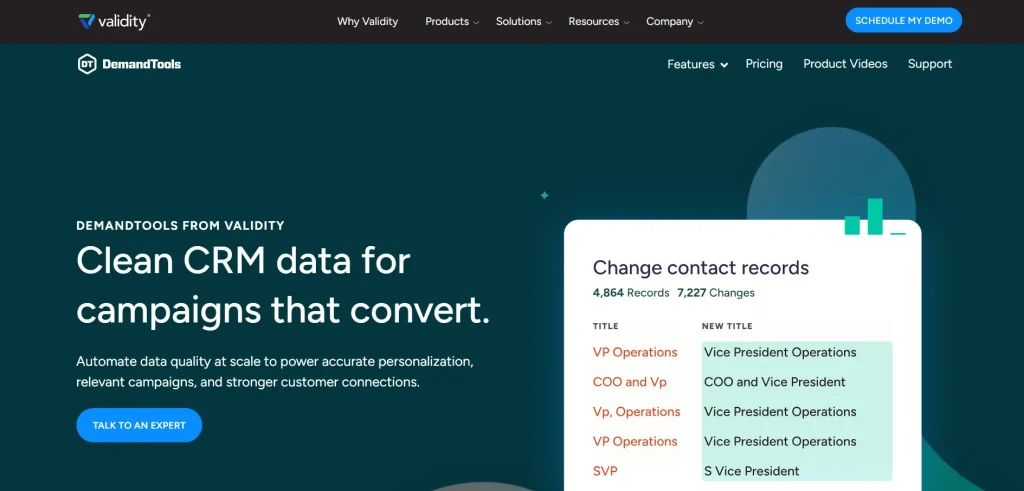
DemandTools is a familiar name in Salesforce ecosystems. It focuses on hands-on data cleanup and control.
A Salesforce-native toolkit for data hygiene and deduplication.
Features
- Duplicate matching and merging
- Data normalization
- Mass record updates
Pros
- Powerful for Salesforce admins
- Highly configurable
Cons
- Manual processes can be time-consuming
- Salesforce-only focus
Pricing
Subscription-based, varies by edition.
4. RingLead
RingLead focuses on preventing duplicates before they enter the CRM. It emphasizes real-time data hygiene.
A data management platform centered on duplicate prevention.
Features
- Real-time duplicate detection
- Data enrichment
- Lead and contact protection
Pros
- Strong prevention capabilities
- Easy CRM integration
Cons
- Less flexible for complex matching
- Limited beyond CRM use cases
Pricing
Custom pricing.
5. Integrate.io

Integrate.io blends data integration with deduplication, making it useful for analytics-driven teams.
Cloud-based platform for data pipelines and quality management.
Features
- ETL and data transformation
- Deduplication during data sync
- Multi-source support
Pros
- Broad data connectivity
- Good for analytics teams
Cons
- Not CRM-specific
- Requires technical expertise
Pricing
Tiered plans with usage-based pricing.
6. Melissa Clean Suite

Melissa Clean Suite focuses on accuracy and validation, especially for customer data.
Data quality tools for cleaning and matching customer records.
Features
- Address and identity verification
- Duplicate detection
- Data standardization
Pros
- High data accuracy
- Strong compliance support
Cons
- UI feels dated
- Less automation for CRM workflows
Pricing
Modular pricing based on services used.
7. WinPure Clean & Match

WinPure is designed for teams that want powerful matching without enterprise complexity.
Desktop and server-based deduplication software.
Features
- Fuzzy matching algorithms
- Bulk deduplication
- Data profiling
Pros
- Easy to use
- Cost-effective for small teams
Cons
- Limited cloud-native features
- Less suitable for real-time CRM syncing
Pricing
One-time license or subscription options.
8. Informatica Cloud Data Quality

Informatica brings enterprise-level data governance and deduplication to the cloud.
Comprehensive cloud platform for data quality management.
Features
- Advanced matching and cleansing
- AI-driven data rules
- Multi-domain support
Pros
- Extremely powerful
- Trusted enterprise solution
Cons
- Expensive
- Requires skilled implementation
Pricing
Enterprise pricing, quote-based.
Best Data Deduplication Software (2026)
| Software | Best For | Key Strength | Pricing |
|---|---|---|---|
| LeadAngel | CRM data | Advanced matching | Custom |
| TIBCO Clarity | Enterprises | Cross-system dedupe | Quote-based |
| DemandTools | Salesforce teams | Manual cleanup | Subscription |
| RingLead | Duplicate prevention | Real-time checks | Custom |
| Integrate.io | Data pipelines | ETL deduplication | Tiered |
| Melissa Clean Suite | Customer data | Data validation | Modular |
| WinPure Clean & Match | Small teams | Fuzzy matching | License |
| Informatica Cloud DQ | Large enterprises | AI data quality | Quote-based |
Common Causes of Duplicate Data
Duplicate data rarely appears on purpose. It quietly builds up over time. These causes of duplicate data often feel small at first, but they create big problems later.
Multiple Data Entry Points
One form. Another form. Then one more.
When customers enter details in different places, duplicate customer data starts to grow.
Manual Data Entry Errors
Typos happen.
Missed letters, extra spaces, and formatting changes turn one record into many. This is one of the most common data duplication problems.
CRM and Tool Integrations
Systems love to share data.
But when tools are not synced properly, the same customer gets created again and again.
Data Imports and Migrations
Old systems meet new platforms.
Without clean rules, imports bring along repeated records and outdated details.
Lack of Matching Rules
No rules. No control.
When systems can’t recognize similar records, duplicate customer data slips in unnoticed.
Teams Working in Silos
Sales, marketing, and support work fast.
But without shared visibility, each team may create the same record—adding to ongoing data duplication problems.
Duplicate data doesn’t show up overnight.
It builds quietly, record by record, until clean data feels hard to maintain.
How Data Deduplication Software Works
Data deduplication software simplifies the way organizations manage growing volumes of data by removing repeated records and keeping only one reliable version. Instead of relying on time-consuming manual cleanup, these tools automatically scan incoming and existing data to identify duplicates before they create confusion. The process feels smooth and controlled, allowing systems to stay organized even as data flows in from multiple sources. This approach reduces clutter, improves accuracy, and helps teams trust the information they work with every day.
Automated data deduplication relies on predefined rules that run continuously in the background. As new records enter a system, the software checks them against existing data in real time. It looks for similarities using match identifiers such as email addresses, web domains, or unique IDs. Before comparisons happen, the data is standardized through normalization steps. Emails may be converted to lowercase, extra spaces are removed, and unnecessary prefixes like “https://” are stripped away. These small adjustments make sure the software compares data fairly and accurately, which is essential for understanding how data deduplication works at scale.
Once records are normalized, the software applies intelligent matching logic to detect true duplicates. Similar entries are grouped together, while false matches are filtered out. When duplicates are confirmed, the system uses prioritization rules to decide which data should be kept. Some sources are considered more reliable than others, and those trusted values take precedence at the field level. The remaining records are merged or removed, resulting in a single, clean version that becomes the source of truth across systems.
Modern data deduplication software is designed to work beyond a single platform. Data today moves constantly between CRMs, marketing tools, sales engagement systems, customer support platforms, and billing applications. Cleaning duplicates in only one tool is no longer enough. Advanced solutions perform automated data deduplication across the entire technology stack, resolving duplicates as records sync between systems. This real-time approach keeps data consistent everywhere, eliminates ongoing data duplication problems, and ensures teams always work with accurate and dependable information.
Types of Data Deduplication Techniques
Different systems handle duplicates in different ways. Each method has its own strengths. These data deduplication techniques work best when used together, not alone.
| Deduplication Technique | What It Means | When It Works Best |
|---|---|---|
| Rule-Based Deduplication | Uses predefined rules to find exact matches. For example, same email address or customer ID. | Best for structured data with consistent formats |
| Fuzzy Matching | Identifies similar records instead of exact matches. It compares names, addresses, and patterns. | Useful when data has typos or formatting differences |
| Real-Time Data Deduplication | Checks for duplicates at the moment data is created or updated. | Ideal for preventing duplicates before they enter the system |
| Batch Deduplication | Scans large datasets at scheduled intervals to detect duplicates. | Works well for cleaning existing databases |
| Hybrid Deduplication | Combines rule-based logic with fuzzy matching. | Effective for complex data environments |
Rule-Based Deduplication
Clean. Predictable. Structured.
Rule-based deduplication follows strict logic to identify duplicates. It is fast and reliable when data is standardized.
Fuzzy Matching
Flexible. Smart. Adaptive.
Fuzzy matching looks beyond exact values. It spots records that look alike, even when details don’t match perfectly.
Real-Time Data Deduplication
Instant. Preventive. Efficient.
Real-time data deduplication stops duplicates before they spread. Every new record is checked as it enters the system.
Choosing the right mix of data deduplication techniques keeps data accurate, organized, and easy to trust.
Data Deduplication Software vs Manual Deduplication
Duplicate data can be handled in two ways. One is slow and hands-on. The other is fast and automated. Both aim for clean records, but the experience is very different.
Manual Deduplication
Careful. Time-consuming. Risky.
Manual deduplication relies on people to find and merge duplicate records. It often starts with basic data cleansing, such as reviewing names, emails, or account lines by line.
- Works for small datasets
- Requires constant attention
- Errors are easy to miss
- Becomes unmanageable as data grows
Manual cleanup may feel controlled, but it struggles to keep up with modern data volume.
Data Deduplication Software
Smart. Scalable. Reliable.
Data deduplication software uses automation to identify and remove duplicates. These data deduplication tools apply rules, fuzzy matching, and real-time checks to maintain accuracy.
- Supports automated data cleansing
- Handles large datasets with ease
- Reduces human error
- Keeps data clean continuously
Software doesn’t just clean data once. It protects it every day.
Key Differences at a Glance
| Aspect | Manual Deduplication | Data Deduplication Software |
|---|---|---|
| Effort | High manual effort | Minimal human involvement |
| Speed | Slow and repetitive | Fast and continuous |
| Accuracy | Depends on users | Rule-driven and consistent |
| Scalability | Limited | Designed to scale |
| Data Cleansing | One-time cleanup | Ongoing, automated cleansing |
Clean data feels effortless when the right tools are in place.
That’s where data deduplication software quietly does the heavy lifting.
Data Deduplication for B2B, CRM, and SaaS Teams
Clean data brings a sense of calm. Everything feels easier when each record has its own place. For growing teams, CRM data deduplication creates that quiet order behind the scenes.
Built for B2B Complexity
B2B data tells long stories.
One customer. Many contacts. Multiple touchpoints across months or years. B2B data deduplication software helps connect these pieces, removing repeats while keeping relationships intact.
The result is data that finally makes sense.
Keeping CRM Records Warm and Accurate
CRMs are always in motion.
New leads arrive. Old contacts update. Without customer data deduplication, records slowly multiply and blur.
A strong deduplication process gently brings everything back together. One customer. One clear view. No confusion.
Sales Teams Move Faster with Clean Data
Sales thrives on clarity.
When reps see duplicates, trust fades and follow-ups stall. Sales data deduplication removes the noise so teams can focus on real conversations, not record cleanup.
Clean data means better timing and smoother handoffs.
Designed for SaaS Growth
SaaS teams grow fast.
Integrations, sign-ups, and product-led motions create data at every step. CRM data deduplication keeps growth organized, even as systems expand.
Everything stays aligned. Nothing feels overwhelming.
When data is clean, teams feel confident.
Each record shines on its own—simple, accurate, and ready to support growth.
How to Choose the Right Data Deduplication Software
Choosing the right deduplication tool can feel surprisingly satisfying. Like setting up a perfect display, everything works better when each piece fits just right. The best data deduplication software for businesses brings order, clarity, and long-term peace of mind.
Understand the Shape of Your Data
Every dataset has its own personality.
Many teams rely heavily on email, making it a natural way to identify unique records. In this case, strong email-based matching is one of the most important data deduplication software features.
But not all businesses work the same way. Cold-calling teams or ecommerce platforms may create records before emails exist. The right software supports multiple identifiers and adapts easily to different data structures.
Expect a Few Exceptions
Even clean data has surprises.
Shared inboxes, group emails, and aliases can blur the lines between unique records. The best data deduplication software for businesses allows custom rules, so special cases can be flagged instead of forced into incorrect merges.
This flexibility keeps real people from getting lost in automation.
Avoid Fixes That Create New Issues
Quick solutions often look tempting.
Basic automation tools may attempt deduplication, but timing gaps and sync delays can quietly introduce errors. Over time, this leads to fragile processes and tangled logic.
Robust data deduplication software features are built for scale. They handle complexity without adding risk, keeping data clean without constant oversight.When the right tool is chosen, everything feels calmer.
Clean records. Clear systems. And data that finally stays organized.
See How LeadAngel Can Transform Your Lead Management
Curious to experience the power of LeadAngel firsthand? We understand!
We're offering a complimentary trial so you can explore LeadAngel's features at your own pace. Once you request a free trial, we'll schedule a personalized onboarding session to ensure you maximize the value of LeadAngel.
Ready to take your lead management strategy to the next level? Request your LeadAngel trial today!
In addition to exploring the platform, we recommend visiting our LeadAngel Help Center for in-depth guidance. Our dedicated customer support team is also available to answer any questions you may have at sales@leadangel.com.
FAQs
The best software fits your data, scales with growth, and cleans records automatically without breaking workflows. Examples: LeadAngel – Built for B2B and RevOps teams. Handles real-time lead deduplication, account matching, and CRM data hygiene at scale. DemandTools – Useful for manual and batch-based CRM data cleanup, especially for Salesforce admins.
By tracking accuracy, completeness, consistency, and how often duplicates appear.
It compares records across systems, identifies matches, and merges or links them using defined rules.
Automated deduplication is faster, consistent, and scalable. Manual cleanup is slow and error-prone.
It uses distributed processing and matching algorithms to clean massive datasets in real time or batches.
A mix of exact matching and fuzzy logic delivers the most reliable results.
It finds similar records even when names, emails, or formats don’t perfectly match.
B2B, SaaS, finance, healthcare, and ecommerce benefit the most from clean, trusted data.
Yes. Advanced RevOps platforms can dedupe leads instantly as they enter the system.
CRM data hygiene keeps records accurate, current, and unique—so teams can trust their data.
The best tool offers real-time matching, flexible rules, and deep CRM integration.