
How leads are assigned in Salesforce can determine how fast deals move. And how fair your sales process really is. Teams often ask the same questions. How do we distribute leads without bias? How do we respond faster? How do we scale Salesforce lead assignment without chaos?
Fair play in lead assignment isn’t optional anymore. Speed matters. But speed without accuracy breaks trust. It’s not enough to capture a lead in your CRM. It must reach the right rep. At the right time. Every time.

In high-velocity Salesforce sales environments, manual Salesforce lead assignment is risky. Leads wait. Reps miss follow-ups. Conversion drops. Studies show the first vendor to respond wins nearly half of all deals. Yet many teams still lose minutes or hours during the lead assignment.
That’s why the round robin assignment exists. Round robin lead assignment Salesforce teams use ensures fair distribution. Balanced workloads. Faster response times. No favoritism. No bottlenecks. And the impact isn’t theoretical. The numbers make it clear:
- Number of organizations using Salesforce: 150,000+
- Percentage of buyers who choose the first responding vendor: ~50%
- Increase in conversion rates with faster lead response: up to 8×
In this blog, we show how to set up round robin assignment Salesforce rules. Where native logic falls short. And how tools like LeadAngel help teams scale round robin lead assignment without friction.
What is Round Robin Lead Assignment in Salesforce?
Round Robin lead assignment in Salesforce is a technique that we use to distribute inbound leads. These incoming leads are distributed evenly across the sales team. Think of it like taking turns. Each sales rep gets a lead in sequence. Also, it will work once everyone has received one; the cycle starts over from the beginning.
Here’s a simple example.
Imagine you have three sales reps and six new leads arrive. Instead of assigning them manually or all at once to one person, Salesforce rotates ownership in a fixed order:
- Lead 1 goes to Rep 1
- Lead 2 goes to Rep 2
- Lead 3 goes to Rep 3
- Lead 4 goes back to Rep 1
- Lead 5 goes to Rep 2
- Lead 6 goes to Rep 3
This approach keeps workloads balanced and ensures no single rep is overloaded while others wait. Each lead is assigned fairly, in order, as it enters the system.
The image below shows how this rotation works in practice.
4 Proven Steps to Set Up Round Robin Lead Assignment in Salesforce (And When Each One Works)
Salesforce doesn’t offer a built-in Round Robin feature, but you can create a working system using custom fields and Lead Assignment Rules. The process takes a little setup, but once it’s in place, new leads can be automatically routed across your sales team in a rotating pattern.
Here’s how to get it done.
Step 1: Create a Unique Lead Number Field
To start, you’ll need to give each new lead a unique number, so Salesforce knows the order in which leads are created. You’ll do this by adding an Auto Number field to the Lead object.
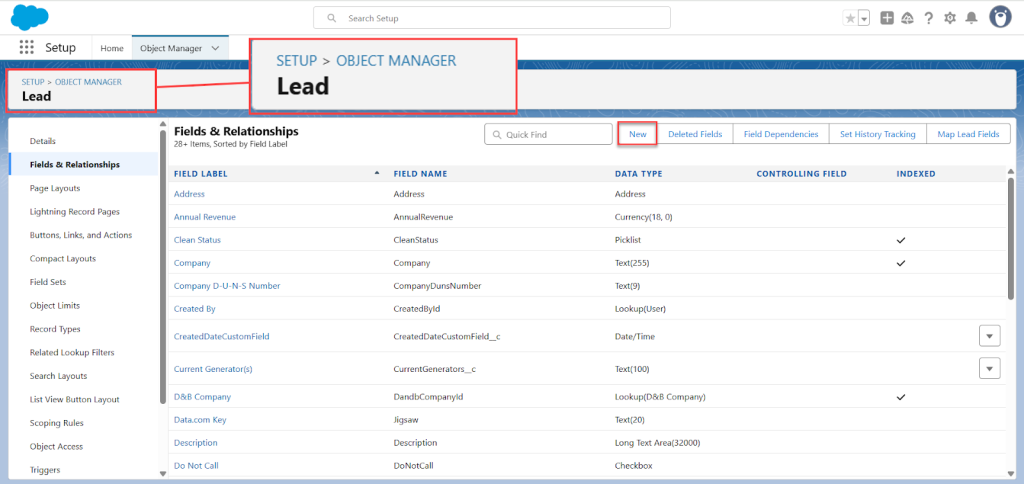
- Go to Setup, then search for Object Manager and select Lead.
- Under Fields & Relationships, click New.
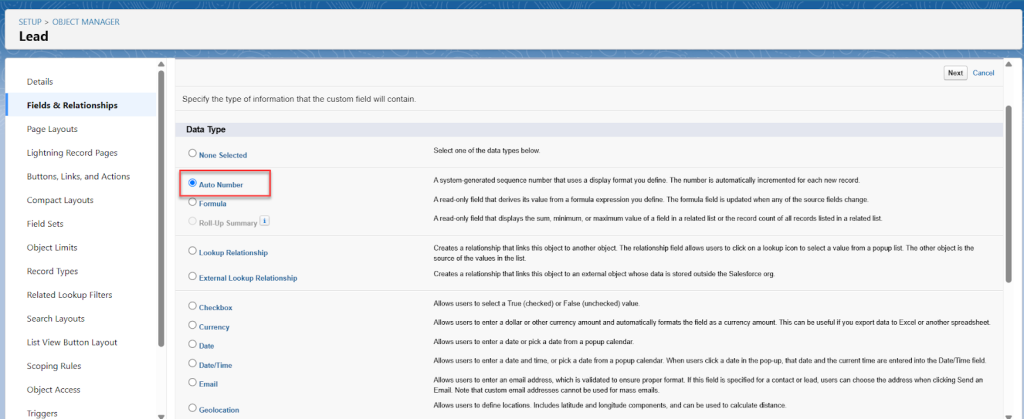
- Choose Auto Number as the field type. And click Next.
- Name the field something like Lead Number.
- In the Display Format box, type {0} and set the Starting Number to 1.
- Check the box that marks it as a unique record identifier (this helps Salesforce reference it in future formulas).
- Click through the permissions screens, then save the field
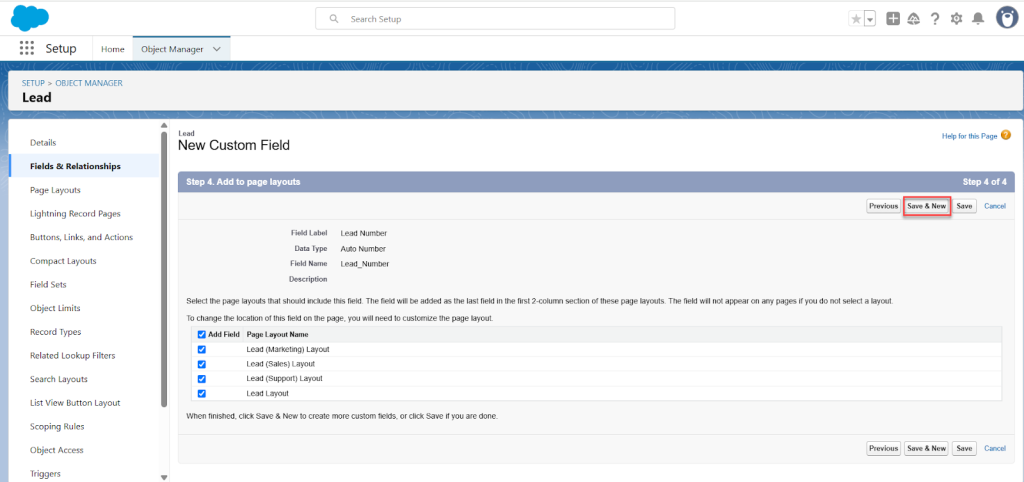
This field will now auto-assign a unique number to every new lead that enters Salesforce.
Step 2: Add a Round Robin Formula Field
Next, you’ll create a formula field that determines which rep a lead should be assigned to, based on its Lead Number.
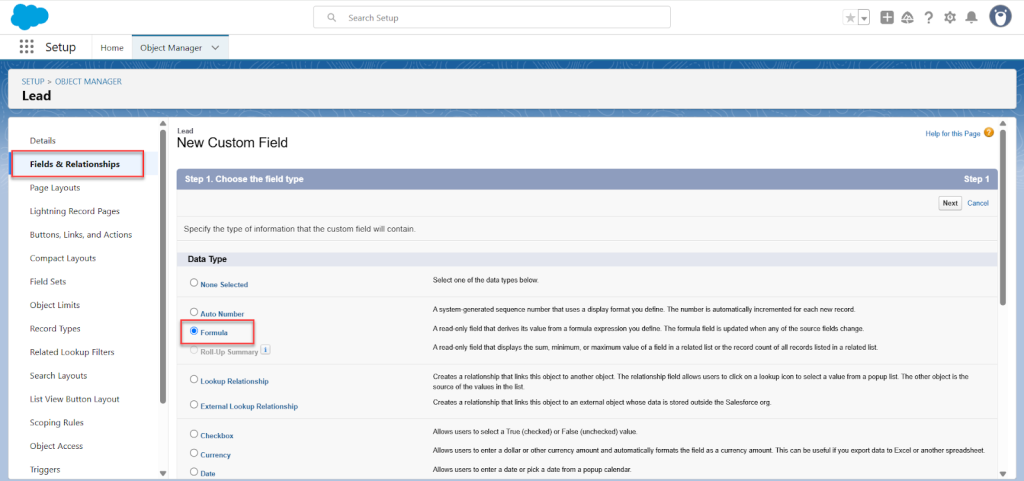
- Still in the Lead object, click Fields & Relationships > New.
- Choose Formula as the field type.
- Name this field Round Robin (or something similar).
- Select Number as the formula return type, and set Decimal Places to 0.
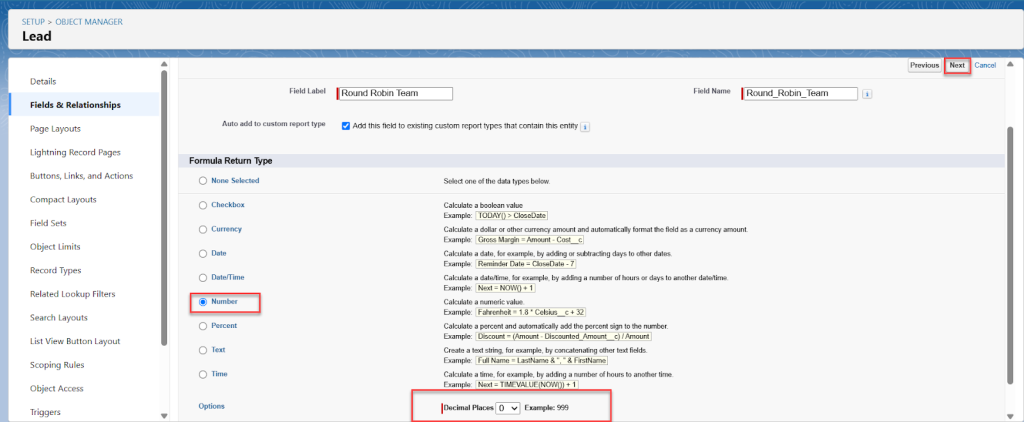
In the formula editor, paste this: MOD(VALUE(Lead_Number__c),3) + 1
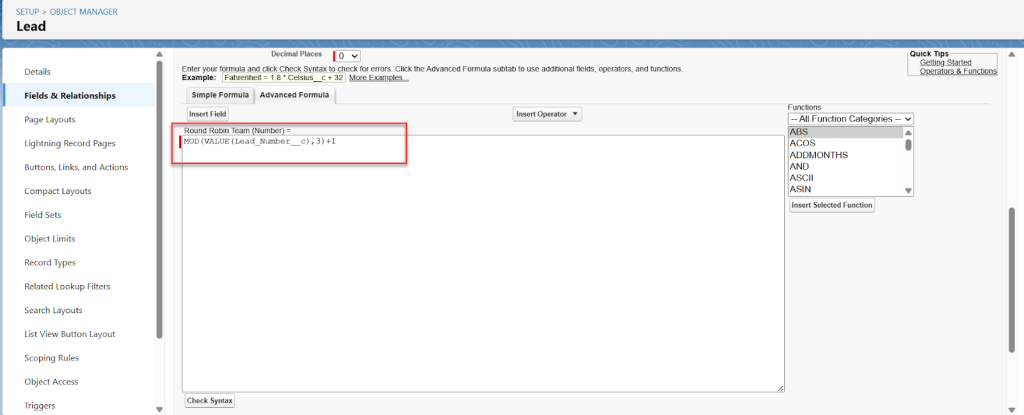
- Here’s how it works:
- MOD() divides the lead number by the number of users (in this case, 3) and returns the remainder.
- Adding +1 shifts the range from 0–2 to 1–3.
- Update the 3 to match the number of users in your Round Robin rotation.
- Save the formula and skip adding it to page layouts.
This formula generates a number (1, 2, or 3) that represents which rep should get the next lead.
Step 3: Create the Lead Assignment Rule
Now that leads have a round robin number assigned, it’s time to use Lead Assignment Rules to match those numbers with individual users.
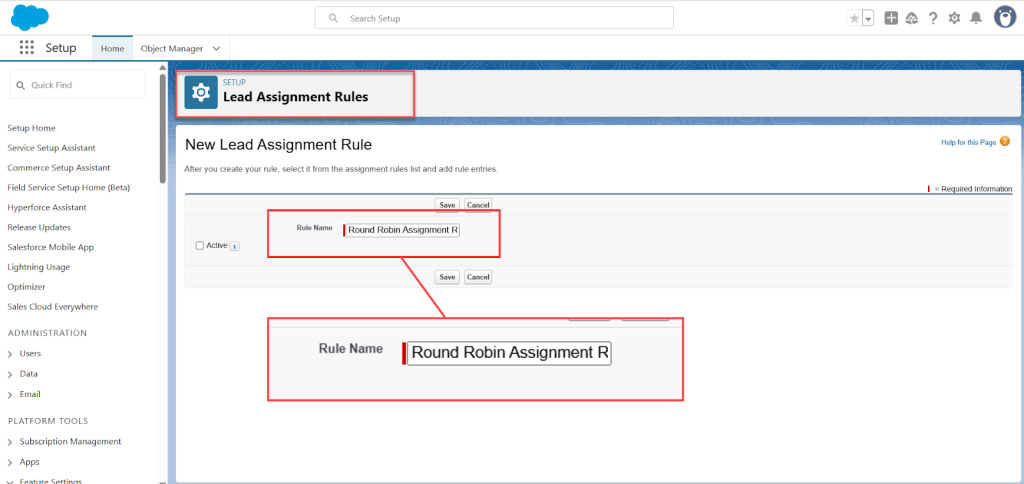
- In Setup, search for and open Lead Assignment Rules.
- Click New, name it something like Round Robin Assignment Rule, and save.
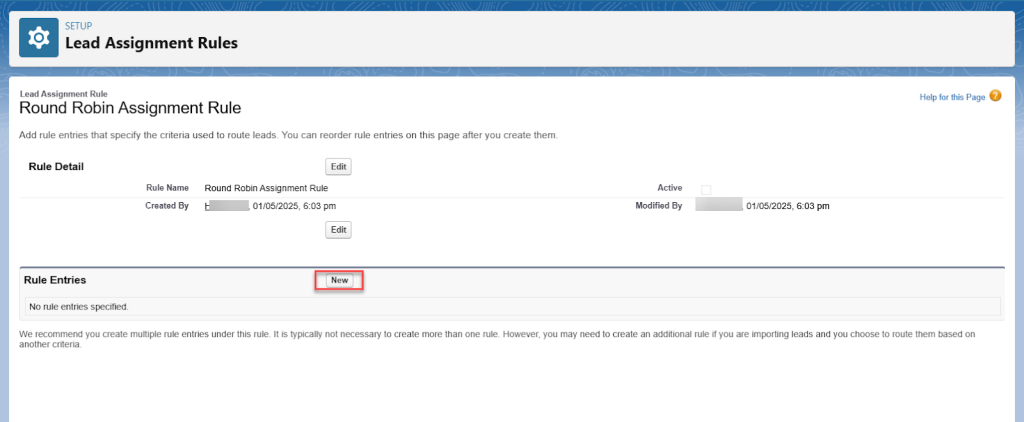
- Click into your new rule, and under Rule Entries, click New.
- For the first user:
- Optionally, select an email template to notify them of new assignments.
- Click Save.
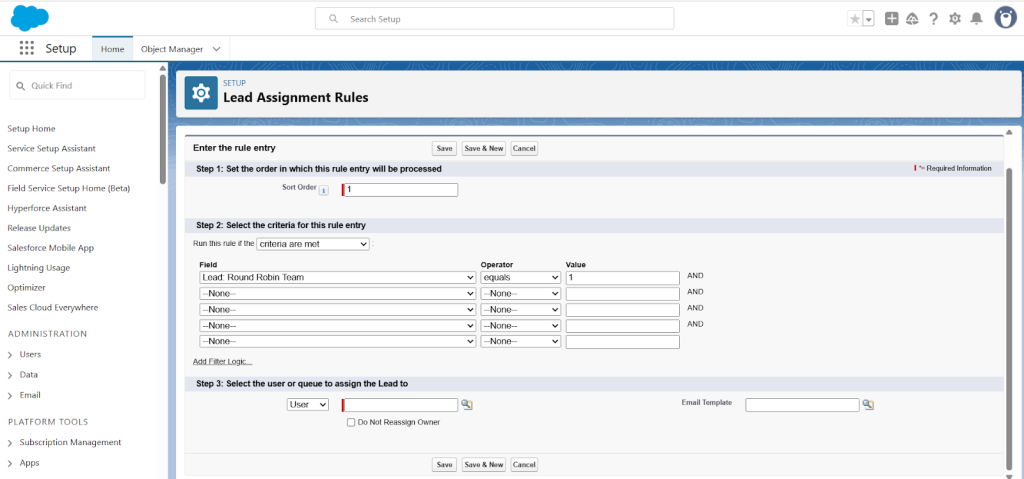

Repeat this process for each user. For example:
- User 2 would have a rule where Round Robin equals 2, and so on.
Each user should have their own rule entry, each with an increasing sort order.
Step 4: Allow Lead Assignment on Manually-Created Leads
By default, manually created leads might skip the assignment rule. Here’s how to make sure it applies in all cases:
- Go back to Object Manager, choose Lead, and open Page Layouts.
- Select your main Lead Layout, then click Layout Properties.
- Look for the Lead Assignment Checkbox, and check the box to show it on the edit page.
- Save your changes.
Now, whenever someone creates a lead manually, they can tick a box to trigger the Round Robin assignment rule.
Software That Powers Round Robin Lead Assignment in Salesforce
If you’re planning a round robin lead assignment, it helps to know where this logic already exists in your sales stack. Many tools support round robin leads, but they vary in control, setup effort, and scale.
Below is a quick view of where teams run round robin Salesforce setups today.
CRMs
CRMs are the most common starting point.
Salesforce and HubSpot support assignment rules in Salesforce using Flows or lead assignment rules. Salesforce lead assignment rules round robin setups work for basic use cases and centralized data.
Sales Engagement Tools
These tools focus on rep activity.
Sales engagement platforms include round robin lead assignment for leads or tasks. Useful when routing and outreach must stay aligned.
Round Robin Lead Assignment Software
These tools are built for routing.
Round robin lead assignment software handles complex logic like territories, capacity, and SLAs. Designed to scale beyond native Salesforce assignment rules.
Scheduling Tools
Scheduling tools offer light routing.
Leads are assigned during booking using a simple round robin assignment or availability checks. Limited compared to full round robin Salesforce logic.
Marketing Automation Platforms
Assignment happens during lead capture.
These platforms trigger round robin lead assignment based on form fills or engagement. Often tied to assignment rules Salesforce workflows.
RevOps Platforms
RevOps tools manage end-to-end flow.
They combine capture, routing, and ownership using salesforce lead assignment rules round robin logic across teams.
Avoid Duplicate Assignment Rules
Multiple tools often mean overlapping lead assignment rules.
This creates conflicts inside salesforce assignment and breaks reporting. The fix is one system of record for round robin leads.
The goal is simple. Clean routing. Fair distribution. No competing rules.
Salesforce Round Robin Lead Assignment: Capabilities, Limits, and When to Go Beyond Native Rules
Salesforce round robin lead assignment is one of the most searched topics by sales ops teams trying to automate fair lead distribution. And for good reason. Salesforce is powerful, flexible, and widely used. But when it comes to round robin lead assignment in Salesforce, there’s a clear line between what works well and what starts to break at scale.
How the Round Robin Lead Assignment Works in Salesforce
Salesforce does not offer a native “round robin” toggle. Instead, round robin assignment Salesforce logic is built using:
- Lead Assignment Rules
- Flows
- In advanced cases, Apex
With the right configuration, salesforce lead assignment rules round robin setups can rotate leads across reps in a fixed order. Leads move automatically. Manual work is reduced. Basic fairness is achieved.
For small teams and simple routing logic, this approach works.
What Salesforce Lead Assignment Rules Handle Well
- Predictable rotation
Using Flows, Salesforce can distribute round robin leads in a repeating sequence. - Rule-based control
You can define lead assignment rules based on region, source, product, or custom fields. - Centralized logic
Everything runs inside Salesforce. No external systems. No sync delays. Your salesforce assignment logic stays tied to CRM workflows and alerts.
Where Salesforce Round Robin Assignment Breaks Down
- No native round robin feature
Every salesforce lead assignment round robin setup is custom. That means higher setup time and ongoing maintenance. - Flow complexity grows fast
As soon as you add territories, capacity limits, availability rules, or multiple teams, Flows become hard to manage. Updates are risky. Debugging takes time. - Limited visibility
Salesforce does not natively track distribution fairness. To see how many leads each rep receives, you need custom dashboards or exports. - No real-time availability or capacity logic
Salesforce will assign leads to reps who are out of office or overloaded unless you manually add conditions. There’s no built-in awareness of working hours or load.
For growing teams, this is usually where lead assignment round robin Salesforce setups start to feel stretched.
When Salesforce Assignment Rules Are Not Enough
Salesforce Flow gets you started. But as lead volume, teams, and routing logic grow, consistency drops.
This is where round robin lead assignment software becomes relevant, not to replace Salesforce, but to extend it.
How Round Robin Lead Assignment Software Fills the Gaps
Dedicated routing platforms are designed specifically for round robin lead assignment at scale.
They add:
- Dynamic round robin logic based on availability and capacity
- Territory and rule layering without complex Flows
- Full audit trails for round robin leads
- Easier updates without breaking Salesforce logic
You still use Salesforce as the system of record. But the routing logic becomes easier to manage, easier to scale, and easier to trust.
Final Thoughts: Fair Routing. Real Momentum.
By now, it’s clear that round robin lead assignment is about more than rotation logic. It’s about removing friction from moments that should feel effortless. When leads arrive, they deserve certainty and your sales team deserves clarity.
Salesforce gives you a solid starting point. Many teams begin there, and for a time, it works. But as lead volume grows and rules multiply, the effort to maintain fairness often turns into quiet frustration. Flows become harder to trust. Visibility fades. Confidence slips.
If that feels familiar, it’s a signal not a failure. It simply means your lead assignment process has become important enough to deserve more structure and care.
Because when leads are routed right the first time, the difference is immediate. Reps feel supported. Follow-ups happen faster. And the entire funnel moves with less resistance exactly how it should.
See How LeadAngel Can Transform Your Lead Management
Curious to experience the power of LeadAngel firsthand? We understand!
We're offering a complimentary trial so you can explore LeadAngel's features at your own pace. Once you request a free trial, we'll schedule a personalized onboarding session to ensure you maximize the value of LeadAngel.
Ready to take your lead management strategy to the next level? Request your LeadAngel trial today!
In addition to exploring the platform, we recommend visiting our LeadAngel Help Center for in-depth guidance. Our dedicated customer support team is also available to answer any questions you may have at sales@leadangel.com.
FAQs
A dedicated third-party routing platform with real-time availability and capacity logic (e.g., LeadAngel).
Native Salesforce handles basic rotation with Flows; third-party tools add dynamic routing, availability, and scalability.
Create lead assignment rules → build a Flow for round robin logic → define rep queue/sequence → activate and test routing.
LeadAngel (a specialized round-robin lead routing solution).

