
No More Contact Mismatches; LeadAngel Aligns Your HubSpot Accounts
HubSpot’s native contact-to-account matching often misses connections, causing lost deals and bad data. LeadAngel addresses this issue with intelligent lead matching that links contacts to the correct accounts, even with variations in names or incomplete information.


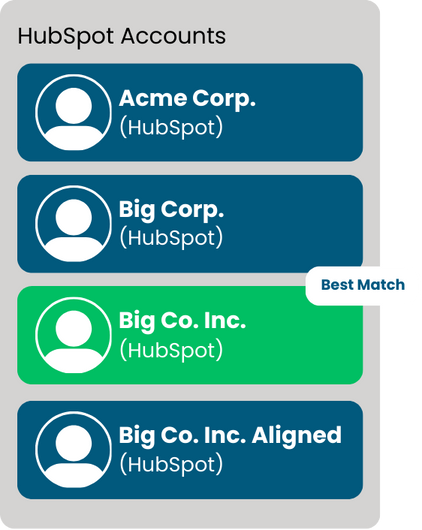
Challenges with HubSpot’s Native Contact-to-Account Matching
HubSpot lets you associate contacts with companies, but it’s far from perfect. Sales teams often deal with missing connections, duplicate records, and a lot of manual cleanup. Here’s why that happens
No Fuzzy Matching
If there’s a typo, abbreviation, or version (like IBM vs. I.B.M.), HubSpot won’t always recognize it as the identical corporation. In that manner, reps can leave out key connections and end up with incomplete account information.
Association Limits
HubSpot puts a cap on how many contacts you can link to a company. For businesses with multiple decision-makers, this makes it tough to track all the right people.
Manual Fixes Required
Since HubSpot doesn’t auto-match contacts to accounts, sales teams have to do it themselves. This slows down the process and makes it easy for contacts to slip through the cracks.
Duplicate Data Problems
If the same organization enters the system underneath distinctive names, HubSpot won’t flag it. That results in duplicate facts, cluttered reports, and reps unintentionally reaching out to the same organization a couple of times.
Inconsistent Lead Ownership
When contacts from the same enterprise input HubSpot through special sources, they don’t always get assigned to the proper sales rep. This ends in confusion, overlooked follow-ups, and uneven contact distribution.
Limited Scalability for Large Databases
As databases grow, HubSpot lead management becomes harder to scale, with native matching growing less reliable and requiring increased manual cleanup.
Solutions
How LeadAngel Fixes HubSpot’s Contact Matching Gaps
HubSpot works best when contact data is perfectly structured, but real-world data rarely is. Inconsistent company names, missing domains, and multi-location accounts often break native contact associations. LeadAngel solves this by enabling automated contact matching in HubSpot, ensuring every contact is linked accurately and ready for routing.
Automated Contact-to-Account Mapping at Scale
Manual contact association doesn’t scale in fast-moving sales environments. LeadAngel automates HubSpot contact-to-account mapping using multiple identifiers like email domain, website, and standardized company names, removing the need for manual fixes.

Smarter Matching Beyond Exact Rules
Native HubSpot matching relies heavily on exact values. LeadAngel applies intelligent fuzzy logic to match contacts even when names, abbreviations, or formatting differ, closing gaps that typically result in orphaned or misaligned contacts.
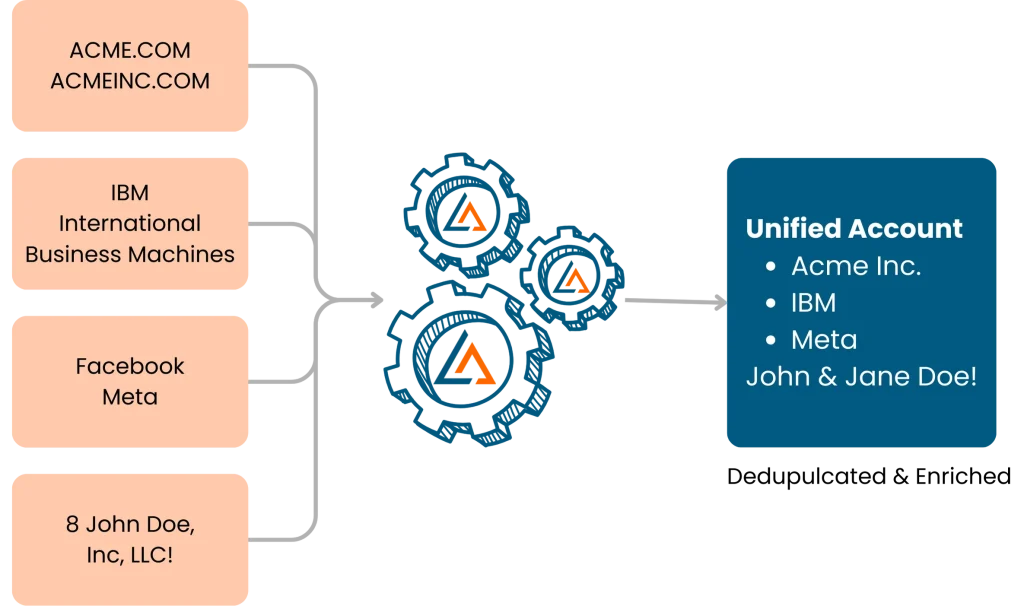
Reliable HubSpot Contact Routing and Matching
Accurate matching is critical for routing. By ensuring contacts are connected to the correct parent or branch account, LeadAngel enables precise HubSpot contact routing and matching, so sales teams always engage the right account owner without delays.

Cleaner CRM with Fewer Duplicates
Duplicate contacts and fragmented accounts reduce visibility and trust in CRM data. LeadAngel prevents duplicate creation at the point of entry, keeping HubSpot clean, consistent, and optimized for reporting, automation, and revenue execution.

Why
Why Businesses Trust LeadAngel for Contact-to-Account Matching in HubSpot
Keeping contact-to-account relationships accurate in HubSpot is harder than it looks. Data inconsistencies, duplicate records, and manual linking slow sales teams down and create gaps in account visibility. LeadAngel removes this friction by automating contact-to-account matching, giving teams a dependable foundation for scale.
High-Confidence Matching Despite Messy Data
Contacts don’t always enter HubSpot with clean or complete information. LeadAngel applies intelligent matching logic that accounts for naming variations, missing fields, and formatting differences, consistently linking contacts to the correct accounts with high accuracy.
A Single, Trusted View of Every Account
When duplicates exist, it’s impossible to understand true engagement. LeadAngel identifies and resolves duplicate contacts and accounts, ensuring each company has one accurate record with all related contacts properly connected.
Faster, More Relevant Sales Engagement
With every contact mapped correctly, sales reps gain full visibility into account history and activity. This eliminates disconnected outreach and enables more informed, personalized follow-ups that move deals forward.
4 Steps: How LeadAngel Powers Contact-to-Account Matching in HubSpot
With the Contact to Account Matching HubSpot integration, LeadAngel functions as a purpose-built HubSpot account matching software that ensures every contact is matched, evaluated, and routed correctly using intelligent logic.
1
Contact-to-Account Match Trigger
When a new contact enters HubSpot from a form, LinkedIn, enrichment tool, or import, LeadAngel automatically triggers the contact to account matching HubSpot process. No manual review or pre-cleaning is required.
2
Match Evaluation Using Intelligent Logic
LeadAngel evaluates the contact using fuzzy matching rules across email domain, website, normalized company name, and hierarchy signals. As a dedicated HubSpot contact matching tool, it determines the best-fit account even when data is incomplete or inconsistent.
3
Match Decision and Account Association
Based on match confidence, LeadAngel applies a decision layer to associate the contact to the correct parent or child account. This prevents duplicate accounts and ensures clean, structured contact-to-account mapping inside HubSpot.
4
Route to Matched Account Owner
Once the contact is matched, LeadAngel routes it to the correct account owner or team using predefined rules such as territory, segment, or account ownership. HubSpot workflows then run on top of clean data, powered by reliable HubSpot account matching software logic.
Comparison: HubSpot Alone vs. HubSpot + LeadAngel
| Feature | HubSpot Native Matching | HubSpot + LeadAngel |
|---|---|---|
| Lead-to-Account Accuracy | Relies on exact matches | Uses fuzzy matching for precision |
| Duplicate Contact Detection | Limited | Automatic merging & flagging |
| Contact-to-Account Linking | Requires manual effort | Fully automated association |
| Data Enrichment | Basic CRM data | Augments contacts & accounts with firmographics |
| Lead Routing | Static workflows | Dynamic rules based on real-time data |
Upgrade HubSpot with Advanced Lead Matching Today
Join businesses using LeadAngel to enhance their HubSpot CRM with smarter lead management.

Read Our Blogs

Revenue teams today use many tools. Nearly 70% of B2B teams say their data is still siloed across systems. Pipeline

Sales today isn’t just about reaching out; it’s about reaching the right prospects at the right time with the right

Leads are the foundation of every growing business. Why? Because speed matters, 78% of deals go to the first responder.
Bad B2B data isn’t just annoying.It’s expensive. It slows down sales.Confuses marketing.And quietly kills revenue. Which is why so many

You’ve explored plenty of tools before, and you know how overwhelming it feels to choose the right one (or even

We used to think our CRM issues were just part of the job: slow pipeline updates, missed follow-ups, and messy
Fequently asked questions

In HubSpot, contacts are automatically linked to companies if their email domain matches the company’s domain. You can also manually associate a contact by editing the contact record and selecting the correct company. For more control, workflows can automate this process based on custom rules.
HubSpot’s lead-to-account matching relies on email domains, which may not work for generic emails (like Gmail) or companies with multiple domains. It also lacks advanced rule-based matching, which can lead to incorrect associations. Manual adjustments or third-party tools are often needed to improve accuracy.
LeadAngel’s lead-to-account matching for HubSpot goes beyond basic email domain matching by using AI-driven logic, custom rules, and fuzzy matching techniques. It accurately connects contacts to the right accounts, even when domains don’t match, ensuring better lead management and sales alignment. LeadAngel also offers automated lead routing, deduplication, and real-time data updates for improved CRM efficiency.
Accurate contact-to-account matching in HubSpot helps sales and marketing teams track interactions personalize outreach, and close deals faster. However, HubSpot’s built-in matching has limitations, often relying on domain-based associations, which can lead to mismatches or missing links. Businesses needing precise, rule-based matching should consider LeadAngel for athe dvanced contact-to-account association.
HubSpot does offer automatic contact-to-company association, but it primarily matches based on email domains, which isn't always accurate, especially for large enterprises, subsidiaries, or personal email addresses. For more flexible and reliable matching, LeadAngel provides advanced lead-to-account matching with customizable rules, ensuring sales teams always have the right connections.