
Instant Lead Transfer from SDR to the Right AE In Salesforce
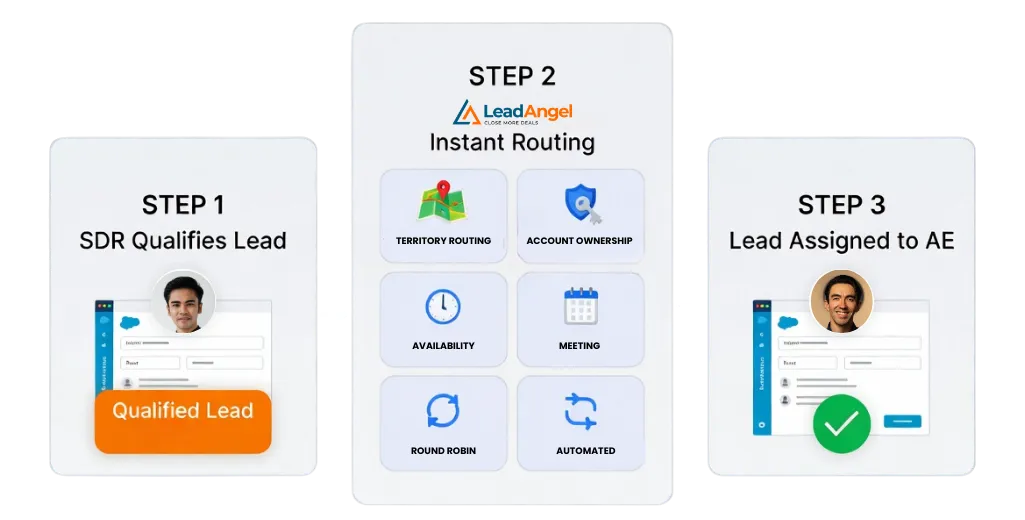
Keep momentum with every hot lead. With On-the-Spot Lead Handoff in Salesforce, qualified prospects are automatically routed and transferred to the best-fit sales rep. Most importantly, the moment sales reps’re ready, eliminating delays, confusion, and manual steps.
Why Salesforce Need On-the-Spot Lead Handoff
Salesforce captures leads effectively. The breakdown often occurs during handoff from SDR to Account Executive. On-the-Spot Lead Handoff in Salesforce closes the gap between qualification and follow-up. These processes happen by enforcing routing, ownership, and scheduling logic directly from Salesforce data.
1
Higher Conversion Rates Through Faster Speed-to-Lead
Response time directly impacts conversion rates. Engaging a lead within minutes significantly improves meeting bookings and pipeline creation. On-the-Spot Lead Handoff assigns ownership instantly ensuring outreach happens while intent is highest.
2
Eliminates Handoff Gaps and Lead Leakage
Manual handoffs create delays and confusion. Leads often stall during ownership changes. Instant transfer maintains continuous ownership and prevents drop-offs.
3
Improves Buyer Experience at First Contact
Buyers expect fast, relevant responses. Instant handoff connects them to the right Account Executive immediately. Context is preserved, and repetition is avoided.
4
Increases Sales Velocity Across the Funnel
Manual coordination slows teams down. Automation removes administrative work from SDR workflows. AEs receive warm, qualified leads and act immediately.
5
Optimizes Rep Assignment and Resource Utilization
Availability alone is not enough. Routing evaluates fit, geography, expertise, and workload in real time. Leads reach the best-suited rep automatically.
Try On-the-Spot Lead Handoff for Salesforce
Turn Salesforce routing decisions into immediate sales conversations.

Automated Lead Handoff and Routing at Scale in Salesforce
Manual lead handoffs don’t scale in fast-moving sales teams. Delays, availability checks, and ownership confusion slow response times and hurt conversions. LeadAngel automates the entire handoff process inside Salesforce, ensuring every qualified lead is routed, assigned, and acted on in real time, without manual intervention.
1
Real-Time, Rules-Based Lead Transfer
Leads are assigned the moment they enter or update in Salesforce. Ownership is resolved instantly using routing logic tied to CRM data. No queues. No waiting. No human dependency.
2
Availability-Aware Routing
LeadAngel routes leads only to reps who are available and eligible. Calendar signals, capacity limits, and readiness rules are applied in real time. This prevents overload and missed follow-ups.
3
Multi-Condition Salesforce Logic
Routing decisions combine multiple Salesforce signals. Territory, account match, priority, SLA, and custom fields are evaluated together. Every lead reaches the correct Account Executive by design.
4
Dynamic Notifications Across Channels
Reps are alerted instantly when a lead is handed off. Notifications are delivered via Salesforce UI, Slack, email, or SMS. Nothing slips through the cracks.
5
Flexible Queues and Intelligent Fallbacks
If the assigned rep is unavailable, the lead doesn’t stall. It can be routed to a live queue or broadcast to the next best rep. Engagement continues without interruption.
How On-the-Spot Lead Handoff Works in Salesforce
When a lead is created or updated in Salesforce, LeadAngel initiates a real-time evaluation pipeline that applies territory rules, ownership logic, and availability checks to deliver immediate, accurate handoff.
1
Lead Ingestion
Leads enter Salesforce from forms, ads, events, APIs, or integrations. Records are created or updated instantly. No preprocessing or manual intervention required.
2
Real-Time Rule Evaluation
LeadAngel evaluates the lead as it enters Salesforce. Rules reference Salesforce data such as territory, account ownership, custom fields, rep capacity, skills, and SLA logic. Evaluation happens synchronously.
3
Ownership Resolution and Instant Handoff
The correct Account Executive is determined first. Ownership is assigned immediately within Salesforce. The handoff occurs while the prospect is still active and engaged.
4
Multi-Channel Rep Notifications
Assigned reps are notified instantly. Alerts are delivered through Salesforce, Slack, email, or SMS. No lead waits unnoticed. No follow-up is missed.
Salesforce Lead Handoff Execution Comparison
For Salesforce buyers, the right lead handoff solution depends on how it executes. Real-time ownership enforcement and data accuracy matter most.
| Capability | Native Salesforce Tools | Calendar / Scheduling Tools | LeadAngel On-the-Spot Handoff |
|---|---|---|---|
| Execution model | Rule-based, often delayed | Availability-first | Real-time, event-driven |
| Batch processing required | Yes (in many cases) | Yes | No |
| Reaction to lead updates | Delayed | Limited | Immediate |
| Availability-aware routing | Limited | Yes | Yes (with CRM rules) |
| Multi-condition routing logic | Basic | Minimal | Advanced (territory, SLA, priority, custom fields) |
| SDR visibility during handoff | No | No | Live |
| AE notification timing | Delayed | Immediate | Immediate + multi-channel |
| Risk of handoff gaps | High | Medium | Eliminated |
| Built for scale | Limited | Not designed | Enterprise-ready |
Read Our Blogs
Shortlisted Tools Tool Key Features Pricing Why We Chose It LeadAngel Lead-to-account matching, online & offline scheduling, advanced routing (territory,

Key Takeaways • Sales lead management is the structured process of capturing, tracking, nurturing, and converting a prospect into a

Shortlisted Tools Tool Core Strength Best For Pricing LeadAngel Routing + Account Matching + Inbound Meeting Scheduling + Data Deduplication

Shortlisted Tools Tools Key Features Best For Pricing LeadAngel Calendar sync, different time zone support, online/offline scheduling, lead routing, lead-to-account

Key Takeaways • What is speed to lead? Speed to lead is the time your salesperson takes to contact a

TL;DR Data Ladder handles data cleansing and deduplication. Data Match Enterprise is Data Ladder’s primary data-quality product. Data Ladder’s primary
frequently asked questions

LeadAngel usually supersedes native assignment rules. The best practice is to turn off the native SFDC rules for the specific record types LeadAngel is handling. This prevents "double-routing," where Salesforce assigns it to a Queue and LeadAngel assigns it to a person simultaneously.
LeadAngel is a hybrid. While the "brains" (matching logic) often live on their high-speed processing engine to avoid slowing down your Salesforce instance, it uses a managed package to stay synced.
OTS Handoff syncs directly with Google/Outlook calendars.
- If an AE is "Busy" or has a "Vacation" flag in Salesforce/Calendar, the OTS router automatically skips them.
- You can also set "Weighted Round Robin" so your senior AEs get more "On the Spot" opportunities than the new hires.
This is LeadAngel’s specialty (Lead-to-Account Matching).
- Before the handoff button even appears for the SDR, LeadAngel runs a "fuzzy match" search.
- If a match is found, the OTS tool will prioritize the Account Owner. It will literally say: "This belongs to AE Sarah. Is she available for a transfer?"
LeadAngel provides a Visual Routing Audit Log.
- Unlike standard Salesforce (which just shows the final owner), LeadAngel shows the "Path" taken.
- Example: "Lead X entered -> Matched to Account Y -> AE John was skipped (Busy on Calendar) -> Assigned to AE Mike."