
You’ve explored plenty of tools before, and you know how overwhelming it feels to choose the right one (or even narrow it down!). So as you’re now looking for a better way to manage your leads, you’re wondering, do we actually need a dedicated lead management tool? What even counts as the “best lead management software” anyway? And with limited time and budget, is it worth making the switch?
Most importantly, you’re thinking about your sales process.

How are your leads currently being handled? Where are things starting to drag or slip through the cracks?
Let’s tackle these questions head-on. Lead management software does matter—but maybe not in the way you think right now.
What Is Lead Management Software?
Lead management software is a tool that tracks, organizes, and manages potential customers. It helps teams handle every lead efficiently, from the first interaction to the final purchase.
This software supports lead capture and ensures no lead is forgotten, making follow-ups easier and more timely. It simplifies lead tracking, prioritizes important leads, and improves communication by centralizing lead data in one place.
The key parts of lead management software include:
- Organizing leads – Storing all lead details in a single system, making it easy to update and track progress.
- Automating tasks – Automating follow-ups and reminders to save time and ensure no leads are missed.
- Prioritizing high-value leads – Highlighting leads most likely to convert so teams can focus on them first.
- Improving collaboration – Helping sales and marketing teams share updates and work together effectively.
With these features, lead management software helps businesses stay organized and close more deals.
Why Do Sales Teams Need Lead Management Software?
Managing leads can be hard without the right tools. Teams may lose leads or miss follow-ups. This creates confusion, delays, and fewer closed deals, hurting overall sales performance.
Lead management software keeps everything organized and helps teams track leads more easily. These tools store lead details in one place, making it faster to follow up and respond.
With easy-to-use features, teams can learn and start using the software quickly. This saves time, reduces mistakes, and helps close more deals efficiently.
Key Features to Look for in Lead Management Software
The right lead management software should simplify your sales process and boost efficiency. Look for these features:
- Easy-to-use interface – Simple design that lets teams navigate and work without confusion.
- Lead tracking – Tracks leads through every stage of the sales funnel.
- Automation – Saves time by handling follow-ups and reminders and updating lead details.
- Integration – You can easily connect with CRMs like Salesforce, HubSpot, and other important platforms.
- Prioritization tool – Highlights leads that are most likely to convert so teams focus on high-value opportunities.
- Analytics and reporting – You will have clear insights into lead performance and team activities.
These features help sales teams stay organized, save time, and handle leads more efficiently.
Top 7 Lead Management Software Tools for Sales Teams in 2026
Here are the seven best lead management software designed to make managing leads simpler for sales teams:
| Tool | Key Feature | Best For |
|---|---|---|
| LeadAngel | Lead routing | Lead distribution |
| HubSpot CRM | All-in-one CRM | Small teams |
| Salesforce CRM | Advanced automation | Enterprises |
| Zoho CRM | Omnichannel tracking | Growing businesses |
| Pipedrive | Visual pipeline | Sales teams |
| Freshsales | Built-in communication | Omnichannel sales |
| Close CRM | Calling + email | Outbound teams |
1. LeadAngel
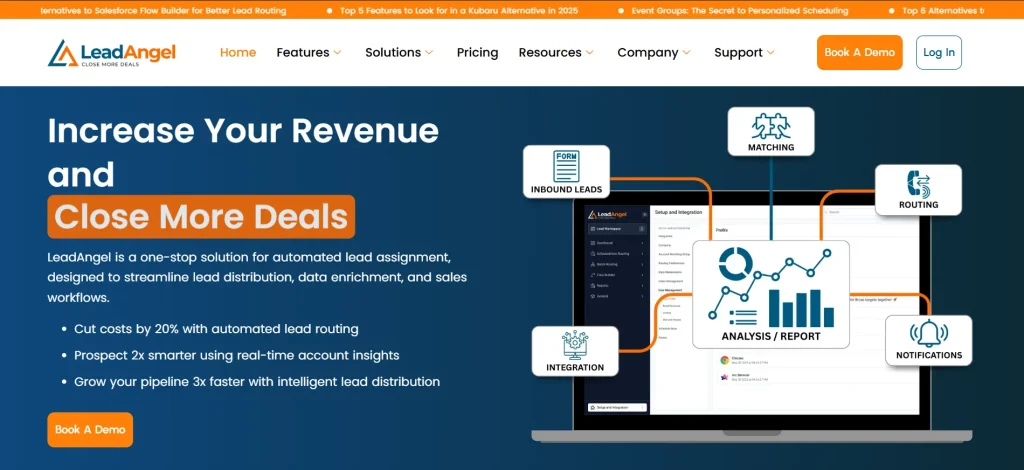
LeadAngel is a lead management platform that works with CRMs to simplify lead tracking. It helps businesses assign leads quickly, clean up duplicate records, and focus on valuable opportunities.
With features like lead routing and account matching, LeadAngel ensures sales reps get the right leads at the right time.
LeadAngel lets businesses create workflows that match their sales process. It connects directly with CRMs like Salesforce, HubSpot, and Microsoft Dynamics 365, making lead management easier. LeadAngel also guarantees teams have accurate data for better decisions and faster follow-ups.
Key Features
- Lead routing – Sends leads to the right sales reps for faster follow-ups.
- Account matching – Matches lead to existing accounts with high accuracy for better targeting.
- Data cleanup – Fixes duplicate records and organizes lead information into a clean database.
- Custom workflows – This lets businesses adjust rules to match their sales process.
- Seamless integration – Works with CRMs like Salesforce, HubSpot, and Microsoft Dynamics 365.
Pricing Plans
- Professional – Designed for growing teams, offering advanced lead routing, matching, and automation capabilities.
- Professional Plus – Includes enhanced features like deeper integrations, advanced workflows, and expanded customization options.
LeadAngel is ideal for businesses that want to organize their leads, reduce errors, and improve efficiency. Its easy integration and reliable tools make it a great choice for teams working with CRMs.
Pros
- Easy to use – Many users highlight that the platform is intuitive and simple to navigate, even for non-technical teams.
- Efficient lead routing – Automates lead distribution effectively, helping teams reduce manual work and improve response time.
- Highly customizable – Users appreciate the ability to create custom routing rules tailored to their business needs.
- Improves team efficiency – Helps streamline workflows, reduce conflicts, and ensure fair lead distribution across sales reps.
- Strong customer support – Frequently praised for responsive and helpful support teams that assist with setup and troubleshooting.
Cons
- Occasional system glitches
- Complex setup for advanced workflows
- Learning curve for deeper features
Sign up for free or book a demo with LeadAngel today!
2. HubSpot

Source: HubSpot.com
HubSpot CRM is an all-in-one lead management software that helps businesses manage leads, track interactions, and automate marketing and sales processes. It’s widely known as a free lead management software option, making it ideal for teams getting started and scaling over time.
It allows teams to capture, nurture, and convert leads efficiently, making it one of the best lead management software for small businesses and growing companies.
Key Features
- Lead management – Tracks and organizes leads across the entire sales funnel.
- Email tracking – Notifies when emails are opened or clicked.
- Marketing automation – Automates follow-ups and nurturing workflows.
- Reporting dashboard – Provides insights into sales performance and pipeline health.
Pricing Plans
- Free – Includes basic CRM tools with unlimited users, making it a strong free lead management tool.
- Starter – Begins around $20/month per user with added automation features.
- Professional – Advanced automation and reporting capabilities.
- Enterprise – Full-scale lead management system software with custom features and analytics.
Pros
- Easy to use and intuitive interface
- Strong lead management tools and integrations
- Excellent free plan for small businesses
Cons
- Advanced features can get expensive
- Limited customization in lower tiers
- Learning curve for deeper automation
3. Salesforce
Source: Salesforce.com
Salesforce CRM is a powerful and highly customizable sales lead management software designed to manage complex sales processes. It offers advanced automation, AI-driven insights, and deep analytics for large organizations.
It is considered one of the top lead management software solutions for enterprises that need scalability and precision.
Key Features
- Lead scoring – Prioritizes leads based on engagement and likelihood to convert.
- Sales automation – Automates repetitive tasks and workflows.
- AI insights – Uses AI (Einstein) to predict sales outcomes.
- Custom dashboards – Provides detailed reports and analytics.
Pricing Plans
- Starter Suite – Around $25/user/month with basic CRM features.
- Professional – Around $80/user/month with enhanced customization.
- Enterprise – Around $165/user/month with advanced automation and AI.
- Unlimited – Premium features with full support and customization.
Pros
- Highly customizable system
- Advanced analytics and forecasting
- Scalable for large sales teams
Cons
- Complex setup and maintenance
- Expensive for small businesses
- Requires training for effective use
4. Zoho CRM
Source: Zoho.com
Zoho CRM is an affordable and flexible lead management software for small business that offers omnichannel communication and AI-powered insights.
It works well as a simple lead management software while still providing advanced capabilities for growing teams.
Key Features
- Omnichannel tracking – Manages leads from email, chat, social, and calls.
- AI assistant (Zia) – Provides predictions and workflow suggestions.
- Workflow automation – Automates repetitive sales tasks.
- Custom modules – Allows personalization based on business needs.
Pricing Plans
- Free – Basic CRM for up to 3 users, making it a practical free sales lead management software option.
- Standard – Around $14/user/month with core features.
- Professional – Around $23/user/month with automation tools.
- Enterprise – Around $40/user/month with AI and advanced customization.
Pros
- Affordable and flexible
- Strong automation features
- Good integration ecosystem
Cons
- Learning curve for new users
- Occasional performance lag
- Limited advanced features in lower tiers
5. Pipedrive

Source: Pipedrive.com
Pipedrive is a simple lead management software known for its visual pipeline and ease of use. It helps teams manage deals and track activities without unnecessary complexity.
It is one of the best lead management software for sales teams that want a clear and actionable pipeline view.
Key Features
- Visual pipeline – Provides a clear view of deal stages.
- Activity tracking – Keeps track of calls, meetings, and emails.
- Automation – Automates repetitive sales tasks.
- Reporting tools – Offers insights into sales performance.
Pricing Plans
- Essential – Around $14/user/month with basic features.
- Advanced – Around $29/user/month with automation.
- Professional – Around $59/user/month with advanced reporting.
- Enterprise – Custom pricing with full features and support.
Pros
- Very easy to use
- Clean and intuitive interface
- Great for managing sales pipelines
Cons
- Limited marketing automation
- Missing advanced features
- Integration limitations in some cases
6. Freshwork
Source: Freshworks.com
Freshsales is a modern lead management software online that combines lead management with built-in communication tools like email, phone, and chat.
It is a strong option for teams looking for free lead management software with upgrade flexibility as they scale.
Key Features
- Built-in communication – Includes phone, email, and chat in one platform.
- AI lead scoring – Prioritizes leads based on behavior.
- Workflow automation – Automates follow-ups and reminders.
- Sales sequences – Helps nurture leads effectively.
Pricing Plans
- Free – Basic CRM features for small teams.
- Growth – Around $15/user/month with automation.
- Pro – Around $39/user/month with AI features.
- Enterprise – Around $69/user/month with advanced customization.
Pros
- Easy setup and user-friendly interface
- Strong AI and automation features
- Good value for money
Cons
- Limited native integrations
- Advanced AI features cost extra
- Support limited to business hours
8. Close

Source: Close.com
Close CRM is a sales lead management software built specifically for inside sales teams and outbound-focused workflows.
It works as a powerful lead management tool for teams that rely on direct outreach and fast conversions.
Key Features
- Built-in calling – Make and receive calls directly from the CRM.
- Email automation – Automates outreach and follow-ups.
- Pipeline management – Tracks deals from start to close.
- Task automation – Reduces manual work for reps.
Pricing Plans
- Starter – Around $25/user/month with core features.
- Professional – Around $109/user/month with automation.
- Enterprise – Custom pricing with advanced tools and support.
Pros
- Simple and intuitive interface
- Strong communication tools
- Great for outbound sales
Cons
- Limited customization
- Some feature limitations
- Occasional calling issues
How to Choose Free Lead Management Software
There are countless free lead management software options out there. You can read reviews, compare features, and watch demos all day, but at some point, you have to actually try the tool.
Because choosing the right lead management software isn’t just about what looks good on paper, it’s about what works for your team in real life.
Think of it this way: you won’t know if a tool fits your workflow until you actually use it. Shortlist a few top lead management software options, test them, and see how they perform in your day-to-day operations.
Here’s how to approach it
1. Start With the Problem You’re Trying to Solve
Before exploring any lead management tools, get clear on what’s not working today.
Are leads getting lost?
Is follow-up too slow?
Is your pipeline messy?
The goal is to identify the gap your lead management system software needs to fill. Once that’s clear, it becomes much easier to filter out tools that don’t align.
2. Know Who Will Actually Use the Software
Not every lead management software for sales teams is built the same way.
Some tools are simple and intuitive, perfect for small teams. Others are complex and built for power users.
Ask yourself:
- Will this be used by the entire team or just a few people?
- Do you need a simple lead management software or something more advanced?
If you’re a startup, a free lead management tool that’s easy to use might be better than a complex system.
3. Check What Other Tools It Needs to Work With
Your lead management software online won’t exist in isolation.
It needs to work with your existing tools: CRM, marketing platforms, email systems, or even accounting software.
Decide:
- Do you want to integrate multiple tools?
- Or replace everything with the best lead management software?
The right choice depends on whether you want flexibility or consolidation.
4. Focus on Outcomes, Not Just Features
It’s easy to get stuck comparing features across different free sales lead management software options.
But features don’t matter if they don’t drive results.
Instead, ask:
- What outcome do I want?
- Faster response time?
- Better visibility into leads?
- Higher conversions?
Good lead management best practices always start with outcomes, not tools.
5. Make Sure It Fits Your Workflow
A tool might be popular, but that doesn’t mean it will work for you.
Every business has different processes. The best lead management software for a small businesses is the one that fits how your team already works or improves it without adding friction.
Test how the software fits into your:
- Sales process
- Lead routing
- Follow-up workflows
Because in the end, even the best lead management software fails if your team doesn’t actually use it.
Final Thought
You can research all the lead management software options out there, but clarity comes from action.
Select a few lead management software options that align with your needs and put them to the test. Don’t just explore features, use them in real scenarios, run your actual workflows, and see how they perform under everyday conditions.
Experiment with the tools, identify what works and what doesn’t, and don’t be afraid to push their limits. This hands-on approach will give you far more clarity than any comparison chart.
Ultimately, the right choice becomes clear when you see which platform genuinely supports your team’s workflow and helps you manage leads more effectively.
See How LeadAngel Can Transform Your Lead Management
Curious to experience the power of LeadAngel firsthand? We understand!
We're offering a complimentary trial so you can explore LeadAngel's features at your own pace. Once you request a free trial, we'll schedule a personalized onboarding session to ensure you maximize the value of LeadAngel.
Ready to take your lead management strategy to the next level? Request your LeadAngel trial today!
In addition to exploring the platform, we recommend visiting our LeadAngel Help Center for in-depth guidance. Our dedicated customer support team is also available to answer any questions you may have at sales@leadangel.com.
FAQs
Small business lead management software is a tool that helps small teams capture, track, and manage leads in one place. It’s usually simple, affordable, and easy to use, helping businesses organize contacts, follow up faster, and close more deals without complex setup.
The best CRM software for lead management depends on your needs. For most teams, HubSpot is great for beginners, Salesforce works best for large enterprises, and Zoho CRM is a strong option for small to mid-sized businesses looking for affordability and flexibility.
Lead management software helps sales teams respond faster, stay organized, and prioritize the right leads. It improves conversion rates, reduces manual work, automates follow-ups, and gives better visibility into the sales pipeline.
Not exactly. Lead management software focuses specifically on capturing and handling leads, while CRM software manages the entire customer lifecycle, including leads, contacts, deals, and customer relationships. However, most modern CRMs include lead management features.
There are different types based on use and complexity: 1)Standalone lead management tools (focused only on lead tracking) 2)CRM-based lead management software (all-in-one systems) 3)Marketing automation platforms (lead nurturing and campaigns) 4)Sales-focused tools (pipeline and deal management) 5)Enterprise solutions (advanced automation and analytics)

