TL;DR
| Salesforce data cleansing is simply the process of identifying and fixing duplicate, incomplete, outdated, or messy records in your Salesforce CRM. So your CRM stays efficient, trustworthy, and ready to support revenue workflows. Bad data quietly breaks reports, wastes sales reps’ time, and sends leads to the wrong people. This blog is a complete guide on Salesforce data cleansing. You’ll find best practices, common mistakes to avoid, and the top tools that make cleaning your Salesforce data faster and easier. |
Key Takeaways
- • Salesforce data cleansing means finding and fixing bad records. It includes duplicate, incomplete, outdated, and inconsistent leads and records in your org.
- • The best results come from mixing native and third-party tools. Tools like LeadAngel, DemandTools, and DataGroomr catch messy duplicates that Salesforce’s built-in rules miss.
- • Duplicates are the biggest problem. Most Salesforce orgs struggle most with duplicate leads, contacts, and accounts.
- • Cleansing and deduplication aren’t the same thing. Cleansing is the broader process, and deduplication is a part of cleansing.
- • Data cleansing requires ongoing efforts. Regular checks keep your CRM clean for the long run.
Dirty CRM data rarely announces itself. It shows up quietly in different forms.
For example, a sales rep might have called a number that’s been disconnected for months, or a Salesforce lead gets routed to the wrong territory because the state field was not standardized. These are not odd glitches.
For most B2B teams, the biggest data cleansing issues are:
Duplicate leads, contacts, and accounts
- Inconsistent field formats
- Missing required fields
- Stale contact and account data
- Dirty data imports from forms, events, enrichment tools, and integrations
They’re symptoms of an underlying problem: an org that has dirty or messy data.
The solution? Salesforce data cleansing.
If you run Salesforce in a growing RevOps environment, the best approach is to treat cleansing as a repeatable operating process:
- Prevent bad data from entering
- Detect duplicates, gaps, and inconsistencies
- Remediate records safely at scale
- Govern the system so the same issues do not return
This complete guide covers what Salesforce data cleansing is, why it matters, what to clean first, how to run the process, best practices, native tools, third-party options, and how to measure impact.
What Is Salesforce Data Cleansing?
Salesforce data cleansing is the ongoing process of identifying, correcting, standardizing, merging, and removing inaccurate, duplicate, incomplete, or outdated records inside your Salesforce organization. The data includes leads, contacts, accounts, opportunities, or any custom objects your business relies on.
In plain terms, data cleansing, or you can also say data scrubbing, answers four questions about every record in your CRM:
- Is it accurate? Does the data reflect the correct information?
- Is it complete? Are the fields your team needs to do their job actually filled in?
- Is it unique? Does this person or company already exist somewhere else in your database?
- Is it current? Is the record updated or simply stale?
In practice, Salesforce data cleansing usually includes the following:
- Removes or merges duplicate attributes
- Standardizes formats (phone numbers, state names, date formats, capitalization)
- Fills in missing or blank fields
- Verifies email addresses and mailing addresses
- Archives or deletes records that no longer serve a purpose
- Corrects field values that break reporting, routing, or segmentation
Data scrubbing is routine maintenance, just like servicing your car. Salesforce data cleanup work should happen on a schedule, and not just when something breaks. Clean data is not just an admin concern. It affects how marketing hands off leads, how sales follows up, how RevOps routes ownership, and how leadership trusts pipeline reports.
Salesforce Data Cleansing vs. Data Deduplication
Although data cleansing and data deduplication are closely related, they’re not the same:
| Aspect | Data Cleansing | Data Deduplication |
|---|---|---|
| Definition | A broad process of fixing, validating, updating, and standardizing data | A specific process of identifying and merging duplicate records |
| Goal | Ensure overall data quality and reliability | Eliminate duplicate entries for better accuracy and reporting |
| Example | Fixing incorrect phone numbers or missing job titles | Merging “John Smith” and “J. Smith” who are actually the same person |
| Tools Used | Validation rules, automation (e.g., Flows), third-party cleaning tools | Matching rules, duplicate rules, Merge functionality, deduplication apps |
| Impact | Broader and ongoing | Focused and more transactional |
Why this matters:
Many teams say they are “cleaning Salesforce data” when they are only running duplicate checks. That helps, but it does not solve stale records, inconsistent fields, bad imports, or invalid routing inputs.
Why Is Data Cleansing Important in Salesforce?
Data cleansing is essential in Salesforce because every downstream process is dependent on the quality of the data feeding it. When that data is dirty, everything built on top of it becomes unreliable.
Here are the benefits of Salesforce data cleansing:
| Category | Benefits |
|---|---|
| Better business reports | Keeps dashboards and sales forecasts free from inflated or skewed numbers. Teams get trustworthy facts instead of guesswork data. |
| Improves team productivity | Clean data builds sales rep trust in the CRM, and they use it every day. Sales reps don’t need to search for correct phone numbers or sort duplicate data. |
| Support for AI | It stops AI from outputting bad summaries or wrong automated emails due to messy input fields. |
According to Gartner’s Data Quality Market Survey, poor data quality costs organizations an average of $15 million annually (Gartner). Forbes reports that roughly 70% of CRM data goes stale within a year as people change jobs, companies merge, and contact details shift (Forbes).
Clean Salesforce data builds trust. When reps stop trusting the data in their CRM, they stop updating it, and the problem compounds. Salesforce data hygiene isn’t just a technical exercise — it’s what keeps your entire revenue team aligned on the same accurate picture of every customer and prospect.
What Are The Top Data Cleansing Challenges?
Let’s face it! Data cleansing in Salesforce isn’t always easy. Many organizations often encounter lots of challenges in keeping things clean and consistent.
1. Challenges in Keeping Data Clean
Clean and accurate data in Salesforce can be difficult to maintain. Problems like duplicate records, missing details, or inconsistent formatting often creep in unnoticed. These problems make it difficult to trust your data, cause bad decisions, and produce inaccurate reports.
2. Difficulties with Data Migration
Moving data into Salesforce from other systems isn’t always easy. Time and careful planning are required to ensure that everything is accurate, organized, and consistent. If the data is cluttered or doesn’t match during migration, it can cause problems later.
3. Risks to Data Security
It is more important than ever to keep customer data safe. You need strong security settings to protect information from being accessed by the wrong people. This is also important for following privacy laws and guaranteeing that your team handles sensitive information responsibly.
4. Missing Data and Duplicate Entries
Gaps or null values force a difficult choice. Either delete the record, chase down the correct value, or guess/impute a replacement. But when the same record comes in through web forms, imports, or integrations, it becomes hard to tell which version you should trust.
5. Scale and Process Obstacles
Massive datasets make manual or traditional script-based cleaning extremely slow and expensive. Different departments often store data in inconsistent ways with no unified governance, and routine human error — typos, misspellings, and shifting entry conventions — continuously breaks even well-built automated rules.
Clean data is the spine of a successful Salesforce CRM. No matter the role — sales, marketing, or operations — bad data can hurt your work. Working with inaccurate, duplicated, or incomplete data leads to poor decision-making and lost opportunities. That’s why data cleansing needs to be an ongoing process, not a one-time task.
How to Start The Data Cleansing Process?
Salesforce data cleansing process starts with inspecting current data quality. Prioritize the essential objects and fields, and then detect, correct, and prevent in the same order. Fixing everything at once will slow down the project before it begins.
Here’s a practical five-step approach:
Step 1: Define the business problem
List out the standard and custom objects—like Leads, Accounts, and Contacts—that require cleaning.
Do not start with “clean the CRM.” Start with the business issue:
- Duplicate lead routing
- Bad forecast accuracy
- Low CRM adoption
- Stale contact data
- Attribution errors
That gives the project a measurable outcome. This tells you exactly where to focus before you touch any records.
Step 2: Analyze field usage and create a backup
Spot low-population or empty fields using tools like ZoomInfo Field Trip or native Salesforce reports. Export a complete data backup to a CSV file before mass modifications or merges. So you can recover if something goes wrong.
Step 3: Merge duplicate records
Use built-in Salesforce Duplicate Management matching rules or third-party tools. These tools can find and combine duplicate records easily.
Step 4: Standardize and fill fields
Clean up missing core values. Fix formatting-inconsistent attributes such as phone numbers or capitalization and update records via Data Loader or automated batch tools.
Step 5: Build long-term maintenance workflow
Implement field requirements and validation rules to stop users from entering incorrect or incomplete data moving forward. Then set up a hygiene dashboard—regular reports that spot suspicious or blank data fields on an ongoing basis, so new bad data doesn’t pile up as fast as you clean the old data out.
Running this process well is what separates a one-off cleanup from a sustainable Salesforce data cleanup routine that actually holds over time. Many teams treat their first data cleanup Salesforce project as the finish line, when really it’s just the baseline everything else builds on.
What Are Salesforce Data Cleansing Best Practices?
This may seem difficult in the beginning, but the right tools and strategies make a big difference. Let’s explore the best practices of Salesforce data cleansing that permit you to preserve your information as smooth, consistent, and dependable.
1. Regular Data Audits and Health Checks
Think of it as a regular check for your data. Regular revision helps you identify and fix problems such as missing fields, old contacts, or duplicate entries. Use the underlying report or Salesforce third-party tool to review your database weekly or monthly.
Look for:
- Duplicate growth
- Stale contacts
- Blank critical fields
- Invalid field patterns
- Routing exceptions
.
2. Use Standardized Data Entry Rules
One of the main reasons why the database gets dirty is inconsistent data. For example, some use “United States,” others use “USA” or “ U.S.,” which makes searching and segmenting data harder.
Solution: Create standard rules to enter data (for example, a drop-down for countries or formats for phone numbers), and use them using Salesforce features, such as a picklist and customized verification rules.
3. Implement CRM Data Deduplication Routines
Duplicated leads, contacts, or accounts cause confusion, waste time, and sloping reporting. This is why it is necessary to reduce your Salesforce data regularly.
Use the integrated duplicate management of Salesforce or a reliable third-party tool to detect and merge duplicate records.
Routine tip: Make it a habit to regularly check the duplicate—every week or month—to keep CRM clean and organized.
4. Leverage Salesforce Duplicate Rules and Matching Rules
Salesforce provides the underlying equipment to prevent duplicate data from entering the system in the first place.
- Matching rules help Salesforce find out if two records can be duplicated—for example, if two contacts have the same email address.
- Duplicate rules control what Salesforce does when it finds duplicates, for example, preventing the user from storing it or showing a warning.
Setup example: You can create a rule that warns users of a management with the same email already present; It prevents duplicates before entering.
5. Use AI-Powered Data Matching Software
Artificial Intelligence can go beyond simple matching policies. AI tools like Salesforce Einstein or third-party platforms use fuzzy logic and machine learning to detect diffused duplicates, capture incomplete information, and advise corrections.
Why it is important: AI tools are specifically beneficial when you’re dealing with huge datasets or complicated information systems.
6. Set Up Automated Workflows for Salesforce Data Cleanup
Manual cleanup can be dull and may be subject to errors. Instead, use Salesforce Flow, Process Building or third-party automation tools, which automatically fix or flag bad data.
Examples of Automation:
- Auto-fill missing fields based on related data
- Flag records with expired email addresses
- Automatically merge leads created from the same domain name
7. Integrate Validation Rules and Field Dependencies
Validation Rules ensure that the data entered meets certain criteria. For instance, you can prevent users from saving a contact without an email or block opportunities without a close date.
Field Dependencies show or hide fields based on values entered. For example, if a user selects “International Client,” then “Country” turns into a required discipline.
These features tell customers to enter correct and complete data from the start.
8. Train Sales & Operations Teams on Data Hygiene Protocols
Tools and rules are only effective if people follow them. Regularly train your teams on:
- Why clean data matters
- How to spot and report issues
- What standards they need to follow when entering or updating records
Create a small checklist or fast reference guide to strengthen Salesforce data cleansing best practices.
Common Mistakes To Avoid While Salesforce Data Cleansing
The most common mistake in Salesforce data cleansing is treating it as a one-time cleanup instead of an ongoing process. Beyond that, a handful of other missteps quietly undo the good work teams put in.
Dirty Data
Dirty data—such as duplicate, old contact or incomplete info—leads to poor reporting and lost appointments. Always clean and organize your data before and after transfer to Salesforce. Poor data quality makes the entire CRM less effective.
Wrong Tools
Using the wrong features, such as tracking potential customers in accounts instead of lead objects, can break your process. Make sure you use the right tools for the job and check if your existing system is evenly integrated with Salesforce.
No Customization
Salesforce isn’t one-size-fits-all. If you just trust the standard field, you will not capture the details of your business requirements. Create custom fields, objects and layouts to fit your precise workflows and data structure.
Poor Training
Even the fine system fails if people do not understand how to use it. If customers aren’t skilled properly, they make errors or prevent the usage of Salesforce completely. Training guarantees that your team is aware of a way to enter and control records properly.
No Governance
Without rules, everyone enters the data in their own way and causes chaos. Data control means setting clear guidelines which can access, edit and manage different types of data, which can ensure stability and responsibility.
Missing Automation
Doing everything manually wastes time and increases issues. Salesforce offers powerful automation systems such as workflows, flows, and triggers to handle repetitive tasks to be repeated and automatically update the data.
Default Dashboards
Pre-made dashboard does not always show what your business means. Custom dashboards and reports track the most important metrics, spot trends, and make smart decisions in real time.
Where Native Salesforce Tools Fall Short?
Native Salesforce tools are useful, but they are not enough for every org.
Common limitations include:
- limited fuzzy matching depth
- manual review burden at scale
- weaker support for complex duplicate scenarios
- difficulty handling ongoing background cleanup
- limited support for multi-object enterprise remediation workflows
That is why many teams combine native controls with dedicated cleansing tools.
If your main need is broader vendor research, see 5 Best Data Cleansing Software & Tools in 2026 and Best CRM Data Cleaning Solutions
Top Salesforce Data Cleansing Tools
The right Salesforce data cleansing tool depends on your company size, budget, and the specific problem you’re solving. Data cleansing tools generally fall into two categories:
- native Salesforce features and
- third-party apps that extend what Salesforce can do on its own.
Here are the five tools worth knowing.
1. LeadAngel
LeadAngel is a third-party tool built specifically to solve the duplicate and routing problems native Salesforce rules miss.
- What it does: LeadAngel’s Data Cleanup Preferences automatically merge duplicate leads and contacts based on your matching rules. Salesforce data stays clean without manual review.
- Key capabilities: Dedupe Flagging Preferences flag potential duplicates using company name (with fuzzy matching), email, or other fields before leads are routed. It catches duplicates early instead of creating extra records, a gap that exact-match native Salesforce rules leave open.
- Best fit: RevOps and sales teams that want data cleanliness to improve speed-to-lead and routing accuracy.
2. Salesforce Duplicate & Matching Rules
A native Salesforce feature and the first line of defense most orgs already have available.
- What it does: Flags likely duplicate records at the point of entry using configurable matching rules.
- Key capabilities: Built-in deduplication and requires no additional costs. It works directly inside standard Lead, Contact, and Account objects.
- Best fit: Smaller orgs or teams just starting to formalize duplicate prevention, where exact or near-exact matching is enough.
3. Salesforce Data Loader
Salesforce’s free, native tool for bulk data operations.
- What it does: Easily manages records’ bulk operations like insert, update, delete, and export.
- Key capabilities: Processes large volumes of records at once. Works well for mass standardization and cleanup passes.
- Best fit: Admins running one-off mass updates or preparing backups before a larger cleanup project.
4. DemandTools
A third-party platform designed for large-scale ongoing data management.
- What it does: Performs deduplication, standardization, and mass data operations across an entire org.
- Key capabilities: Handles high data volumes and complex matching logic that native tools can’t scale to.
- Best fit: Enterprise orgs with large, complex databases and dedicated admin resources.
5. DataGroomr
A third-party tool with a primary focus on continuous monitoring of data quality.
- What it does: Maintains ongoing deduplication and checks data quality in the background.
- Key capabilities: Fuzzy matching, automated merge rules, and scheduled scans to identify new duplicates.
- Best fit: Teams looking for cleanup on autopilot instead of periodic manual reviews.
| Tool | Type | Best For | When to Use |
|---|---|---|---|
| LeadAngel | Third-Party | Enterprise-based fuzzy matching, duplicate prevention, plus automated lead routing | Duplicates are affecting lead routing or speed-to-lead for mid-sized to large enterprises. |
| Duplicate & Matching Rule | Native | Basic duplicate prevention at entry | Small org, simple exact-match duplicates. |
| Salesforce Data Loader | Native | Bulk imports, updates, and exports | One-off mass update, import, or backup |
| DemandTools | Third-Party | Enterprise-scale deduplication | Large, complex org with high data volumes |
| DataGroomr | Third-Party | Ongoing fuzzy-match dedupe and monitoring | Want cleanup running continuously in the background |
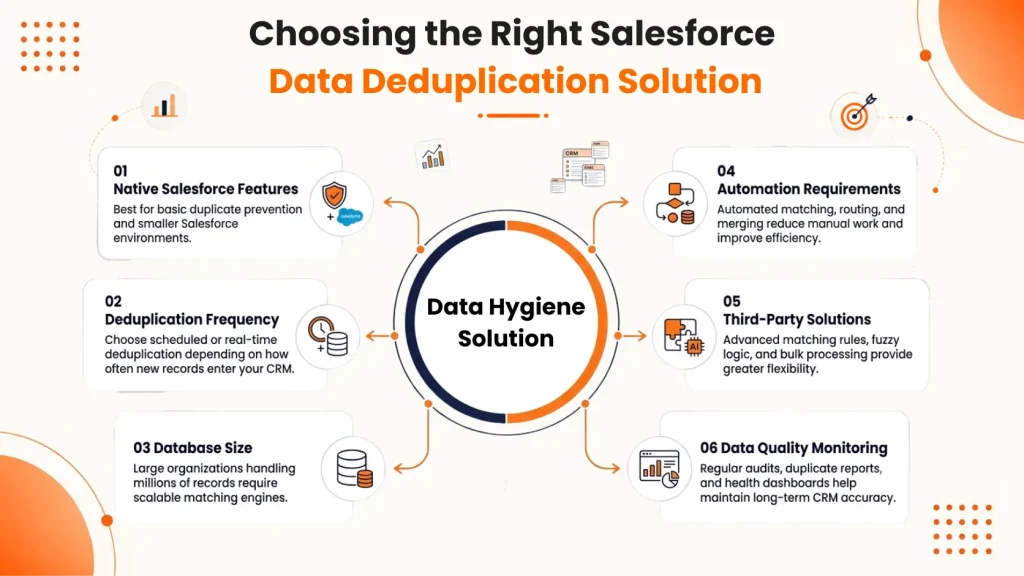
Choose the right tool for your needs
Choosing the right tool depends on your specific requirements, such as deduplication frequency, number of records, and automation needs. For the best results, many organizations use a combination of Salesforce native features and third-party solutions to maintain comprehensive Salesforce data hygiene.
Conclusion
Keeping Salesforce data clean is not just a technical function—this is a business priority. Clean, accurate data leads to higher returns from better decisions, strong customer relationships, and its CRM investment. By following best practices as standardization, automation, and regular audits, you can make sure Salesforce is reliable and effective.
It is now time to invest in a dedicated data cleansing strategy that grows with your business. Do you need expert help?
Partner with Leadangel to streamline your data management and unlock the full potential of Salesforce. Work together to keep CRM clean, powerful and ready to perform.
See How LeadAngel Can Transform Your Lead Management
Curious to experience the power of LeadAngel firsthand? We understand!
We're offering a complimentary trial so you can explore LeadAngel's features at your own pace. Once you request a free trial, we'll schedule a personalized onboarding session to ensure you maximize the value of LeadAngel.
Ready to take your lead management strategy to the next level? Request your LeadAngel trial today!
In addition to exploring the platform, we recommend visiting our LeadAngel Help Center for in-depth guidance. Our dedicated customer support team is also available to answer any questions you may have at sales@leadangel.com.
FAQs
Cleansing fixes what's wrong — duplicates, missing fields, bad formatting. Enrichment adds new data, like company size or job title, from third-party sources. Mature programs cleanse first, then enrich.
Clean your data before data migration. Deduplicate and standardize source data first, map fields carefully, then load in stages — test batch, validation, full load — to catch issues early.
Keep an eye on the signs below: Frequent identification of duplicates, reports that don't match reality, rising email bounce rates, misrouted leads, and reps keeping their own spreadsheets instead of trusting the CRM.
Track lead reassignment rates, speed-to-lead times, forecast accuracy, and win rates everytime before and after cleansing. Falling reassignment rates and faster response times signal it's working.
Native rules need exact or near-exact matches. Fuzzy matching scores similarity between records, catching duplicates from typos, abbreviations, or formatting differences that rigid rules miss.