Key Takeaways
- • What is lead to account matching? Lead-to-account matching is the process of connecting or matching an incoming lead to the existing account in your CRM. .
- • Why does lead to account matching matter? It routes leads to the rep who is already in touch with the prospect, prevents duplicate data, improves response time, and maintains accurate pipeline data..
- • How it works: A lead enters the CRM → compares domain/company data against existing accounts → rule-based or AI matching finds a match → tiebreaker logic solves conflicts → lead routes to the right rep.
- • Best practices: Prioritize email domain, use fuzzy matching, check with multiple criteria, and always match before routing.

A simple way to think about lead-to-account matching
Do you remember “match the column” assessment from school?
One side had names or terms, the other had a scrambled list of matching correct answers. And you have to draw a connecting line for each item from the left side to its correct partner on the right.
Lead to account matching works the same way, just inside your CRM instead of on paper. One side has your incoming leads, and the other has your existing accounts in the CRM. Lead to account matching is the process of drawing that line correctly every time. So, each lead ends up paired with the right sales rep or account executive.
In this guide, we’ll cover what lead-to-account matching is and why it matters, how it works, how to set it up, and what to look for when choosing a tool to do it well.
What Is Lead To Account Matching?
Lead-to-account matching means linking a new person who shows interest in your product (a lead) with a company you already know about (an account) in your system. It helps keep all the right people connected to the right businesses so your team knows who’s who and can follow up faster and smarter.
For instance, picture someone filling out a demo request form on your company’s website. In your CRM with an effective lead-to-account matching process in place, the lead’s details would be automatically compared to the existing database of contacts and company records. If there’s a match—typically determined by comparing the domain in the lead’s email address to the domain associated with an account or contact in the CRM—it would convert the lead into a contact and associate them with the correct account in your CRM system.
This process ensures cleaner data, better visibility into buying groups, and more efficient follow-up by your sales and RevOps teams.
Why Lead to Account Matching Matters?
L2A matching connects leads to the right accounts in your CRM, which is what makes accurate lead prioritization and efficient sales follow-up possible in the first place. Here’s where that shows up in practice.
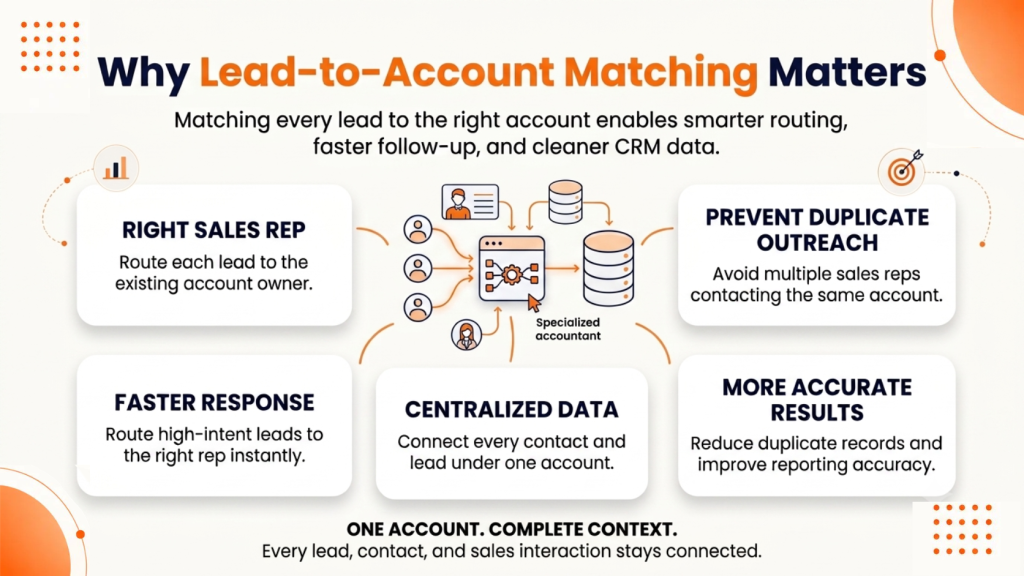
1. Right Sales Rep Gets the Lead
Account matching finds the sales rep who has already worked on the incoming inbound account. It does not send the lead to any random rep or to someone who does not know the lead.
When a lead is routed to the person who has already spoken with the prospect, the sales rep has an idea of how and where to start the conversation. It builds trust, and the conversation follows up smoothly.
Use Case: Someone from Acme Corp fills out a form. Since an AE is already working with Acme, the lead will get assigned to that AE instead of a new SDR.
2. Duplicate Outreach Prevention
Sometimes, two different salespeople call the same company or the same person more than once. It happens because the leads are not tied to one shared account, and it creates duplicate accounts. Lead to account matching identifies this and cleans data.
Use Case: An SDR is cold-calling Global Tech. The system shows an AE is already mid-deal there. So, the call gets stopped in time.
3. Faster Replies to Hot Leads
Regular lead-to-account matching practice removes the need to manually check the details of the account owner or account executive. It simply fetches the details and helps the sales reps to reply faster. By practicing this, you can improve the lead response time in your CRM
Use Case: A VP fills out a demo request for your product at 9 PM. The appropriate sales rep working at that time gets notified immediately. This way, the lead will not sit in a queue overnight.
4. Centralized Company Data
B2B lead-to-account matching logic brings the same data of an organization into one place in your CRM and sales automation software. Lead to account matching systems do not mark the same records as random or disconnected records.
Use Case: Suppose five people of a company fill out forms in three months. A good lead-to-account matching and routing software shows all records under a single account and not in different accounts.
5. Accurate Results
Lead to account matching safeguards teams from considering the same deal and prospect twice. Matched leads and accounts remove duplicated records from the CRM. It unifies lead data and provides accurate reports.
Use Case: Marketing teams claim credit for a “new” lead that your sales team has already closed last quarter. Account matching engine identifies it as an already contacted lead and shows the lead details as already existing.
How Does Lead To Account Matching Work?
Lead-to-account matching works by way of the use of smart regulations and algorithms to connect incoming leads (individuals) with existing accounts (companies or corporations) on your customer relationship management (CRM) system.
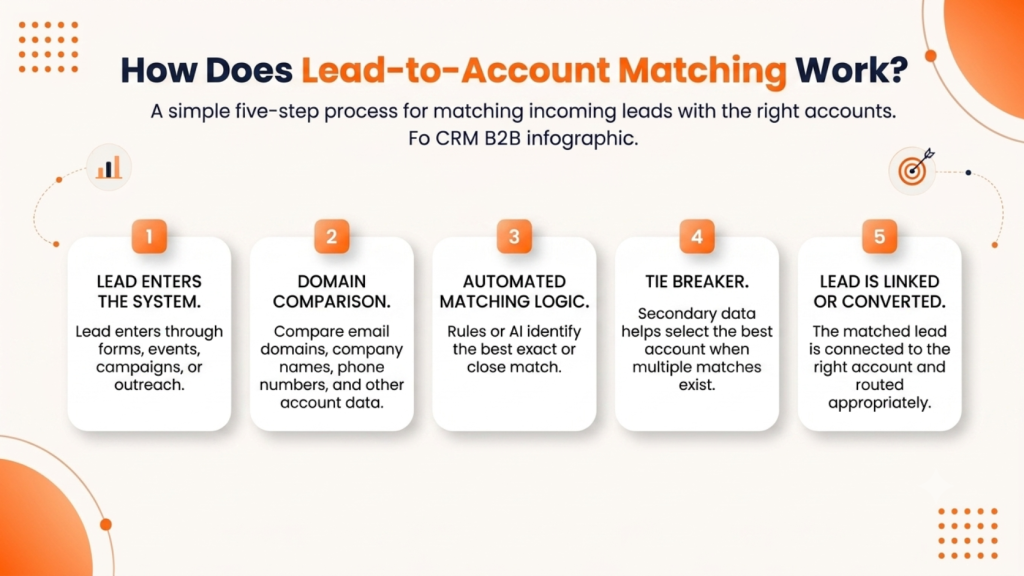
Here’s a step-by-step breakdown of the way it commonly functions:
1. Lead Enters the System
A lead comes into your CRM from various sources—web forms, events, marketing campaigns, or sales outreach.
2. Domain Comparison
The system checks the new lead’s information (like email domain, company name, phone number, or IP address) against existing account data to find a potential match.
- The most popular matching requirement is an email domain (e.g., @company.com).
- Company name is also used, often with fuzzy matching to catch slight variations (e.g., “IBM Corp” vs. “International Business Machines”).
- Geographic location or industry may also be used for more accurate pairing.
3. Automated Matching Logic
Using predefined rules or artificial intelligence, the lead-to-account matching system determines whether there is an exact or close-enough match between the lead and an account.
- Rule-based matching: Manual reasoning is used in rule-based matching, such as “match if email domain equals account domain.”
- AI-based matching: Uses machine learning to analyze patterns and make intelligent match predictions—even when data isn’t a perfect match.
4. Tie Breaker
When a lead matches more than one account, the system finds a way to select the best account. It falls back on secondary data to choose the best sales rep among the reps with the same score. It uses attributes, like country, state, city, postal code, or which account has the most active contacts, to decide the correct placement instead of guessing.
5. Lead Is Linked or Converted
Once a match is found:
- The lead is linked to the account as a contact.
- Some systems may auto-convert the lead into a contact and attach it to the appropriate account.
- If no match is found, a new account may be created, or the lead remains unmatched. The matched or converted lead is routed to the appropriate sales rep, improving follow-up speed and personalization.
This process reduces data duplication, ensures better sales alignment, and helps you build a clearer view of buying groups within target accounts. L2A matching works on similar principles for other CRMs such as HubSpot and Microsoft Dynamics.
Learn – How Fuzzy Matching Reduces Lead Duplication and Enhances CRM Data Quality
How to Set Up Lead To Account Matching in Salesforce?
Setting up Salesforce lead to account matching can extensively improve sales efficiency by way of making sure every lead is tied to the right account. Here’s how you may set it up effectively:
Step 1: Define Your Matching Criteria
- Decide the field criteria to match the lead to the account. Email domain, company name, or website are a few of the common operators.
- Standard fields work for straightforward setups, whereas custom rules provide more control. Custom rules are more relevant if your company has unusual naming conventions or multiple regional subsidiaries.
Step 2: Create Your Matching Fields
- Go to your CRM Object Manager for Leads.
- Create a Custom Lookup Field on the Lead object and name it “Matched Account”. Link this to the Account object.
- Create a Formula Field on the Lead and Account objects that will help you extract clean web/email domains (suppose, parsing @company.com from emails and cleaning://company.com from account websites).
Step 3: Set Up Matching and Duplicate Rules
- Go to Matching Rules in Salesforce Setup. You can either use the standard rules or build custom ones based on the desired domain or company name.
- Create Duplicate Rules that apply these matching rules whenever a record is created or updated. Salesforce can flag potential matches, block duplicates, or auto-convert the lead and record.
Step 4: Build the Automation Flow
- Create a new Record-Triggered Flow that runs when a lead is created or updated.
- Add a Get Records element that will search for an Account record where the Account domain formula matches the Lead domain formula.
- Add a Decision Element to check if a matching account was successfully found.
- Add an Update Records element to populate your custom “Matched Account” lookup field with the ID of the discovered account, and route the lead to the correct account owner.
Step 5: Test and Monitor
- Turn on and activate your flow.
- Create test lead records with known corporate email domains to verify that the lookup field populates correctly before rolling it out to your entire sales team.
- Keep monitoring after launch, since match quality tends to drift as your account base and lead sources change over time.
Explore – Salesforce Lead-to-Account Matching: How It Works, Limitations & Best Practices
Lead To Account Matching Best Practices
Simple changes in the process can make lead-to-account matching more accurate and effective. These lead-to-account matching CRM best practices are worth adding to your process to optimize your workflow.
1. Clean Data
Remove subdomains and protocols to clean duplicate pipeline records. Compare lead emails and account websites to find a stronger match. Implement a valid website domain on every prospect account record.
For personal emails like Gmail, either ask for a work email on inbound forms or use enrichment data. This data will map the inbound lead details back to the correct company.
2. Prioritize Domain Matching
Email domain is the strongest lead signal because most B2B leads use a corporate email address to inquire or research. If one or more than one person of the same domain enter your CRM pipeline, you can group them.
Search through the company name, abbreviations, famous name, or other fields when you can’t extract a clean match with the email domain. This rule resolves the majority of B2B lead-to-account matching logic without complicating anything.
3. Multiple Signals
Use multiple attributes to match an inbound lead with the appropriate sales rep. You can combine email domain with company name, phone number, and location.
If more than one account record matches with the same domain, set clear tie-breaker rules to identify the best-fit sales representative.
4. Fuzzy Matching
Exact-string matching treats similar company names or misspelled company names as different company records. Whereas fuzzy matching considers similar strings, names, and data records as one. Fuzzy logic considers abbreviations, dropped legal suffixes, prefixes (Inc., Corp., Ltd.), and acronyms as one entity; it does not create duplicate accounts for them.
The result is reduced duplicate accounts. Fewer unmatched or idle leads. Cleaner CRM.
5. Match Before Routing
Perform account matching immediately when a lead is created or enters your pipeline. When you match leads to an account after lead routing, the chances of landing it to the wrong rep increase.
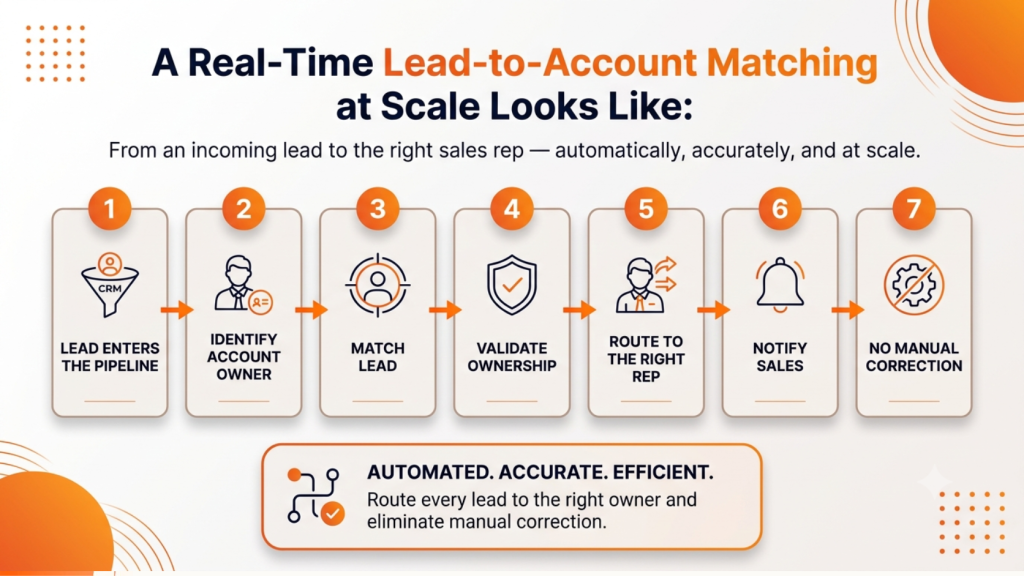
A real-time lead-to-account matching at scale looks like:
Lead enters the pipeline → Identify account owner → Match lead → Validate ownership → Route to right rep → Notify sales → No manual correction
What to Look For While Selecting A Lead To Account Matching Software?
Lead to account matching software is not designed the same way. The difference becomes visible when inbound lead volume increases. Let’s understand the key factors that you must consider before choosing software:
1. Multi-Field Matching
A good lead to account matching software weighs several conditions together instead of considering a single condition. Search for multiple attributes like organization name, email domain, website, phone, and address.
A single field can be wrong and give wrong output, but filtering using multiple attributes provides genuine and real output.
2. Fuzzy Logic Over Exact Match
Exact matching needs data to match perfectly. Fuzzy matching finds similar matches. It considers differences in spelling, formatting, abbreviations, or missing information. Sales teams give more importance to fuzzy matching because it considers data variations and provides accurate potential matches.
For example, fuzzy matching will consider “Acme Corp” and “Acme Corporation” as the same account rather than creating two individual accounts.
3. Real-Time Processing & Native CRM Fit
Figure out the working hours s of the matching processor. Does the account matching system work immediately when a new inbound lead comes, or does it work only on a scheduled batch run?
A tool that runs once an hour will not provide you real-time lead-to-account matching at scale.
After checking the processing time of the lead to account matching tools, analyse the CRM fit.
Understand if the inbound lead records get processed inside your CRM or if the tool uses an external system to function and then sync back later?
4. Hierarchy Support
A good lead to account matching software understands the importance of parent-child accounts. Consider how the tool manages and rolls subsidiary leads. Check its flexibility on lead management for your team requirements on a global account, or does it just keep them separate?
5. Confidence Scoring and Review Queues
Don’t implement ambiguous matches. Find tools that can detect low-confidence matches. If multiple potential matches exist for the same lead, implement different practices like Tie-breakers that can help you select the best sales rep account.
A tie-breaker is a technique that helps teams to find the appropriate salesperson among the multiple potential sales reps with the same score based on different attributes.
6. Visual Lead Matching & Routing Flow
In the current dynamic workplace, managers and admins choose software that can show exactly which field is a match. Visual flow easily troubleshoots a wrong match and removes the scope of guesswork. Sales reps also get trust and visibility in the system’s decisions.
A lead to account matching solution that checks these boxes will hold up as your lead volume grows. One that doesn’t tends to work fine in a demo and fall apart six months in.
How Does LeadAngel Ease Your Lead To Account Matching?
LeadAngel is an enterprise-level advanced lead routing and lead-to-account matching platform. It connects every incoming lead to the correct account in your CRM, with 99.7% real-time accuracy. The platform uses a configurable fuzzy matching engine instead of rigid, exact-string rules.
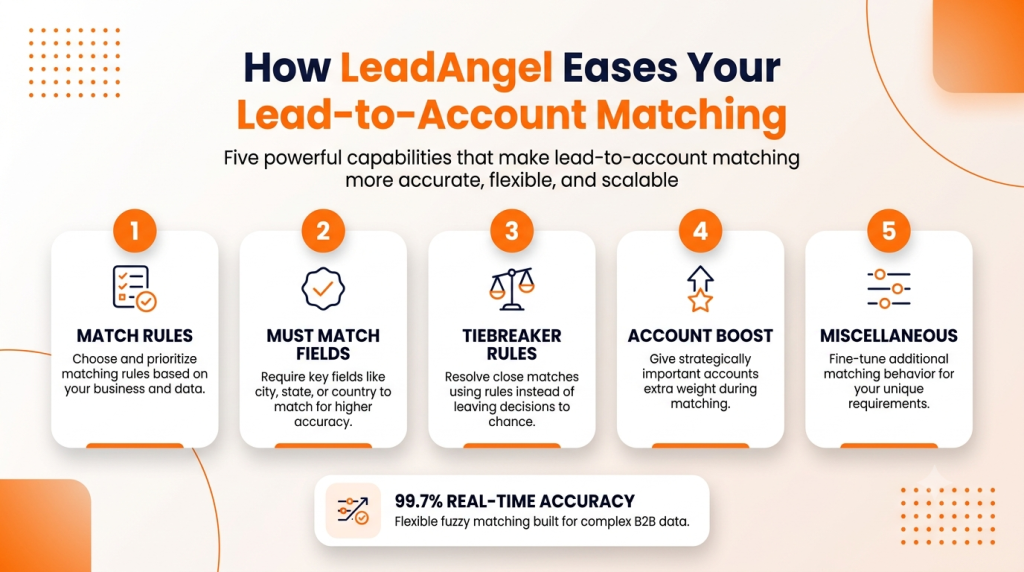
LeadAngel provides the following core capabilities for lead matching
1. Match Rules
You can choose and prioritize matching rules for your business. It uses domain match, exact name match, clean name match, geo expansion, industry-based matching, phone number matching, and more, based on your data and firmographics.
2. Must Match Fields
These rules require specific fields, like city, state, or country, to align before a match is considered valid. This empowers accuracy and cuts down on false positives.
3. Tiebreaker Rules
Tiebreaker rules help in deciding an account executive when a lead scores similarly against more than one AE. It is like a close call that gets resolved by rule instead of chance.
4. Account Boost
Give extra weight to specific high-value or strategically important accounts. Leads are more likely to land with the appropriate sales rep even when two candidates look similar.
You can configure up to 5 account boost conditions, and the maximum value ranges from 1 to 5. 5 is the highest and 1 is the lowest.
5. Miscellaneous
Fine-tune additional behavior, like matching obscure acronyms, excluding ISP email domains from matching, or re-running matches automatically when rules change.
See How LeadAngel Can Transform Your Lead Management
Curious to experience the power of LeadAngel firsthand? We understand!
We're offering a complimentary trial so you can explore LeadAngel's features at your own pace. Once you request a free trial, we'll schedule a personalized onboarding session to ensure you maximize the value of LeadAngel.
Ready to take your lead management strategy to the next level? Request your LeadAngel trial today!
In addition to exploring the platform, we recommend visiting our LeadAngel Help Center for in-depth guidance. Our dedicated customer support team is also available to answer any questions you may have at sales@leadangel.com.
FAQs
Account matching differentiates a completely new lead and an already contacted lead. It bridges the gap between an individual prospect and company leads.
When a single lead matches multiple accounts is an indication of a dirty CRM and duplicated accounts. Good lead to account matching software flags it as low-confidence and waits for a human to confirm before merging or removing records.
Automated lead-to-account matching catches name variations before creating it a separate accounts. Therefore, it prevents duplicates, provides cleaner CRM, and segregates leads and accounts.
Match rate, false-positive rate, and lead response time are essential metrics that measure the effectiveness of an account matching tool. Good lead to account matching tools should provide all data without any inaccuracies
When a new lead is matched after it enters the CRM, it reduces the chances of routing it to the wrong rep and provides instant context for the lead. This reduces response time for leads, and the speed of contacting a lead increases.
Sales teams get a unified view of account activity when a lead is matched to an existing account. It eliminates the blind spots and improves lead routing.