Key Takeaways
- What is sales process automation? Sales process automation is the use of software or digital tools to do repetitive and rule-based sales tasks without needing manual effort. This process includes tasks like capturing leads, routing leads, activity logging, triggering follow-ups, and moving deals between stages.
- Why It Matters? Reduces manual work, improves data accuracy, speeds up lead response times, and helps sales teams focus on selling.
- What to Automate First? Start with lead capture, lead qualification, lead-to-account matching, and lead routing before automating follow-ups, pipeline updates, and onboarding.
- Sales process automation best practices: Clean CRM data, document workflows, define clear routing rules and SLAs, keep human approvals for critical decisions, and continuously measure automation performance.
- How to Automate It: Define your sales workflow, clean your CRM data, choose the right automation tools, build rule-based workflows, test them with a small team, train sales representatives, and continuously monitor performance.
According to Salesforce’s State of Sales, 6th edition (survey fielded March–April 2024), sales representatives spend 28% of their time selling. The remaining 72% of their time goes into doing everyday repetitive tasks or manual work, such as data entry, research, planning, prioritization, and internal meetings.
Let’s take an example to understand it mathematically. Imagine a salesperson who works 48 hours in a week. So, 28% of those 48 hours is 13 hours and 26 minutes, and this is the exact time a salesperson spends selling or connecting with a prospect. The remaining 72% of the time, which is 34 hours and 34 minutes, goes into doing manual work. After looking at the numbers, it is clear that sales process automation bridges that gap.
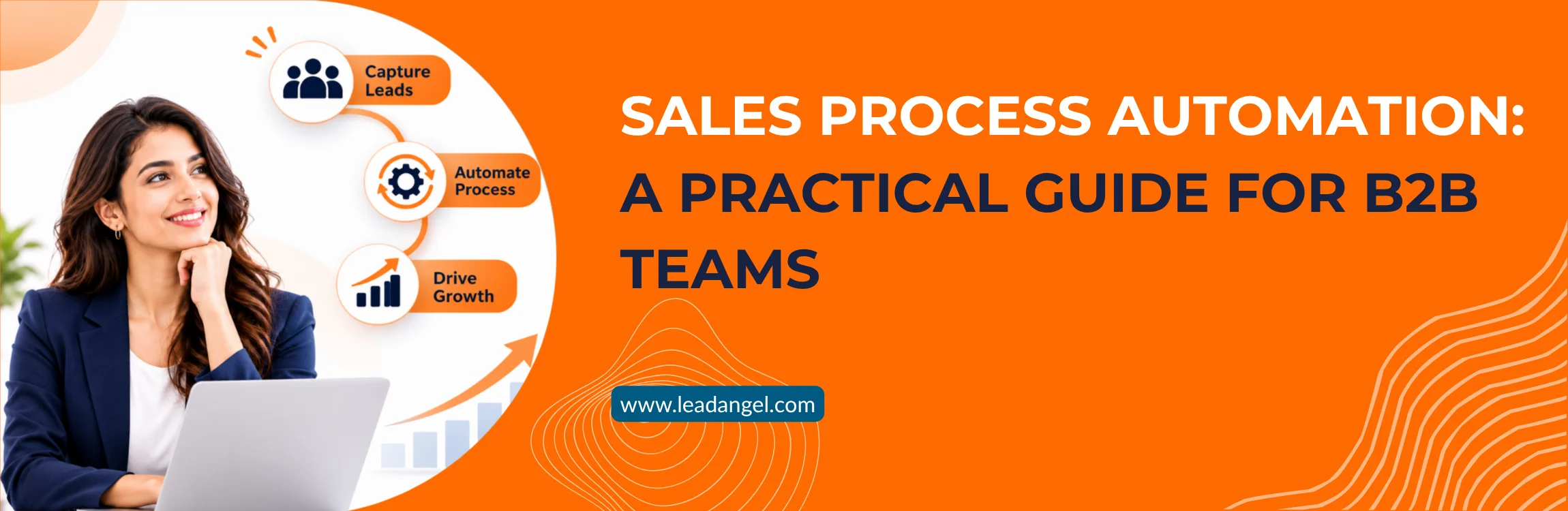
And this is why the sales process has become the talk of the town, and apparently every other organization is trying to implement sales automation in their everyday workflow. The split is why B2B revenue operations teams automate administration and assignment before they automate conversations.
Sales process automation uses software to run repetitive, rule-based sales work without a person completing each step by hand. In a B2B motion, that usually means lead capture, duplicate checks, lead-to-account matching, lead routing, activity logging, follow-up tasks, and stage updates. It does not replace selling. Discovery, negotiation, pricing judgment, and strategic account decisions stay with people. Automation is for the steps that should happen the same way every time and for the handoffs that fail when they depend on a shared inbox or a spreadsheet.
This blog is a complete guide to sales process automation. We discuss what sales automation is, why it matters, how to automate sales processes, best practices, and crucial stages.
What Is Sales Process Automation?
Sales process automation is narrower and more useful for operations leaders: it is the full path those activities sit inside, from the moment interest is captured to the moment a closed deal is handed to onboarding.
Teams usually search for what sales process automation is before they search for sales automation software. Sales process automation is the use of software or digital tools to do repetitive and rule-based sales tasks without needing manual effort. This process includes tasks like capturing leads, routing leads, activity logging, triggering follow-ups, and moving deals between stages.
So, to explain it precisely, it is the broad category of technology that removes manual work in the process of selling. You can consider it your digital assistant that handles your everyday predictable tasks in the sales cycle. Let’s look at the practical use case of this in the daily workflow.
Use Case of Sales Process Automation
In traditional setup of the sales process, operation teams usually review leads manually, check its company details, finds matching accounts in CRM, along with identifying the best-fit sales representative, assigning them leads, and notifying the sales rep.
On the other hand, after doing so much manual work, if the sales rep is unavailable, the lead simply sits untouched. It remains untouched until someone reassigns it to a salesperson.
Teams can make it hassle-free with the help of an automated sales process. In that process, every action triggers the succeeding action automatically.
Lead Capturing → match them with CRM accounts → check routing rules → identify available reps → assign leads → notify reps → track follow-ups
With the help of this process, manual coordination is reduced, and lead response times are sped up. It ensures every incoming inquiry reaches the right sales representative.
How it differs from sales automation, marketing automation, and CRM automation
Sales process automation, sales automation, marketing automation, and CRM automation all sound similar until you start researching them. All these terms are interconnected with each other; that’s why they are confusing. But not anymore; let’s understand them.
| Criteriia | Sales Process Automation | Sales Automation | Marketing Automation | CRM Automation |
|---|---|---|---|---|
| Scope | The full sequence of sales stages, from lead capture to close and handoff | Individual rep tasks and activities | Lead generation, nurture, and scoring before sales engagement | Rules inside the system of record |
| Primary owner | Sales Ops / RevOps | Sales leaders and reps | Marketing | CRM admin |
| Typical examples | Lead routing, stage-based tasks, approval flows, quote generation | Email sequences, call logging, meeting scheduling | Campaign workflows, lead scoring, landing pages | Field updates, validation rules, record assignment |
| Where it stops | Does not cover pre-lead demand generation | Tasks run in isolation unless connected to a defined process | Ends at the marketing-to-sales handoff | Limited to what the CRM natively exposes |
How Does Automation Change The B2B Sales Process?
Automation saves time. We’ve heard about this all the time, but does automation only save time? Doesn’t it do anything else? It does more than save time. Because, as somebody in a leading position, decisions cannot be made on the basis of time-saving. One must consider measurable productivity, efficiency, speed, and how it impacts your revenue.
Improved Data Quality
Good data quality is the foundation of a leading sales system. A lot of operations are dependent on data quality. Inaccurate or dirty data hampers daily operations and provides inaccurate results. Along with this, manual data entry is tedious and consumes a lot of time. Sales process automation overcomes this gap, and the chances of errors are reduced.
Accelerated Speed
When repetitive tasks are automated, such as lead capturing, matching, and routing, half the battle is solved. Sales representatives do not need to look out for the best match, and as a result, they don’t worry about whom to assign the lead to. Consequently, the lead response time decreases, and teams notice positive changes in speed to lead.
Consistency & Visibility
Sales workflow automation provides complete visibility to managers. They can see where deals stall and where handoff processes break. It maintains consistency as every lead follows the same rules and principles. They follow a fixed set of rules that is defined in the system, such as territory logic, round-robin logic, availability logic, or capacity-based assignment logic.
Data-Driven Financial Decisions
When an organization implements sales process automation, the impact is visible on the most important metric: financial performance. According to McKinsey, businesses that adapt sales process automation see a 10-15% increase in efficiency. A well-structured process increases productivity and provides clean, real data, which ultimately helps in making better decisions. That’s why accurate numbers are the utmost priority for any business.
What Are The Stages Of B2B Sales Automation Process? (What to automate first)
There are seven stages of b2b sales automation process. In these stages, rules, triggers, and workflows are applied. Leads, or deals, move forward from one stage to the next with less manual effort, with the help of technology and AI-driven workflows. Now that you know what the stages of the sales automation process flow, it is equally important to understand which one to automate first.
| Stage | What Happens | What To Automate | Which Stage To Automate First |
|---|---|---|---|
| Lead Capture | Prospect interest becomes a CRM record | Form submissions, contact creation, enrichment, source tracking, duplicate checks | First |
| Lead Qualification | Leads are scored for fit and readiness | Lead scoring, ICP fit checks, intent signals, qualification forms, disqualification rules | First |
| Lead Routing | Lead is assigned to the right owner | Territory, segment, product-line, and round-robin assignment; alerts for unassigned leads | Second |
| Outreach & follow-up | Prospect receives timely communication | Email/LinkedIn sequences, personalized templates, reminders, response tracking, re-engagement | Second |
| Discovery & Demo | Team understands needs and shows fit | Meeting scheduling, pre-call research briefs, call recording/notes, next-step tasks, stakeholder mapping | Third |
| Proposal | Offer and terms are presented | Proposal/quote generation, approval workflows, document tracking, objection-playbook prompts, approval alerts | Third |
| Hand-off & Onboarding | Deal is signed and handed off to onboarding | Contract workflows, e-signature, closed-won updates, onboarding handoff, renewal and upsell triggers | Fourth |
What Are The Benefits Of Sales Process Automation?
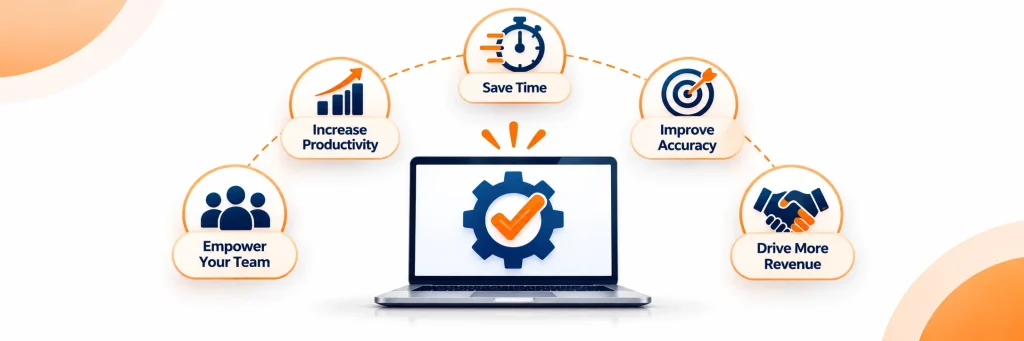
Everyone knows about the basic benefits of process automation. But there is a lot more that is undiscovered. Let’s explore the sales process automation benefits:
Identify New Inbound Opportunities
Everyday hundreds and thousands of leads are generated and entered in the CRM. Information is often restricted in reports; fetching those reports and identifying new opportunities becomes hard. Sales reps need hours to identify new potential prospects. But automating the sales process helps identify new inbound opportunities with the help of lead scoring.
Shorter Sales Cycle
When capturing, scoring, routing, and matching are automated, sales reps can easily focus on talking to leads and selling more. They follow up quickly and focus more on understanding the prospect’s problem, along with providing them with a better solution. This way, the sales cycle becomes shorter, and leads get closed.
Precision & Accuracy
Sales process automation overcomes errors that could arise from manual data entry. Accurate data provides accurate insights to work on, which allows sales reps to understand the workflow the chances of mistake reduces.
Better Pipeline Management
Sales process automation automates the major chunk of the daily operations. From lead capturing to onboarding, each step is automated; hence, the software maintains each and every detail; therefore, pipeline management gets easier.
How To Automate Your Sales Process?
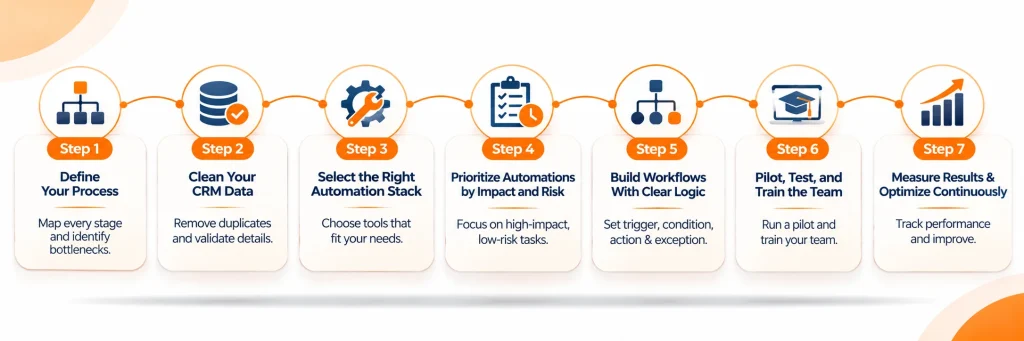
You have gained enough context for sales process automation. Now, it’s time to understand how you can automate it to make your workflow efficient. Here are the steps to automate your sales process
Step-01 Define Your Process
The first step is to document every stage, task, decision point, handoff, and bottleneck you are currently facing. Until and unless you do that, you will not be able to differentiate or measure the effect. Do this from your initial point to the last. It will help you understand which parts of the process need automation first.
Tip: Fix unclear ownership or broken stages before you start your automation process.
Step-02 Clean Your CRM data
Clean data is the foundation of a healthy revenue system. Deduplicate your records, validate contact details, and standardize the fields available in your current CRM. Connect web forms, ads, events, and referrals to your CRM. Clean data is the best source you can have in your system for reliable sales workflow automation.
Tip: Validate email addresses and company details of leads before you move it for automated sequences.
Step-03 Select the right automation stack
Choose sales automation tools that match your current workflow and business requirements. Understand CRM workflows, lead routing, email sequencing, meeting scheduling, and reporting before you finalize a tool or tech stack. Ensure they integrate with your CRM and scale in the future.
Tip: Prioritize platforms that support custom workflows and clear reporting.
Step-04 Prioritize automations by impact and risk
When you are choosing software for sales process automation, make sure you go through how and what repetitive tasks it automates. Try to look out for a tool that follows rule-based sequence such as capturing, enrichment, scoring, routing, follow-ups, and CRM updates. Also, ensure that you can add a human touch or the system asks for human approval for high-risk tasks.
Tip: Start automation with the step that saves the time of most sales reps and prevents sales funnel leakage.
Step-05 Build Workflows With Clear Logic
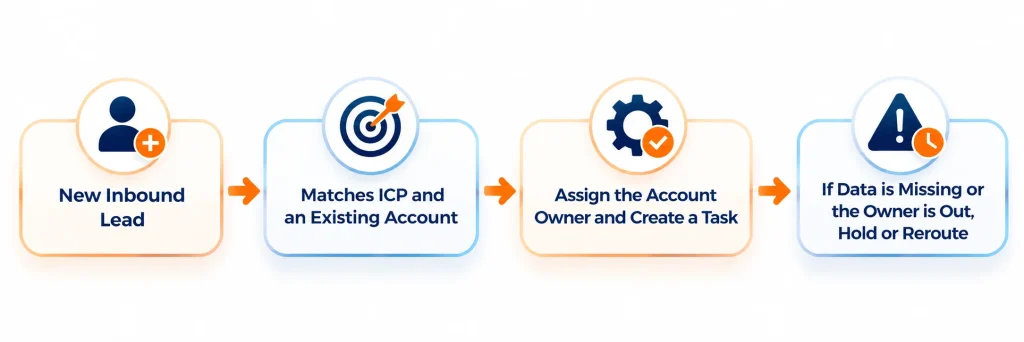
Define every automation as trigger → condition → action → exception. The reason behind this logic is that it makes your sales workflow automation easier to test and maintain.
Example: New inbound lead → lead matches ICP → assign the correct AE → send first-touch email → create follow-up task.
Tip: Always have logic to add an exception path for missing data, bounced emails, or delayed approvals.
Step-06 Pilot, test, and train the team
Before moving your complete workflow to software, try the workflow with a small set of people. Test normal cases and failure cases so that you can get an understanding. After this, train your sales reps on how to use it, its pauses, and its functionality.
Tip: Arrange doubt sessions and training sessions. Involve sales reps earlier in the process to understand the process better.
Step-07 Measure results & optimize continuously
Measuring the end results after implementing a new system is necessary. It gives you a clear picture of how the system or tool is fitting in your workflow, whether it is an asset or a liability. Track lead response time, follow-up completion, lead-to-opportunity conversion, pipeline velocity, data accuracy, adoption, and ROI. Use these results to refine or retire your automations.
Tip: Regularly review your workflow every month or on a quarterly basis. Your sales process automation will stay aligned with dynamic buyer behavior and team needs.
What Are the Core function/Applications of Sales Process Automation?
As the term says, “sales process automation,” it is obvious that it uses digital tools and software to smoothly handle the workflow and tasks. Here is the application of sales process automation that the team uses daily.
| Function | What It Does |
|---|---|
| Lead Capture & Data Entry | Captures prospect details and creates accurate CRM records automatically |
| Lead scoring and qualification | Ranks leads by fit and intent so reps focus on high-value prospects |
| Lead routing and assignment | Sends leads to the right rep quickly |
| Outreach and follow-up | Sends timely, consistent communication based on behavior or time delays |
| CRM updates and activity logging | Keeps customer and deal data current without manual entry |
| Pipeline management | Tracks deal progress and alerts reps to stalled or risky opportunities |
| Quote and proposal generation | Creates accurate documents faster |
| Reporting and forecasting | Turns sales activity into insights for managers |
Here is a list of the major applications:
Inbound lead management: It captures leads from forms, ads, chat, events, and referrals. It also enriches records, scores them, and routes the qualified leads to the best-fit salesperson.
Outbound prospecting: Identifies target accounts, prioritizes prospects using intent data, and automates personalized outreach sequences.
Sales nurturing: Sends behavior-based follow-ups, reminders, and relevant content until the prospect is ready for a sales conversation.
Opportunity management: Update deal stages, create next-step tasks, flag stalled deals, and guide reps through required sales activities
What Are The Sales Process Automation Best Practices?
Here is a list of best practices that sales and revops teams can use, as it is based on the patterns that get repeated across B2B teams.
- Fixing the process before automating it
The primary function of automation is to scale the existing process. So, to get the maximum results, you must fix what is broken in your system and process. For example, if a loophole is present that is costing you handoffs, then with automation, the broken process will become faster.
- Start with routing and matching.
All the systems that b2b implement are to get more business and revenue. What they often forget is that revenue does not knock on your door with lead capture. To generate revenue, you must convert the lead, and for that, route the lead to the best sales representative and match it to the correct account. Start automating your routing and matching system.
- Keep humans in high-value moments.
What is automation? It is a system that is doing your tasks, right? So, a system can only do a fixed amount of work an uncountable number of times, if you ask it to. So, keep human validation and verification at the high-value moments. You can automate sales admin and follow-up. But do not automate strategic account conversations.
- Set SLAs and escalation paths.
Speed to lead is one of the essential metrics of a sales cycle. It is highly dependent on how fast a salesperson responds to the inbound lead. Create a response window for every inbound lead to maximize your speed to lead. Also, keep a fallback assignee and owner in the loop, so in the absence of a sales rep, they can manage the leads.
- Document Workflow Rules.
Undocumented sales workflow automation rules are the main cause of conflicts after a reorg. It creates hassle and hampers the workflow. If a new person joins your team, how will he understand your workflow? Briefing only works for a few weeks; after this, the chances of forgetting rules increase. Also, documented workflow rules help in understanding the complete process and dealing with exceptions on the basis of rulebooks.
How Does LeadAngel Help in Sales Process Automation?
LeadAngel is an advanced B2B lead management platform.It works with Salesforce, HubSpot, and Microsoft Dynamics 365. It does not replace those CRMs, and it does not generate leads.. LeadAngel helps in stages where most sales process automation either succeeds or fails. To be more specific, it manages the leads a company already captures: matching them to accounts, routing and assigning them, deduplicating records, enforcing response rules, and supporting scheduling and handoff.
That is the stretch of the sales process where automation most often succeeds or fails. Email sequencing, quoting, and forecasting can live in other tools. If the lead is on the wrong account or with the wrong owner, those tools accelerate the mistake.
Here is how that supports the sales process automation.
- Lead-to-account matching: LeadAngel provides advanced lead to account matching capabilities that provide 98% accurate results. It uses fuzzy logic and techniques like tie-breaker, account boost, must-match fields, and miscellaneous. The software uses attributes like domain matching, popular name, mergers and acquisitions, and more.
- Advanced Lead Routing: The software is well-known for its lead routing capabilities. It offers advanced routing techniques like territory, product interest, account ownership, round-robin, capacity-based, sales rep availability-based, and custom rules.
- SLA enforcement: LeadAngel allows sales reps to set a minimum time to deal and manage the lead. Within the time period, if the assigned sales rep does not handle the lead, the software reassigns the lead automatically to the fallback assignee or queue owner.
- Data Dedupe: It supports data cleansing and deduplication as a part of the lead routing process. LeadAngel allows teams to dedupe and merge old records into new records, or new records into old records based on the user’s choice. It cleans data based on attributes like domain, email, first name, or last name.
The Final Words
Sales process automation is not a tool purchase. It is an important process of choosing software that can help you automate your repetitive tasks. Teams that understand and implement the sales automation process flow nicely see its benefit in a quarter or more, depending on their business model.
It does not matter what question you had before you read this blog; the important thing is, how much it helped you. If you are looking for a solution to how to automate your sales process, or trying to understand sales process automation workflow, the answer is going to be the same.
To begin with, clearly define your entire workflow, clean your data before you push it forward for automation, select tools that match your business model, automate tasks that your team does repeatedly every day, and, lastly, test it and measure results to understand how it is affecting your operations.
If lead routing and lead-to-account matching are your first tasks to automate, LeadAngel can help you do that. Lastly, use sales automation software to ease your workflow, but leave room for manual approval in case of bigger decisions.
See How LeadAngel Can Transform Your Lead Management
Curious to experience the power of LeadAngel firsthand? We understand!
We're offering a complimentary trial so you can explore LeadAngel's features at your own pace. Once you request a free trial, we'll schedule a personalized onboarding session to ensure you maximize the value of LeadAngel.
Ready to take your lead management strategy to the next level? Request your LeadAngel trial today!
In addition to exploring the platform, we recommend visiting our LeadAngel Help Center for in-depth guidance. Our dedicated customer support team is also available to answer any questions you may have at sales@leadangel.com.
FAQs
Lead capture, lead qualification, routing, outreach and follow-up, demo sessions, proposal, and hand-off and onboarding are the stages of a sales process automation.
The difference between marketing and sales automation is simple. Sales automation solutions handle outreach, logging, follow-up, and pipeline updates. Whereas marketing automation helps in generating and nurturing leads before it reaches the sales team.
HubSpot Sales Hub, Salesforce, Nextiva, and LeadAngel are a few of the common examples of sales automation software.
If you are planning to invest in sales process automation software, look for features like lead to account matching, SLA timers, integration capabilities, and rule-based routing capabilities with your existing workflow and tech stack.
There is no fixed answer to this question. Different tools have different pricing, and pricing models are based on several criteria. Some tools offer custom pricing, whereas some publish pricing on their website. On average, the initial price of a sales process automation starts around $15 per month.
Since lead capture is the initial stage of major processes, therefore start by automating lead capture, followed by lead to account matching and routing
When the workflow is not documented, you are working with dirty data, and there is no maintenance before you try to automate your workflow; your sales process automation starts breaking down.