Quick Summary
Salesforce lead routing is the automated process of assigning incoming leads to the right sales rep based on criteria. Attributes such as territory, company size, or product interest. A good lead routing drives faster speed-to-lead, prevents leads from going unclaimed, and boosts rep productivity. Done poorly, it provides bad data, missing fallback rules, or manual processes, and leads stall or land with the wrong rep entirely.
While Salesforce’s native tools handle basic routing, they lack advanced prioritization, real-time visibility, and AI-driven logic. In this guide, we’ll break down everything about Salesforce lead routing, what works, what doesn’t, and how to scale lead routing in Salesforce effectively.

Key Takeaways
- • Speed-to-lead is everything in Salesforce lead routing. Respond within 5 minutes to boost conversions by 9x. Automated lead routing removes delays and connects leads instantly.
- • Salesforce native routing works for simple teams, not complex ones. It works for basic teams, not complex sales structures. It lacks real-time flexibility, advanced automated logic, and scalability.
- • Clean CRM data is critical. Duplicates and missing fields cause wrong assignments. Routing is only as good as your data.
- • The right routing strategy depends on your sales structure. Use territory, company size, industry, and product interest. This avoids conflicts and missed handoffs.
- • Advanced tools like LeadAngel fill the gaps Salesforce leaves behind. They offer advanced logic, real-time routing, and deduplication. They improve speed and accuracy beyond native systems.
- • Lead routing is not a one-time setup — it’s an ongoing revenue lever. It needs regular updates and audits. Track speed, conversions, and logic to stay effective.
What is Salesforce Lead Routing?
Salesforce lead routing automatically matches incoming leads with the right sales rep based on the rules your business defines. These rules often include factors such as territory, location, company size, product interest, and other lead attributes.
Why Lead Routing Matters in Salesforce?
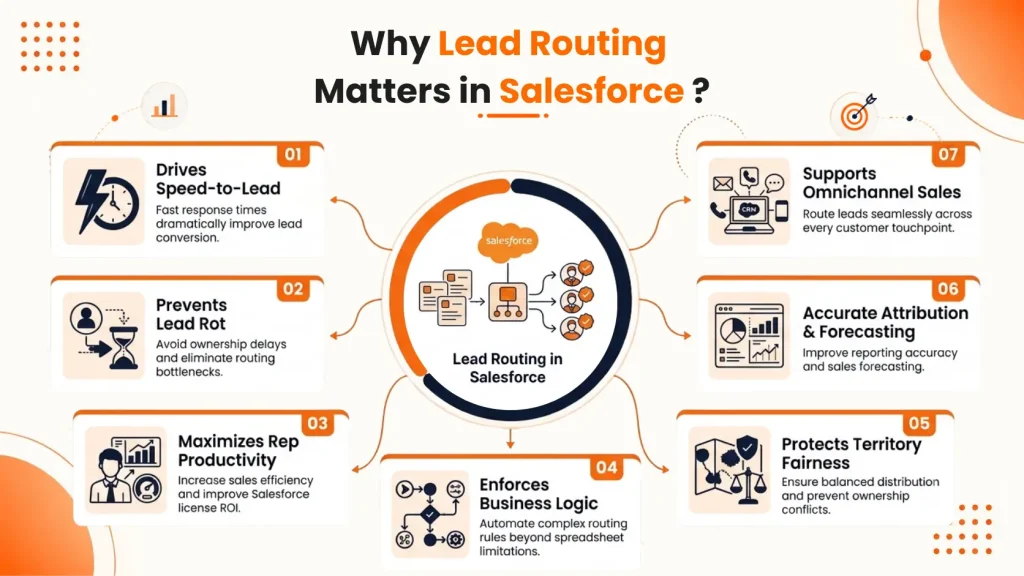
Lead routing in Salesforce isn’t just about “who gets the email.” It’s a lever that directly impacts revenue efficiency, rep morale, and customer experience. Without an intentional routing strategy, even the best CRM becomes a black hole for opportunities.
Here is why lead routing matters specifically within the Salesforce ecosystem:
1. It Drives Speed-to-Lead, the Most Critical Metric
Salesforce data shows that responding within 5 minutes makes a lead 9x more likely to convert. Manual routing (e.g., an admin emailing a rep) breaks this window. Automated routing in Salesforce uses Assignment Rules, Flow, or Omni-Channel to instantly push leads to the right rep while they are still hot.
2. It Prevents “Lead Rot” and Ownership Bottlenecks
Without routing, leads sit in a shared queue. Reps assume “someone else will take it.” By the time someone claims it, the lead has called a competitor. Proper routing assigns unambiguous ownership (e.g., round-robin to available reps), eliminating the bystander effect.
3. It Maximizes Rep Productivity (and ROI of Salesforce Licenses)
You pay for every Salesforce seat. If reps spend 20% of their day sorting through queues, pulling reports to find unassigned leads, or fighting over territory, you are burning money. Good routing pushes qualified, ready-to-work leads directly into their dashboard, so they sell, not administrate.
4. It Enforces Complex Business Logic That Spreadsheets Can’t
Modern go-to-market motions are complex:
- Enterprise leads go to field reps.
- SMB leads go to inside sales.
- Leads from a specific webinar go to a product specialist.
High-scoring leads (BANT qualified) bypass SDRs and go directly to an AE.
Salesforce Flow and advanced assignment rules can handle this real-time conditional logic based on any field: industry, company size, lead source, or even predictive score from Einstein.
5. It Protects Territory and Fairness (Prevents Rep Rebellion)
Nothing destroys sales team morale faster than the perception that a manager is playing favorites or that territory lines are fuzzy. Transparent routing rules (round-robin, load balancing, geo-based) ensure:
- No rep gets flooded while another is idle.
- No poaching or cherry-picking leads.
- Every lead is assigned based on clear, auditable criteria.
6. It Enables Accurate Attribution and Forecasting
If you don’t know who worked a lead, you don’t know your conversion rates per rep, per channel, or per region. Salesforce reports become useless noise. Proper routing ensures every lead has a single, traceable Owner from the moment of creation. This allows you to report on:
- Conversion rates by rep.
- Lead response times by source.
- Bottlenecks in your funnel (e.g., leads piling up in “unassigned”).
7. It Supports Omnichannel and Hybrid Sales Models
Salesforce is no longer just for inside sales. With Omni-Channel Routing (Service Cloud) or Einstein Lead Scoring + Routing, you can route:
- Chat leads instantly to an available SDR.
- High-intent website form fills to a video call link with an AE.
Inbound calls (CTI) to the rep who last worked the account.
This creates a seamless buyer journey, something your competitors are likely failing at.
How Does Salesforce Lead Routing Work?
Effective lead routing sounds simple. But it depends on speed and data quality. Leads need to reach the right sales rep immediately, not hours or days later. Faster response times directly improve your chances of winning deals.
But this is where things can break.
If your Salesforce CRM data is not clean, routing rules will not work as expected. Duplicate records, incorrect ownership, or outdated data can send leads to the wrong rep. This creates delays and reduces your chances of conversion.
This is why clean data matters.
In Salesforce, accurate data ensures routing decisions are reliable. Proper data migration and cleanup help maintain consistency across records, making automated routing more effective.
Now, consider a simple scenario to understand the Salesforce lead routing process
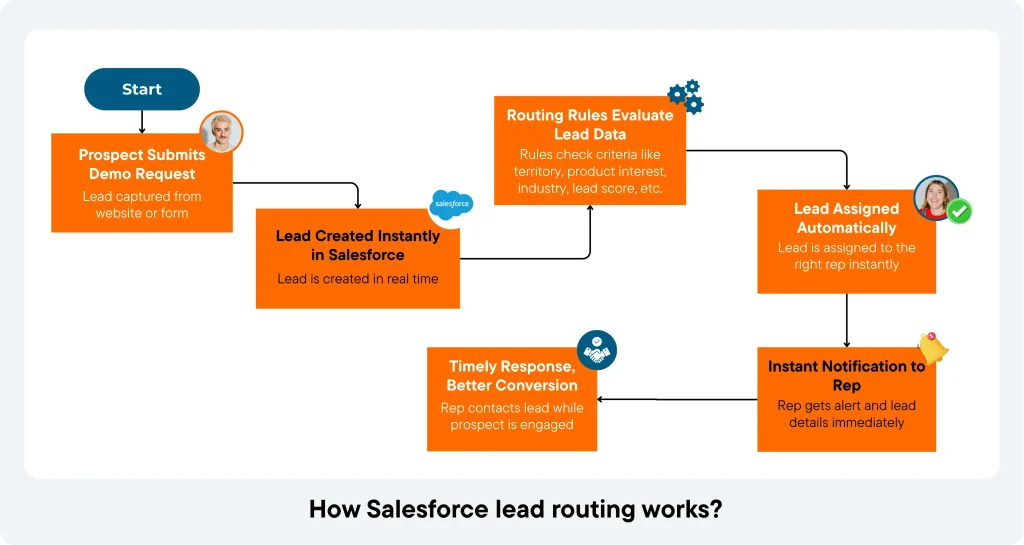
A prospect submits a demo request on your website. Without automation, that lead may wait for manual review. By the time a rep responds, the prospect may already be speaking with a competitor.
With automated Salesforce lead routing, the process is different.
The lead is created instantly. Routing rules evaluate the data and assign it to the right rep in real time. The rep can respond while the prospect is still engaged.
That’s where the impact shows.
Faster responses lead to more conversations. Better timing leads to higher conversions. And your best leads are handled when it matters most.
Why Does Salesforce Native Lead Routing Have Limitations?
| Limitation Category | What Happens in Salesforce | Why It Matters for Lead Routing |
| Limited Customization in Routing Logic | Relies on basic assignment rules using static fields like region or role | Cannot handle multi-layered routing based on behavior or real-time signals |
| Basic Round-Robin Without Prioritization | Distributes leads evenly without considering rep performance or workload | High-value leads may not reach the most suitable or available reps |
| Weak Lead Scoring Integration | Lead scoring exists but is not deeply tied to routing decisions | Limits the ability to prioritize high-intent or high-value leads |
| Limited Real-Time Visibility | No detailed native view of routing flow, delays, or assignment tracking | Difficult to monitor performance and identify bottlenecks |
| Limited Multi-Team Routing Flexibility | Routing across teams is possible but not highly dynamic or scalable | Slows down coordination between sales, support, and account teams |
| Dependency on External Tools | Advanced routing often requires third-party integrations | Adds complexity and reduces native system efficiency |
| Lack of AI-Driven Routing | Routing decisions are rule-based, not predictive or performance-driven | Misses opportunities to optimize lead assignment using data insights |
1. Limited customization in routing logic
Salesforce supports basic assignment rules, but struggles with multi-layered routing. It relies mostly on static fields like region or role. This makes it difficult to route leads based on behavioral signals or real-time engagement.
2. Basic round-robin without prioritization
Round-robin routing distributes leads evenly, but it does not account for rep performance or workload. Every rep is treated the same, regardless of capacity or success rate. This can impact how high-value leads are handled.
3. Weak integration between lead scoring and routing
Salesforce offers lead scoring, but it is not deeply connected to routing decisions. Leads are often assigned based on static rules instead of dynamic scores. This limits the ability to prioritize high-intent prospects.
4. Limited real-time visibility into routing
Tracking where a lead is and how it was assigned is not always straightforward. There is no built-in, detailed view of routing flow or delays. This makes it harder to identify bottlenecks and optimize performance.
5. Limited support for multi-team lead distribution
Routing across multiple teams is possible, but not highly flexible. It becomes difficult to manage when leads need to move between sales, support, or account teams. This can slow down coordination and follow-ups.
6. Dependency on external tools for advanced workflows
Salesforce integrates with many tools, but advanced routing often depends on third-party solutions. Native capabilities may not support complex workflows or real-time data syncing. This adds complexity to the overall system.
7. Lack of AI-driven routing capabilities
Salesforce does not natively use AI to assign leads based on past performance or behavior. Routing decisions are mostly rule-based. This limits the ability to optimize assignments based on predictive insights.
Salesforce vs Advanced Lead Routing Tools
This comparison helps you understand the difference between basic, built-in routing in Salesforce and more advanced routing tools. While Salesforce handles simple lead distribution, advanced tools are designed for speed, flexibility, and scale as your process becomes more complex.
Comparison:
| Strategy | What It Does | Best Use Case |
| Territory-Based Routing | Assigns leads based on geographic location or region | Teams organized by regions or countries |
| Company Size-Based Routing | Routes lead based on business size (SMB, mid-market, enterprise) | Different sales approaches per segment |
| Industry-Based Routing | Assigns leads based on industry/vertical | When reps specialize in specific industries |
| Product-Based Routing | Routes leads based on product or service interest | Businesses with multiple product lines or offerings |
1. Territory-Based Routing
Distributes leads based on geography or predefined sales territories such as country, state, or region. This ensures that reps handle leads within their assigned areas, avoiding overlap and confusion.
2. Company Size-Based Routing
Assigns leads based on company size, typically segmented into SMB, mid-market, or enterprise. Each segment often requires a different sales approach and deal strategy.
3. Industry-Based Routing
Routes leads according to their industry or vertical, allowing reps with domain expertise to handle relevant prospects.
4. Product-Based Routing
Assigns leads based on the product or service they are interested in. This is especially useful when offerings are complex or require specialized knowledge.
How to Set Up Lead Routing in Salesforce?
The canonical lead routing setup in Salesforce is built across three layers:
- Lead Assignment Rules, which handle the initial dispatch.
- Queues, which act as holding pools for unassigned or overflow leads.
- Flow Builder, which orchestrates conditional logic too complex for static rules alone.
Below is a modern Salesforce lead routing workflow adapted for the Lightning Experience— that is, the sequence any org built on Classic-era conventions will recognize, updated for the Lightning Experience console.
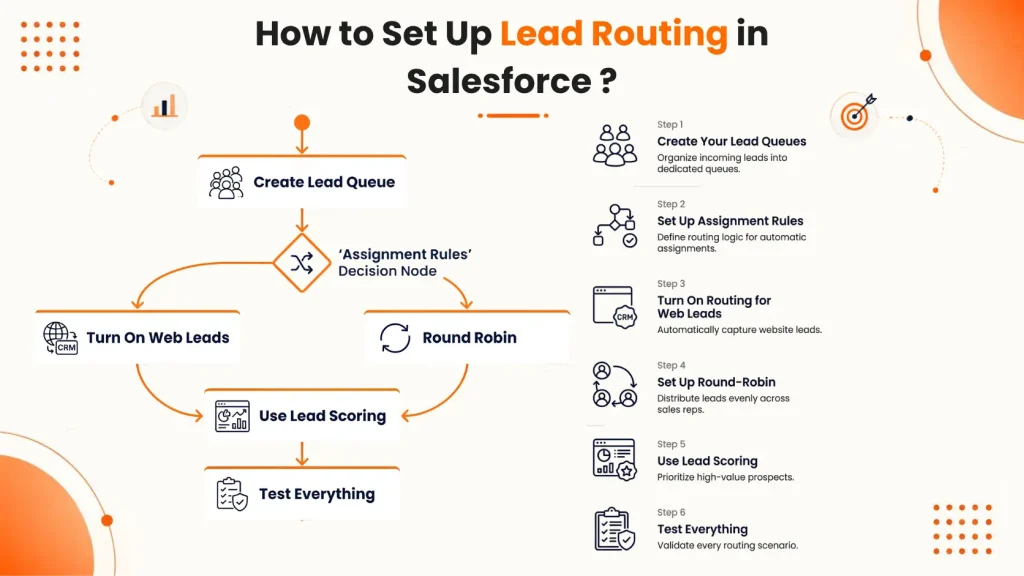
Step 1: Create Your Lead Queues
Before routing starts, you need a place where leads can go.
In Salesforce, go to Setup → Queues and create a queue like INBOUND_WEST or ENTERPRISE_LEADS. Add team members to this queue. Think of it like a shared inbox where leads wait before a rep picks them.
Step 2: Set Up Assignment Rules
Now decide how leads should be assigned. Go to Setup → Lead Assignment Rules and create a rule. You can add conditions like company size or lead source. Salesforce checks these rules from top to bottom and picks the first match.
Step 3: Turn On Routing for Web Leads
Leads from forms don’t follow rules automatically. Go to Web-to-Lead settings and enable assignment rules. If you skip this, all leads go to one default user. And they may just sit there.
Step 4: Set Up Round-Robin (Optional)
Salesforce does not have a built-in round-robin. You need to create it using Flow and a simple counter. This helps distribute leads evenly across reps. Each new lead goes to the next person in line.
Step 5: Use Lead Scoring (If Available)
Lead scoring helps you rank leads. Turn on Einstein Lead Scoring in Setup. It takes some time to learn from your data. Once ready, you can send high-score leads to your best reps.
Step 6: Test Everything
Always test your setup. Create a sample lead and check who it gets assigned to. Make sure rules and flows are working correctly. Fix issues before going live.
What Are the General Salesforce Lead Routing Mistakes You Should Avoid?
Efficient lead routing hinges on clean data, sensible rule design, and automation. Here are the most frequent failure points — and how to fix them.
1. Poor Data Quality
Routing rules depend on accurate lead attributes — job title, country, company size, and similar fields. Missing or incorrect data makes rules fail to trigger, and leads either go unmatched or get routed to the wrong rep.
Fix: Run lead enrichment and validation before routing executes, not after.
2. No Fallback Rules
Not every lead will match your defined criteria. Without a catch-all rule or default queue, these leads sit unassigned indefinitely. A silent pipeline leak that often goes unnoticed costs you real opportunities.
Fix: Always configure a default assignment path for unmatched leads.
3. Overengineered Rules From Day One
It’s tempting to build exhaustive, multi-condition logic upfront. But at low lead volume, this complexity outpaces the actual need — rules start conflicting, misroutes increase, and the system becomes hard to maintain or debug.
Fix: Start with one or two criteria and eventually add complexity only as volume justifies it.
4. Manual Assignment as the Default
Manual routing scales poorly. Leads sit unassigned for hours or days, which degrades response times. Reps and managers get busy with admin work instead of dealing with prospects.
Fix: Automate assignment for the majority of leads; reserve manual handling for genuine edge cases.
5. Stale Contact and Account Data
Outdated territory, ownership, or contact information causes leads to route based on facts that no longer hold — sending them to the wrong rep entirely.
Fix: Sync and refresh routing-relevant fields on a regular cadence, not just at lead creation.
6. Ignoring Rep Availability
Routing to a rep who’s out of office, at capacity, or on PTO stalls speed-to-lead even if the rule itself fired correctly.
Fix: Build capacity and availability checks into your routing logic, not just territory/ownership matching.
Salesforce Lead Routing Best Practices
Getting lead routing right isn’t just about automation. It’s about building a system that consistently assigns leads based on clear logic, clean data, and fast execution. These best practices help ensure your routing process scales without creating bottlenecks.
One. Start with clear routing rules
It’s tempting to jump straight into automation. But without clear rules, routing will break quickly. You need to define who gets what and why. Geography, company size, industry, or product interest, pick your criteria and document it properly.
Two. Align routing with your sales structure
Routing should reflect how your sales team actually works. If your team is split by territory or segment, your routing logic should follow the same structure. Misalignment here creates confusion and ownership conflicts. Keep it consistent with how your teams sell.
Three. Prioritize speed, not just accuracy
Getting the right lead to the right rep matters. But getting there fast matters more. The best systems balance both, quick assignments with the right criteria. Because in most cases, the first response wins.
Four. Use queues and automation wisely
Not every lead needs an instant one-to-one assignment. Sometimes, queues work better, especially for shared teams like SDRs. Automation should guide leads into the right path, whether that’s a queue or a direct owner. Keep the flow simple and predictable.
Five. Keep your data clean and structured
Routing is only as good as the data behind it. If your fields are inconsistent or incomplete, your rules won’t fire correctly. In Salesforce, clean data ensures leads are matched and assigned properly. Salesforce data migration services can help ensure clean data before routing automation goes live. This is where many teams struggle without realizing it.
Six. Plan for exceptions and edge cases
Not every lead fits perfectly into your rules. Some will fall outside your standard logic. You need a fallback plan, default owners, backup queues, or escalation paths. Without this, leads can get stuck or ignored.
Seven. Review and optimize regularly
Routing is not a one-time setup. As your business grows, your rules need to evolve. Monitor performance, check response times, and adjust logic where needed. Small improvements here can lead to big gains in conversion.
How Automated Lead Routing Tools (LeadAngel) Improve Salesforce Lead Routing
- See how LeadAngel use cases bring these routing strategies to life.
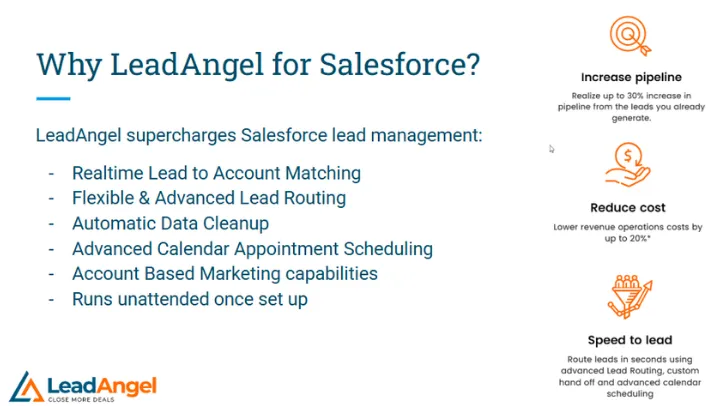
Integrating Salesforce with LeadAngel resolves many of the challenges businesses face with Salesforce’s automated lead routing tools.
Together, these platforms offer advanced features that improve the accuracy, speed, and efficiency of lead management.
Here’s how the integration makes a difference:
Precise Lead Assignments
LeadAngel’s advanced lead routing for Salesforce CRM allows for multi-layered criteria, such as lead behavior, engagement history, and account data.
This assures leads are matched to the most suitable representative or team, eliminating inefficiencies in the routing process.
Faster Follow-Ups With Prioritized Routing
Dynamic lead scoring integrated with routing means high-value leads are assigned to top-performing reps immediately.
This reduces delays and increases the chances of converting leads during peak interest periods.
Transparent Lead Tracking
The integration provides real-time visibility into the lead routing logic and process.
Managers can see which leads are assigned, how long they’ve been in progress, and whether any adjustments are needed to improve workflow.
Collaborative Multi-Team Lead Distribution Software
LeadAngel makes it easy to route leads across multiple teams, such as sales, support, and account management.
This confirms that leads are directed to the right department based on their type, stage, or engagement, improving communication and follow-ups across the organization.
Improved Data Accuracy and Quality
LeadAngel automates data validation and removes duplicate records, keeping Salesforce databases organized and reliable.
Accurate data guarantees that leads are routed correctly from the start, saving time and reducing reassignments.
Seamless Integration With External Tools
LeadAngel’s intuitive design integrates smoothly with Salesforce, making it easy for teams to adapt to the improved workflows.
With detailed documentation and support, the transition is straightforward, making sure teams can start using the system without confusion.
Final Thought
As we look at Salesforce lead routing today, one thing is clear: it’s no longer just about assigning leads. It has become a core part of revenue operations. Speed, accuracy, and data quality now define how well your system performs.
Native capabilities in Salesforce can support the basics, but growing teams need more control and flexibility. As routing logic becomes more complex, the need for real-time decisions and scalable systems becomes more important.
Whether you rely on Salesforce native features or adopt advanced lead routing tools, the goal remains the same. Build a system that connects the right lead to the right rep at the right time. Because in modern sales, timing and precision are what drive results.
See How LeadAngel Can Transform Your Lead Management
Curious to experience the power of LeadAngel firsthand? We understand!
We're offering a complimentary trial so you can explore LeadAngel's features at your own pace. Once you request a free trial, we'll schedule a personalized onboarding session to ensure you maximize the value of LeadAngel.
Ready to take your lead management strategy to the next level? Request your LeadAngel trial today!
In addition to exploring the platform, we recommend visiting our LeadAngel Help Center for in-depth guidance. Our dedicated customer support team is also available to answer any questions you may have at sales@leadangel.com.
FAQs
Lead assignment rules in Salesforce work on simple conditions like lead source, geography, or form fill. They follow a fixed “if-this-then-that” structure and assign leads in a set order. Lead routing rules go further by adding real-time decision-making, priority handling, and multiple conditions at once. This allows leads to be distributed based on availability, urgency, or business logic instead of just static rules.
Territories are created in Salesforce using criteria such as region, industry, company size, or named accounts. Each territory is mapped to specific sales reps or teams. When a new lead enters the system, it is checked against these rules and assigned to the correct territory owner. This ensures enterprise teams maintain clear ownership and avoid conflicts across regions or accounts.
LeadAngel enhances routing by introducing real-time processing and more flexible rule configuration. It allows teams to route leads based on rep availability, workload, or round-robin logic instead of fixed assignment. It also supports faster execution, reducing response time and improving lead engagement. This results in better distribution and higher chances of conversion.
Before assigning a lead, Salesforce can check if the lead already belongs to an existing account. This process matches the lead using the company name, domain, or other identifiers. Once matched, the lead is routed to the account owner instead of being treated as new. This improves accuracy, keeps account context intact, and avoids multiple reps reaching out to the same company.
Common issues in Salesforce include delays in assignment, duplicate leads, incorrect territory mapping, and uneven workload distribution. These problems often lead to missed opportunities or slow response times. LeadAngel addresses these by automating lead distribution, removing duplicates, and applying intelligent routing logic. It also ensures leads are assigned instantly and fairly across teams.
Routing in Salesforce is primarily rule-based and works best for simple use cases. It can struggle with complex scenarios that require real-time decisions or multiple conditions. There is limited flexibility in handling workload balancing or dynamic reassignment. Tools like LeadAngel are often used to extend these capabilities and support more advanced routing needs.