Short Answer
HubSpot data cleansing is the process of finding and fixing duplicate, incomplete, outdated, and inconsistently formatted records in your HubSpot CRM. Done well, it gives sales, marketing, and RevOps one accurate record per person and per company.
Most teams only notice the problem when something breaks. A lead goes to the wrong rep, two sellers email the same buyer, or a pipeline report shows numbers nobody trusts. In Validity’s State of CRM Data Management in 2025, a survey of 602 CRM users, 37% said their company loses revenue as a direct result of poor data quality.

Key Takeaways
- What is HubSpot data cleansing? Data cleansing in HubSpot fixes existing CRM data errors. It involves identifying, correcting, merging, and removing inaccurate, duplicate, incomplete, or outdated CRM records to maintain data accuracy.
- HubSpot data cleansing and hygiene are different jobs. Cleansing fixes records that are already wrong. Hygiene stops bad records from entering.
- 5common HubSpot data quality problems that cause most of the damage: Duplicate records, incomplete data, stale contact information, inconsistent formatting, and less flexible data mapping are 5 common challenges.
- Why is HubSpot data cleansing important? Clean CRM data improves lead routing, sales productivity, reporting accuracy, personalization, and decision-making.
- How do you clean HubSpot data? Audit CRM records, merge duplicates, standardize properties, automate formatting, fill in missing information, and correct contact-to-company associations.
- What are the best practices for HubSpot data hygiene? Set required fields, merge duplicates regularly, standardize data formats, perform bulk cleanup, and schedule recurring CRM audits.
- How can you maintain clean HubSpot data? Keep relevant CRM properties, enforce consistent data entry, automate validation and cleanup workflows, and monitor data quality regularly.
- HubSpot’s native tools cover the basics. The Data Quality page finds duplicate contacts and companies, flags formatting issues, and shows enrichment gaps.
- How does LeadAngel help with HubSpot data cleansing? LeadAngel identifies duplicate records using matching rules and fuzzy-matching logic, supports duplicate-record merging, and improves lead-to-account matching to help teams maintain cleaner HubSpot data.
HubSpot is one of the most used CRMs in the world. It is one of the main lead-generation sources for SMBs. Yet, people in HubSpot’s community and on review platforms like G2 have found that HubSpot data cleansing does not meet users’ expectations, and it needs improvement.
Maintaining clean data creates a strong foundation for a smoother workflow. But keeping HubSpot data clean is difficult because the native workflow offers limited data hygiene functionality, and the advanced features are hidden behind paid pricing tiers. So, SMBs face a lot of challenges in HubSpot data cleansing, and as a result, the search for data cleansing tools and methods has taken a positive turn.
So, this blog will walk you through HubSpot CRM data hygiene, common causes, a step by step guide to clean data, best practices, tips, and more.
What is HubSpot data cleansing?
HubSpot data cleansing means identifying, correcting, merging, and removing CRM records that are inaccurate, duplicated, incomplete, or out of date. It applies to contacts, companies, deals, and the associations between them.
Is HubSpot Data Cleansing & Data Hygiene the Same?
No, HubSpot data cleansing and HubSpot data hygiene are not the same thing. Even though they are different, people often use “data cleansing” and “data hygiene” as the same term. They are related, but they do different work.
You need both. Cleansing without hygiene means repeating the same cleanup every quarter. Hygiene without cleansing leaves years-old errors in place.
| Factor | HubSpot Data Cleansing | HubSpot Data Hygiene |
|---|---|---|
| Nature | Corrective: fixes problems that already exist | Preventive: stops new problems from entering |
| Timing | Periodic projects, such as quarterly clean-ups and bulk merges | Continuous, running in the background every day |
| Core Activities | Merging duplicates, standardizing formats, filling gaps, archiving junk | Validation rules, required fields, dropdowns, ownership, governance |
Why Does HubSpot Data Cleansing Matter?
Dirty data rarely fails loudly. It shows up as small, repeated losses across routing, selling time, and reporting. Clean data management feels like a redundant, boring task; however, teams don’t understand the silent cost it makes them pay. Let’s understand why clean, HubSpot deduplication-free data is so essential:
Flawed Lead Routing
It is needless to say how important effective lead routing is for B2B teams. Routing rules are only as good as the records they read. No matter which lead routing rules you use for lead distribution, unless you have clean CRM data, effective lead routing will not be possible. Dirty data will affect your entire sales process.
Suppose a new lead matches a duplicate or incomplete company record, it inherits the wrong owner, territory, or segment. The rule worked. The data did not. This is why clean matching sits at the start of any HubSpot lead management process. As a result, wrong account matching will trigger flawed lead routing.
Reduced Sales Productivity (Reps spend selling time on research)
Dirty data causes poor sales productivity. According to Validity’s 2025 State of CRM data management report, 37% of organizations lose revenue because of poor data quality.
When one buyer’s history is split across two records, a rep sees half the story. Missing job titles, phone numbers, and company details push reps into manual lookups before every call, which reduces overall sales productivity.
Improve Data Analysis & Better Decision Making
Duplicates inflate contact counts and distort conversion rates. Inconsistent values, such as “CA” and “California,” break filters and segments. Clean and complete data provide accurate data records, which help B2B teams to make decisions on the basis of actual numbers and records. When a decision is backed by numbers, instead of assumptions, it allows teams to strategize better. RevOps teams can easily analyze where it all went wrong. And this is how HubSpot data cleansing improves the decision-making process.
Outdated Data (Data decays even when nobody touches it)
People change jobs, companies rebrand, and email addresses stop working. HubSpot’s database decay simulation estimates that email marketing databases degrade by about 22.5% a year, which works out to roughly 2.1% a month. According to HubSpot, 22.5% of the contact data decays every year. So, it is crucial to create backups and perform regular data cleansing practices. Imagine the cost organizations would be paying by working with outdated data.
Let’s take an example of how it affects; please note that the numbers mentioned are truly for the purpose of explaining, and they are imaginary.
If a HubSpot database contains 10,000 contacts, and 22.5% of the contacts decay every year, then monthly contact decay is 2.1% of the contacts. According to this, 22.5% of 10,000 is 2,250 records that could decay every year.
| Time | Accurate Contact | Contact Lost |
|---|---|---|
| Starting point | 10,000 | 0 |
| 3 months | 9,383 | 617 |
| 6 months | 8,804 | 1,196 |
| 9 months | 8,261 | 1,739 |
| 12 months | 7,752 | 2,250 |
Common HubSpot CRM Data Quality Problems
HubSpot is a great CRM. But like any other database, it is prone to various data hygiene issues. Five problems account for most HubSpot data quality issues. Each has a recognizable symptom and a predictable cause. Here are the 5 HubSpot CRM data quality issues:
| Problem | How it shows up | Usual root cause |
|---|---|---|
| Duplicate records | Two records for one person or company, such as a work and a personal email, or acme.com and acme.co | Form submissions, list imports, integrations, and missing unique identifiers |
| Incomplete records | Contacts with no job title, phone number, or associated company | Short forms, partial imports, and optional fields nobody fills in |
| Stale records | Old job titles, bounced emails, and outdated company details | Natural data decay and no scheduled refresh |
| Inconsistent formatting | One location stored as “CA”, “Calif.”, and “California” | Free-text properties and no entry standards |
| Rigid field mapping | Custom fields that do not line up between HubSpot and a connected system | Different field types and structures in the source and destination |
Duplicates deserve the most attention because they hide the other four.
Less Flexible Data Mapping
Data mapping in HubSpot becomes challenging over time. If teams need to match, transform, or organize data records from different sources, they experience limited flexibility. It becomes harder to maintain consistent CRM records during data importing and integration.
- How it shows up: Difficulty mapping custom fields or matching different field formats between systems.
- Usual root cause: Limited mapping options, complex data structures, and differences between source and destination fields.

Source: Posted by Vibhor J on G2
Duplicate Data
Duplicate company data and contacts occur when the same person or company record has multiple records in HubSpot. It creates confusion for sales reps when they see details. The prospect’s details are split across records, which provides only half the information about the prospect contact or company.
- How it shows up: Two records for the same person or company with different email addresses (work and personal) and spelling errors. Example: acme.com and acme.co
- Usual root cause: Form submissions, imports, missing unique identifiers, or inconsistent company domain information.
Incomplete Data Records
Incomplete data records carry missing or blank information about a record. For example, email addresses, phone numbers, job titles, or any other relevant missing information. Because of this missing information, lead qualification and personal outreach become difficult.
- How it shows up: Contact records missing email addresses, phone numbers, job titles, or company information.
- Usual root cause: Incomplete form submissions, insufficient data collection, and inconsistent CRM data entry.
Stale Data
Stale data is also called outdated data. It means contact or company information that no longer reflects the current details. When the system grows, the number of records and information also increases. But, with time, new information comes out and old information become outdated with time.
Working with stale data wastes sales rep efforts and time, because there is no point of contacting people using incorrect information
- How it shows up: Old job titles, outdated company details, and bounced email addresses.
- Usual root cause: Natural data decay and a lack of regular CRM updates.
Inconsistent Formatting
Inconsistent formatting means the same information or data is entered incorrectly or in different forms in the CRM. Inconsistent data is difficult to analyze, filter, and segment.
- How it shows up: The same location appears as “CA,” “Calif.,” and “California.”
- Usual root cause: Free-text fields and inconsistent data entry.
These are the most common data hygiene issues that HubSpot data cleansing can help with, but since HubSpot’s native data cleansing hits a wall when advanced features are required, teams look for an advanced third-party software like LeadAngel.
How to Clean HubSpot CRM Data: A Step-by-Step Process
HubSpot offers different tools and ways for HubSpot data cleansing. These steps use HubSpot’s native tools. Menu names follow HubSpot’s current data quality tools documentation, and some features depend on your subscription. However, offering tools isn’t enough. These tools demand higher manual intervention.
Before understanding how to clean data, please keep in mind that this capability is available in HubSpot Data Hub Professional and not in the free plan. Let’s see how to clean data that can help with HubSpot duplicate management.
Step 1: Audit your HubSpot CRM data.
- Navigate to Data Management → Data Quality in HubSpot.
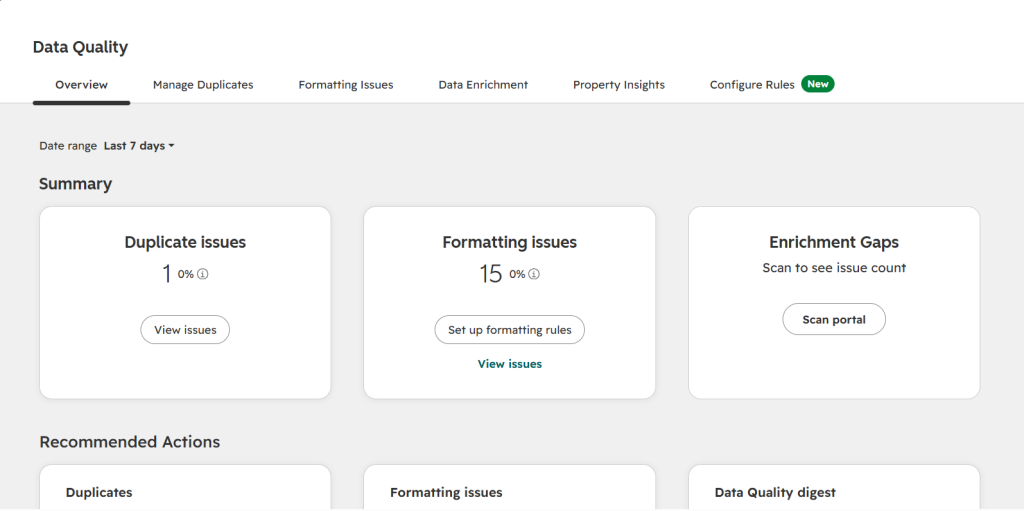
- Analyse the data quality dashboard for duplicate records, formatting issues, and incomplete properties.
- Identify the records and properties that require attention.
Step 2: Find and merge duplicate records
- Navigate to Data Management → Data Quality → Manage Duplicates.
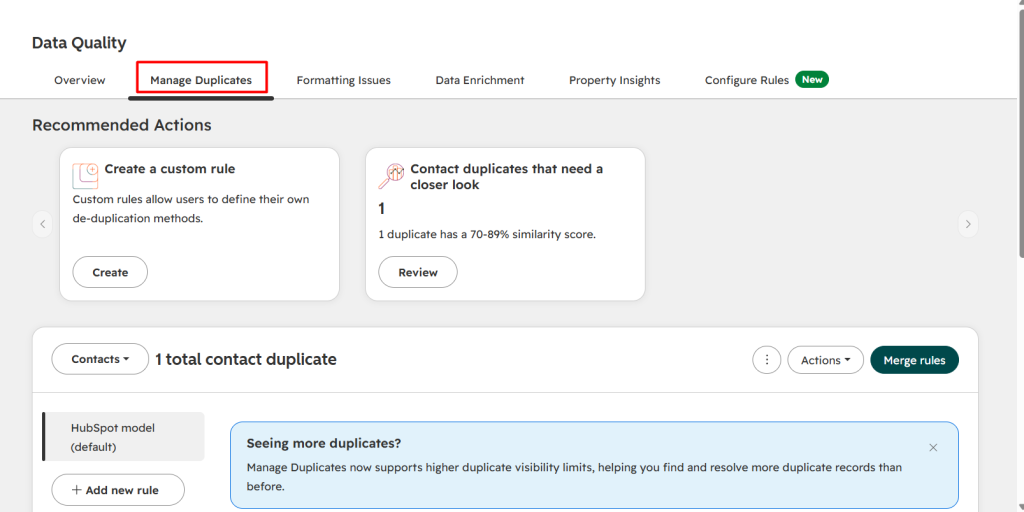
- Check the available HubSpot duplicate contacts or companies.
- Compare the records using email addresses, names, phone numbers, or company details.
- Select the records that are duplicates.
- Merge the records after reviewing which information should be retained.
Step 3: Standardize CRM properties
- Go to Settings → Data Management → Properties.
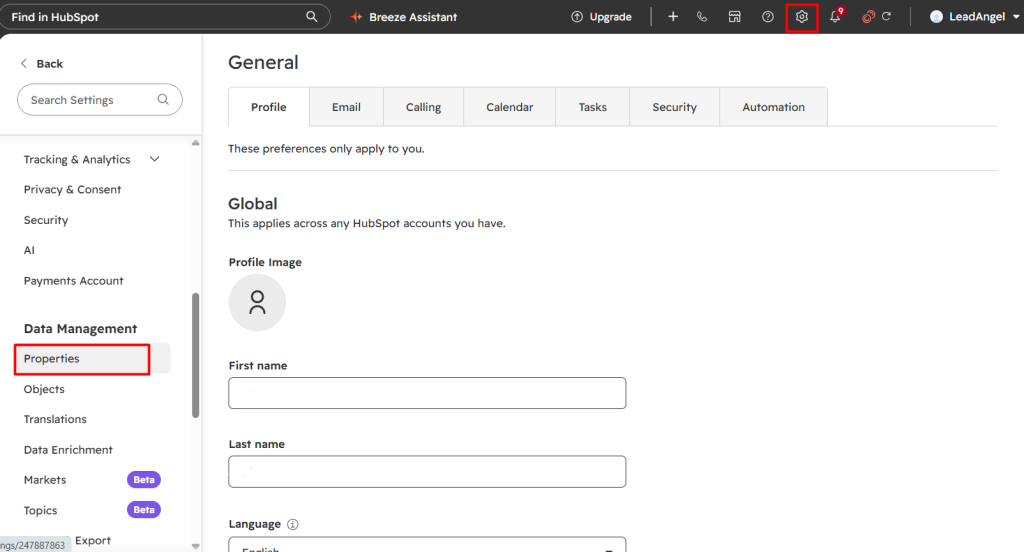
- Search for the property you want to standardize.
- Open the property settings and review its field type.
- Use dropdown select, radio select, or other controlled field types instead of open-ended text fields where appropriate.
- Define consistent property values and save your changes.
Step 4: Standardize existing data using workflows
- Navigate to Automation → Workflows.
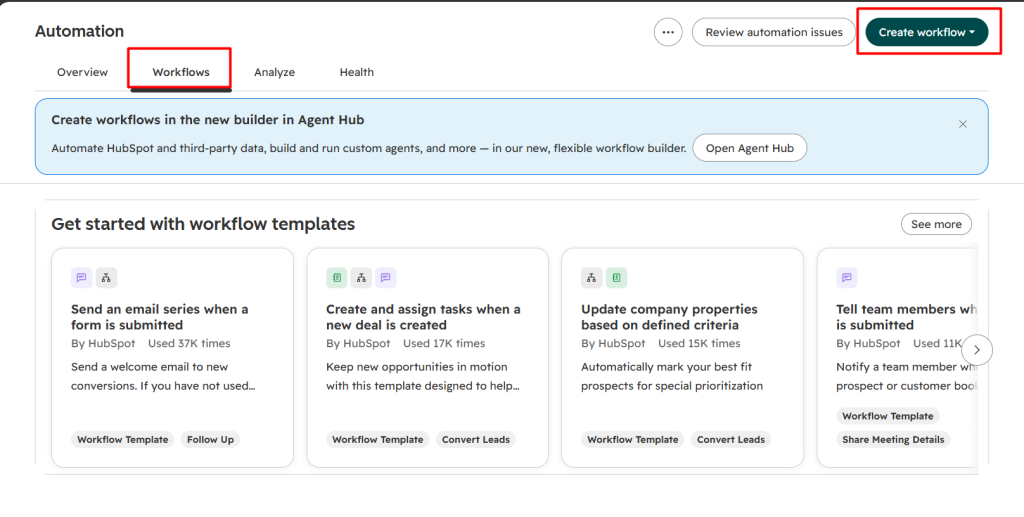
- Create a new workflow or edit an existing one.
- Define the enrollment criteria.
- Add the Format Data action.
- Select the property you want to format.
- Choose the required formatting option, such as lowercase, uppercase, title case, or trimming whitespace.
- Configure the output and save the formatted value to the relevant property, where supported.
- Review and test the workflow before activating it.
Step 5: Identify and fill missing data
- Navigate to CRM → Contacts or CRM → Companies.
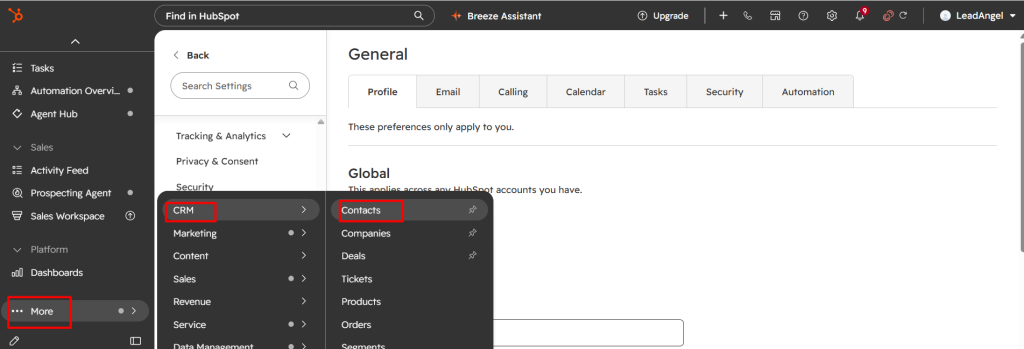
- Apply filters to identify records with missing or unknown properties.
- Create a saved view or list of incomplete records.
- Review the records and fill missing information using verified sources or HubSpot data enrichment tools.
Step 6: Correct contact-to-company associations
- Navigate to CRM → Contacts.
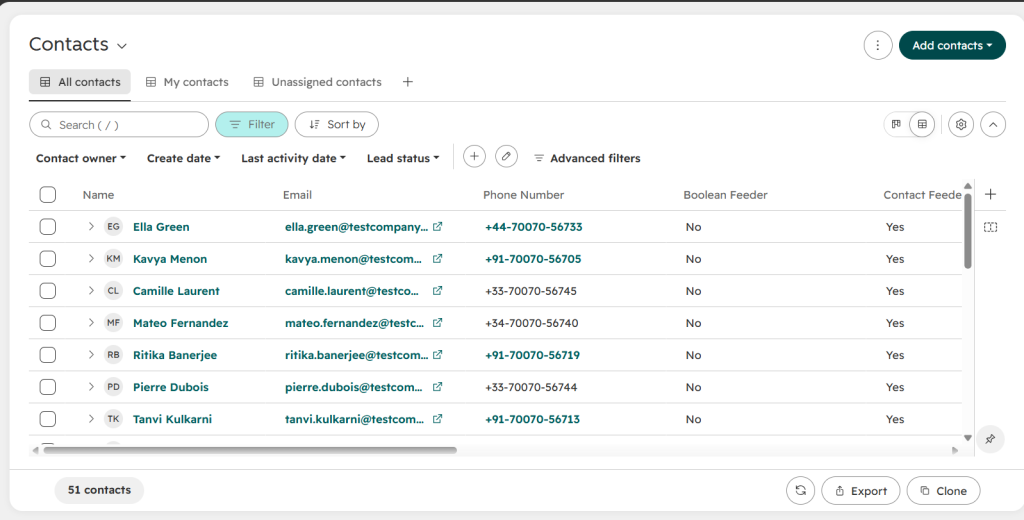
- Filter for contacts without associated companies, where applicable.
- Open the contact record.
- Review the company information.
- Associate the contact with the correct company record.
- Save and verify the association.
Step 7: Maintain CRM data quality regularly
- Schedule periodic data quality reviews.
- Monitor duplicate records and incomplete properties.
- Standardize data entry through forms and property settings.
- Set up workflows to flag missing or inconsistent data.
- Review data quality reports regularly to prevent recurring issues.
Checklist for HubSpot Data Cleansing
| Step | What To Check |
|---|---|
| Audit | Identify duplicate, incomplete, outdated, and inconsistent CRM records. |
| Clean | Merge duplicates, correct errors, and fix incorrect associations. |
| Standardize | Normalize property values, formatting, naming conventions, and field mapping. |
| Prevent | Use workflows, required fields, and standardized forms to prevent recurring errors |
| Maintain | Schedule regular data quality checks and train teams on CRM data entry. |
What Are The Best Practices of HubSpot Data Hygiene?
One thing that is clear is that HubSpot data cleansing is very important. Cleansing fixes the past. These practices keep the same problems from returning. Effective execution of daily operations is dependent on HubSpot data quality. Here are some of the best practices for maintaining clean HubSpot data.
- Require the fields you route and report on. Make email address and company name mandatory on forms and in manual record creation.
- Replace free text with controlled values. Dropdowns for country, industry, and lifecycle fields remove most formatting errors at the source.
- Retire unused properties. Fewer properties mean fewer blanks and less confusion. Limit who can create or edit properties.
- Check every import before it runs. Use a unique identifier, such as email or record ID, so imports update existing records instead of creating new ones.
- Give data quality an owner. One named person or team should own the audit schedule and the matching rules.
A simple maintenance schedule
| Frequency | Task |
|---|---|
| Daily | Automated duplicate checks and formatting workflows run in the background. |
| Weekly | Review the data quality digest and any duplicate alerts. |
| Monthly | Review records with missing key properties and unassociated contacts. |
| Quarterly | Run a full audit, archive stale contacts, and review property usage |
HubSpot Data Cleansing Use Cases for Sales and Marketing Teams
HubSpot CRM duplicate account management is not a luxury; it is a basic requirement to maintain better workflow. Let’s see the different use cases of HubSpot data cleansing for sales and marketing teams.
The important thing to understand here is what tasks it can handle easily, so that you can incorporate it into your workflow.
| Use case for sales team | Use case for marketing team | Common use cases of both teams |
|---|---|---|
| Remove duplicate contacts | Improve audience segmentations | Duplicate record management |
| Identify outdated leads | Improves lead scoring | Hubspot contact to company matching |
| Standardize CRM properties | Helps with better personalization | Data accuracy |
| Correct inaccurate account information | Clean inactive marketing contacts | Incomplete data management |
Tips for Maintaining Clean and Accurate HubSpot Data
Many people consider best practices and tips as one. But they are not the same; best practices are the proven methods, and on the other hand, tips are the preventive measures. Here are the tips for HubSpot data cleansing:
1. Standardize data formats across CRM properties
Inconsistent data formats affect CRM searches. Define standardized values for fields such as industry, country, job title, and company size, and establish naming conventions for CRM properties and values.
2. Keep relevant CRM properties
Unnecessary properties make data entry difficult and complicated. It increases the likelihood of inconsistent or incomplete records. To avoid this, regularly monitor the sales properties your sales and marketing team actively uses. Also, set permissions for who can create, edit, or delete CRM properties.
3. Schedule regular CRM data quality audits
CRM data changes over time. Every time a change happens, new data is established. When contacts change jobs, companies, or even update their information, new HubSpot data enters. So, regularly reviewing the CRM data can help you address issues before they create problems.
Where native HubSpot data cleansing stops
HubSpot’s tools handle a small database well. Four limits appear as record volume and the number of data sources grow.
- Review is manual. Someone has to open each duplicate pair and decide. Bulk actions on formatting issues are limited to Data Hub plans.
- Matching is shallow. HubSpot deduplicates contacts by email address and companies by domain. A buyer with two emails, or a company stored as “Acme Inc” and “Acme Incorporated,” can slip through.
- Cleanup is reactive. Duplicates arrive through forms, imports, and syncs, and are caught after they exist. By then, they may already be routed, scored, and emailed.
- Objects are cleaned separately. Fixing contacts does not fix the company records and associations they depend on.
How to Automate HubSpot Data Cleansing with LeadAngel?
LeadAngel is a lead routing, lead-to-account matching, and data deduplication platform that works with HubSpot, Salesforce, and Microsoft Dynamics 365. It sits on top of your CRM and does not replace it. Its HubSpot data dedupe feature automates the parts of cleansing that native tools leave to manual review.
B2B teams can automate HubSpot data cleansing by-
- Identifying duplicate records
- Correcting inconsistent data
- Improving Hubspot Contact to company matching
- Incomplete CRM records.
HubSpot cannot perform all this to an advanced extent. Businesses that are looking for a complex lead routing solution along with data deduplication capabilities can use LeadAngel.
Let’s understand how you can automate data cleansing and maintain HubSpot data hygiene
LeadAngel automates HubSpot data cleansing by identifying duplicate records. It applies matching rules and resolves duplicate data across CRM records. Instead of finding duplicates manually, teams can review duplicate entries and configure data cleansing rules to handle records based on their matching criteria.
1. Connect HubSpot with LeadAngel.
Start by integrating HubSpot CRM with LeadAngel. Don’t worry, LeadAngel does not replace HubSpot in any sense; it simply sits on top of the CRM and maintains smoother workflows. After integrating LeadAngel with your existing CRM records, it will help you identify Hubspot Contact to company matching accounts and support the data cleanup process.
2. Set up duplicate matching rules
LeadAngel offers several HubSpot deduplication rules with the help of fuzzy matching logic to identify HubSpot duplicate contacts or company records based on specific data fields, such as:
- Email addresses
- First name and last name
- Phone numbers
- Company names
- Custom CRM properties
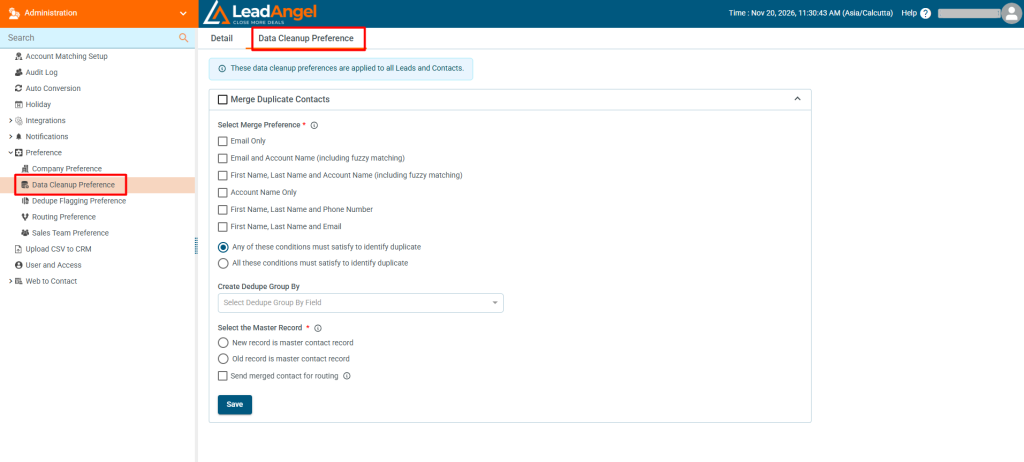
3. Identify and resolve duplicate records
When duplicates are found with the help of the matching rules, LeadAngel allows you to merge duplicate accounts. You can either merge old records into new records, or new records into old records. This will reduce duplicate accounts in HubSpot data management.
4. Automate data cleanup workflows
Configure data cleansing workflows that can manage duplicate HubSpot data records based on your requirements. They can reduce the need for repetitive manual intervention.
5. Maintain cleaner CRM data
LeadAngel’s lead-to-account matching and duplicate management help sales and marketing teams maintain a cleaner CRM database. B2B teams get reliable HubSpot Contact to company matching records. Along with cleaner data, teams improve their lead routing workflow, account visibility, and CRM reporting.
| Area | Built-in HubSpot cleanup | Automated cleansing with LeadAngel |
|---|---|---|
| Duplicate detection | Exact checks on email and domain | Exact and fuzzy matching on fields you choose |
| Resolution | Manual review, pair by pair | Rule-based merging that runs automatically |
| Scope | One object at a time | Contacts and companies matched together |
| Timing | After duplicates exist | As records enter HubSpot |
| Effort at scale | Grows with the database | Stays low once rules are set |
The Bottom Line
HubSpot data cleansing is an essential step for maintaining a reliable CRM database. Duplicate records, incomplete fields, outdated contact information, and inconsistent formatting affect lead routing, reporting, personalization, and sales productivity. While HubSpot’s native tools can help address many of these issues, maintaining data quality over time requires consistent monitoring, standardized data entry, and regular cleanup.
To begin your HubSpot data cleansing process, audit your existing CRM data, fix duplicate and incomplete records, standardize properties, and establish preventive workflows. Enterprise b2b teams that manage larger databases or more complex matching requirements, third-party data cleansing tools like LeadAngel can help reduce repetitive manual work and maintain cleaner CRM records.
See How LeadAngel Can Transform Your Lead Management
Curious to experience the power of LeadAngel firsthand? We understand!
We're offering a complimentary trial so you can explore LeadAngel's features at your own pace. Once you request a free trial, we'll schedule a personalized onboarding session to ensure you maximize the value of LeadAngel.
Ready to take your lead management strategy to the next level? Request your LeadAngel trial today!
In addition to exploring the platform, we recommend visiting our LeadAngel Help Center for in-depth guidance. Our dedicated customer support team is also available to answer any questions you may have at sales@leadangel.com.
FAQs
Go to Data Management > Data Quality and open the Manage Duplicates tab. HubSpot lists suggested duplicate contacts and companies, which you can review and merge or reject one pair at a time.
There is no specific field that is advised to use for deduplication. But most of the businesses use email address as the best field for identifying duplicates. However, company, accounts, website domain, or phone numbers are the top fields after email address.
Clean your CRM database every 3-4 months to maintain good HubSpot data quality. But create a system that can run automated checks on a daily basis, and review duplicate records every week.
CRM data cleansing is the process of fixing existing errors. It includes duplicate merging, correcting typing errors, or removing outdated data records. CRM data management is a broader ongoing process that governs, organizes, and maintains data throughout the lifecycle.
Yes, HubSpot can partly remove duplicates. It can automatically deduplicate records on the basis of email or company domain. But it cannot manage bulk tools or records that require fuzzy matching deduplication.
To improve HubSpot’s data quality, standardize formats, ask for key properties, clean duplicates, perform HubSpot data enrichment, and monitor records regularly.
HubSpot’s native data quality tools can help with HubSpot data cleansing. But they offer limited capabilities, so you can use a third-party tool like LeadAngel, Insycle, or Koalify.
Whenever you want to prevent duplicate records, always ask for an email address on forms and use a unique ID that can help you with importing and syncing. Along with this, you can set integration match rules to match on email address or domain.