Key Takeaways
- Account hierarchy organizes parent companies, subsidiaries, and related business units into a clear structure in Salesforce.
- Account hierarchy, account mapping, and account matching serve different purposes. Account hierarchy organizes corporate relationships, account mapping understands business connections, and lead-to-account matching links leads to the right accounts.
- Accurate account hierarchies help sales teams avoid ownership conflicts, improve lead routing, and identify expansion opportunities.
- Salesforce’s native hierarchy works for basic account structures, but complex corporate relationships require maintenance, visualization, enrichment, or routing automation and additional tools.
- Choose account hierarchy software based on CRM integration, automated hierarchy building, account matching, data deduplication, scalability, and sales workflow support.
- LeadAngel is a B2B lead management platform that works with Salesforce (and other supported CRMs). It uses existing account relationships for lead-to-account matching and rule-based routing across parent and subsidiary accounts. It does not replace Salesforce or act as a dedicated hierarchy builder.
Have you ever come across a situation where an account executive and sales representatives have contacted the same prospect in the same week? Or has your team ever approached different subordinates of the same parent company unknowingly, without knowing that another executive or rep has already talked to them? Those are usually hierarchy problems—not “more leads” problems.
These are the signs of an unclear account view or, more precisely, a lack of account hierarchy. Sales and RevOps teams work across duplicate accounts, miss cross-selling opportunities, come across dirty account data, and often work with incomplete account information.
Account hierarchy is the parent–child structure that shows how related company records connect. Account hierarchy tools solve this problem by organizing related company records into parent-child relationships and operationalize that structure. B2B sales and RevOps teams begin to understand how subsidiaries and business units connect to a parent organization or account.
This guide covers what an account hierarchy is, how Salesforce account hierarchy works, how to set it up, where native limits show up, how to evaluate account hierarchy software for Salesforce, and when LeadAngel is the right next step. So, let’s get started.
What Is An Account Hierarchy?
Account hierarchy is a technique to showcase parent-child relationships in a structured map. This technique helps map out the complex relationships in a CRM and helps you understand how related companies are organized. Through this technique, a global parent account is connected to its subsidiaries, regional entities, and different business units. Revenue teams get details about ownership, pipeline, and buying authority of a corporate family in a single place. They don’t need to find it across multiple accounts. It helps the team see roll-up data, full customer relationships, and routes or reports on accounts consistently.
Here is the core structure of account hierarchy:
| Term | Meaning |
|---|---|
| Ultimate Parent Account | Top-level account in the hierarchy. All the accounts are piled up below this account. |
| Parent Account | The immediate account one level above another |
| Child Account | An account linked beneath a parent |
| Sibling Account | Accounts that share the same parent |
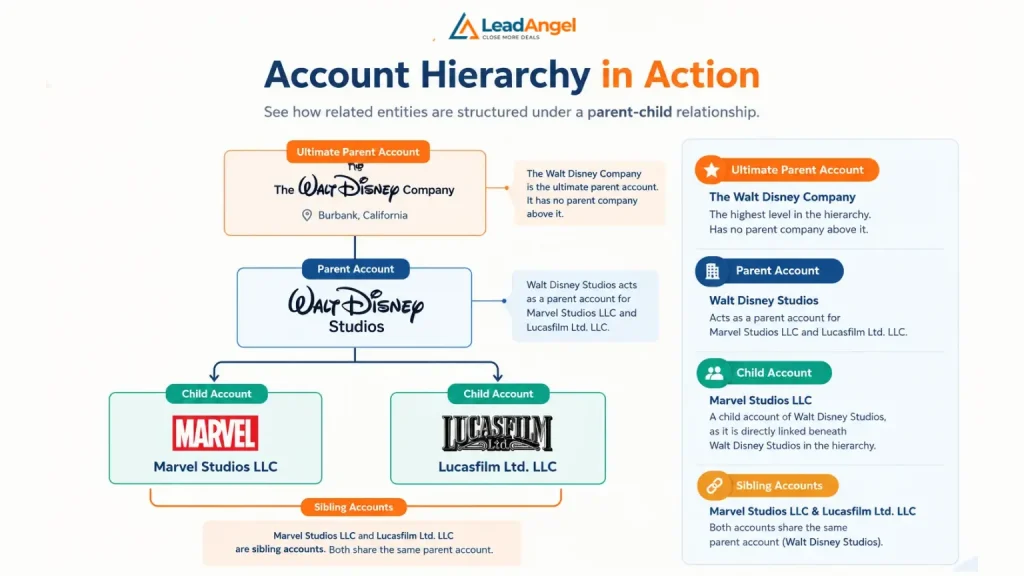
Let’s take an example of the Walt Disney Company to understand it better:
The Walt Disney Company is headquartered in Burbank, California. The organization operates through different business units, subsidiaries, and entertainment studios. An account hierarchy organizes overall related entities into a structured parent-child relationship. Hence, it becomes easier for sales teams to understand the connection between each unit.
- Ultimate Parent Account: The Walt Disney Company is the ultimate parent account. It has no parent company above it.
- Parent Account: Walt Disney Studios acts as a parent account for Marvel Studios LLC and Lucasfilm Ltd.
- Child Account: Marvel Studios LLC is a child account of Walt Disney Studios, as it is directly linked beneath Walt Disney Studios in the hierarchy.
- Sibling Accounts: Marvel Studios LLC and Lucasfilm Ltd. LLC are sibling accounts. Both these accounts share the same parent account.
Now, after understanding account hierarchy, people often think it is similar to account matching and account mapping. But in reality, it is not. In fact, there are quite a few differences between them.
Account Hierarchy Vs. Account Mapping Vs. Account Matching
These three terms are used interchangeably in the SalesOps & RevOps vocabulary. Let’s understand the difference between each one of them.
| Comparison Factor | Account Hierarchy | Account Mapping | Account Matching |
|---|---|---|---|
| Primary purpose | Organizes related accounts into a parent-child structure. | Visualizes relationships between companies, stakeholders, and business entities. | Identifies the correct existing account for a lead, contact, or record. |
| Main focus | Corporate ownership and relationships between accounts. | Organizational structure, stakeholders, and business relationships. | Identifying the correct account for a record. |
| Question It Answers | Who owns whom? | Who owns or covers which accounts? | Which existing account does this lead or contact belong to? |
| Where It Happens | Between account records | Territory and segment design | At lead creation or update |
| How it works | Links parent accounts to subsidiaries or other related accounts. | Connects companies, departments, decision-makers, and other relevant entities | Compares company names, domains, websites, and other attributes to find matching records. |
| Example | Linking Walt Disney Studios and Disney Experiences to The Walt Disney Company in an account structure | Identifying a target company’s subsidiaries, department heads, and purchasing decision-makers. | Matching an incoming lead from Microsoft to the correct existing Microsoft account in Salesforce. |
| Primary users | Sales operations, RevOps, account managers, and CRM administrators. | Account executives, sales representatives, and account-based marketing teams. | Sales operations, RevOps, and CRM administrators. |
| Business benefit | Provides visibility into related accounts and supports coordinated account management | Helps sales teams understand account relationships and plan outreach. | Improves CRM data accuracy and reduces incorrect associations and duplicate records. |
| Typical outcome | A structured view of related accounts. | A visual representation of account relationships and stakeholders | A lead, contact, or record associated with the correct account. |
What Is Account Hierarchy Software?
Account hierarchy software (also called account hierarchy management software or account hierarchy tools) helps teams create, link, maintain, visualize, enrich, or operationalize customer account information into structured parent-child relationships and simplifies relationship management. Basically, account hierarchy management software builds, links, and maintains relationships between account records in CRM systems such as Salesforce.
It primarily handles three tasks:
- Deduplicating records: Cleaning records on time is more essential than teams usually consider. It is important because every duplicate record will become a duplicate branch in the account hierarchy tree.
- Updating Records on Time: Timely updating of records aids in efficient workflow management. Mergers and acquisition updates help in clear ownership and proper responsibility handovers.
- Linking records to the global ultimate parent: The chain must run from the subsidiary accounts through every middle tier to the top. Accurate hierarchy maintenance gives a clear picture of the tree, which avoids last-minute hassle.
Why Account Hierarchies Matter for B2B Sales and RevOps?
After understanding what an account hierarchy is, the next question that arises is what changes it brings to the workflow. So, here are the operational outcomes that teams experience because of account hierarchy.
Accurate Lead Routing
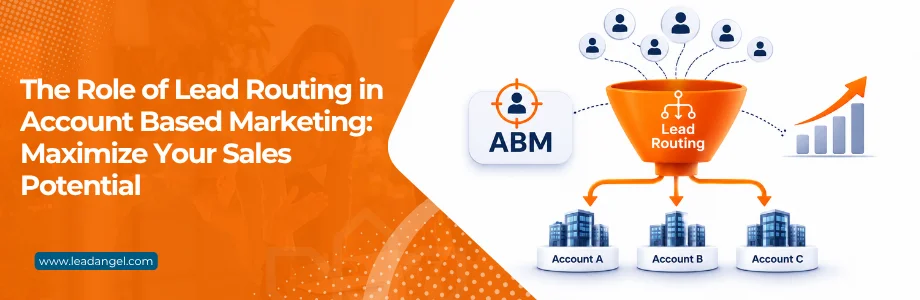
Lead-to-account matching helps teams to find the right account. The account hierarchy tells the lead who should be routed to whom, whether it should be the subsidiary owner, parent owner, ultimate parent owner, or a territory owner. If leads are routed without that logic, then teams will not be able to assign leads to the right salesperson, and the overall lead response time, speed-to-lead, and ownership quality will all be affected.
Expansion & Whitespace
Account hierarchy gives a clear view of subsidiary and child accounts. Hence, subsidiaries with no records are one of the most qualified expansion universes available in databases. Since they share the same parent account, the lead is not a cold prospect; it can be handled through nurturing and ABM strategies.
Overcomes Ownership & Territory Conflicts
You might have seen that two reps might have contacted the same account, or they own different subsidiaries of the same parent unknowingly. This is what is known as ownership conflicts. The prospect has heard two different and disconnected pitches. Account hierarchy tools help overcome such problems. It allows you to make an explicit decision: either you can allow one account executive to own the whole family, or the ownership can be split by territory with complete visibility.
Where Does Salesforce Account Hierarchy Fail?
In Salesforce, account hierarchy utilizes a self-referencing lookup relationship. That being said, it means child accounts are linked to the Parent Account field in Salesforce. Salesforce traverses these links to build a hierarchical tree of parent companies, subsidiaries, and branches. It enables account-level reporting, data aggregation, and automated lead routing.
Now, let’s see where this model fails.
No Native Hierarchy-Aware Routing
Salesforce does not offer any hierarchy-aware routing. That means it does not have any specific option to “route lead to the child account owner” or “route lead to its parent account owner”. Hence, teams need to process it manually or route leads manually, which again is a time-consuming process. Teams either need to invest in advanced lead routing software like LeadAngel or adapt Salesforce customization options.
No Child Account Visibility
Salesforce shows only parent accounts for every record. Teams need to see reports or dig deeper to figure out the child account. Hence, at this scale, sales reps struggle to understand the account hierarchy. Therefore, it is time-consuming to understand the parent-child account.
Lack of Parent Account Auto-Update
Salesforce does not auto-update the ultimate parent account. Teams need to manually update the parent account after a new change, merger, acquisition, or reorganization. While small corporate accounts can be updated, larger corporate accounts have a bigger hierarchy tree. Therefore, it is essential to maintain updated records to ensure a smoother workflow.
Only 4 Level Traverse
According to Salesforce, it can only maintain parent-child relationships up to four levels. Beyond that, teams need APEX code or custom workflow to maintain deeper relationships. Large corporate account hierarchies run at least six, eight, or ten levels deep. Therefore, it disrupts their workflow and affects the decision.
A Single Structure
Account hierarchy in Salesforce offers a single-view structure, i.e., an indented list. It offers limited columns, and there is no option for merging, sorting, or adding custom metrics. It shows only one structure. That means native Salesforce cannot hold a legal view, a go-to-market view, and a partner view of the same family at once.
How To Choose The Best Account Hierarchy Software For Salesforce?
Before choosing any software, consider the following factors when evaluating account hierarchy software:
1. CRM Integration: Ensure compatibility with Salesforce, HubSpot, or Microsoft Dynamics 365, or any other CRM and tech stack that you use in your everyday workflow.
2. Automated Hierarchy Building: Look for automatic parent-child relationship mapping and ultimate parent identification.
3. Account Matching: Check whether the software accurately matches companies using names, domains, or other attributes, and the techniques it uses to match accounts.
4. Data Deduplication: Choose a solution that identifies duplicate account records and helps maintain data quality.
5. Hierarchy Visualization: Ensure it displays corporate structures, subsidiaries, and related accounts clearly.
6. Sales Workflow Support: Check for hierarchy-based lead routing, territory assignment, and account ownership management.
7. Pricing and Scalability: Compare pricing, implementation requirements, and support for complex corporate structures.
Best Account Hierarchy Software For 2027
Here is the list of the best account hierarchy software for Salesforce that teams must keep in mind for 2027. The tools are listed here on the basis of the hierarchy to change routing, ownership, and reporting.
| Tool | Best For | Hierarchy Approach | Pricing |
| LeadAngel | Matching leads to the right account family and routing by different rules & techniques. | Fuzzy lead-to-account matching and rule-based routing across parent and subsidiary accounts | Free demo available on request and custom tier-based pricing |
| LeanData | Orchestration and routing teams that need hierarchy as a routing signal | Persistent hierarchy objects, Account Hierarchy Match Node | Custom pricing plans |
| Traction Complete | Building and maintaining hierarchies for messy enterprise data | Salesforce-native hierarchy object, Data Agents, parallel hierarchy views | Pricing not revealed. |
| Delpha | AI data stewardship of ultimate parents and legal vs. commercial structure | Ultimate Account field, AI agents researching company sources | Plan starts from $300/mo |
| Dun & Bradstreet | Authoritative legal ownership data | D-U-N-S linkage and corporate family trees | Quote-based pricing |
How Does LeadAngel Help With Account Hierarchy?
LeadAngel is a B2B lead management platform that has its primary focus on lead routing and lead to account matching. The software handles account hierarchy as carefully as it does account matching and lead routing. It integrates with Salesforce, HubSpot, and Microsoft Dynamics 365 CRM and works with the existing and current data the CRM offers. LeadAngel has its separate routing engine and does not replace your existing CRM and tech stack for performing lead routing. It is not primarily a hierarchy visualization or corporate-family maintenance suite.
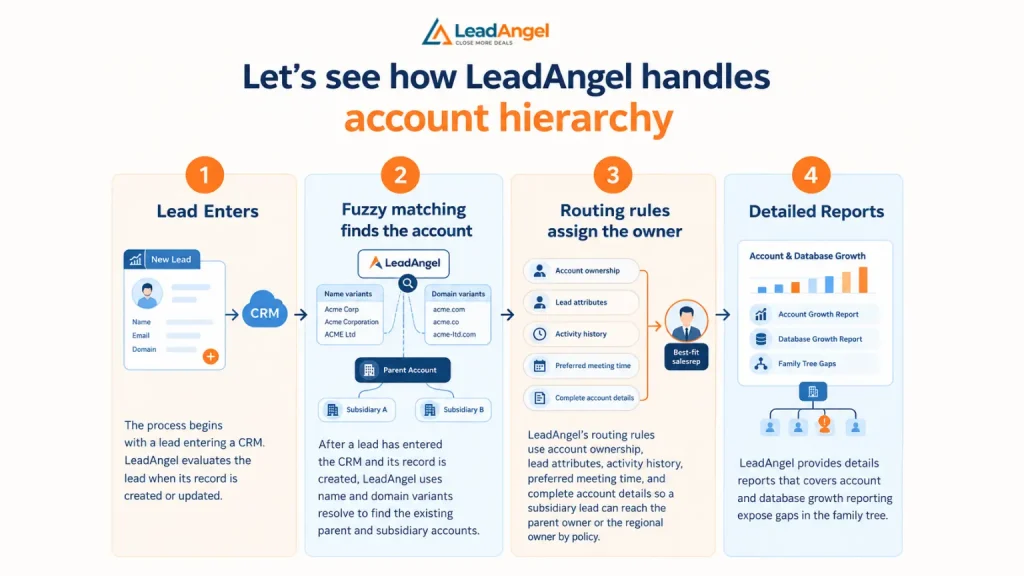
Let’s see how LeadAngel handles account hierarchy
- Lead Enters
The process begins with a lead entering a CRM. LeadAngel evaluates the lead when its record is created or updated.
- Fuzzy matching finds the account
After a lead has entered the CRM and its record is created, LeadAngel uses name and domain variants that help in resolving and finding the existing parent and subsidiary accounts.
- Routing rules assign the owner
LeadAngel’s routing rules use account ownership, lead attributes, activity history, preferred meeting time, and complete account details so a subsidiary lead can reach the parent owner or the regional owner by policy. Routing leads with small and practical details helps leads to connect with the best-fit sales rep. Prospect doesn’t feel disconnected while a salesperson talks to them.
- Detailed Reports
LeadAngel provides detailed reports that cover account and database growth reporting and expose gaps in the family tree
| Hierarchy need | How LeadAngel Addresses It |
|---|---|
| Subsidiary(child) leads create duplicate accounts | Fuzzy algorithm and two-way matching link the lead to the existing account before auto- conversion |
| Subsidiary lead goes to the wrong rep | Ownership-based routing rules send the lead to the parent, regional, or ultimate parent account |
| Non-standard family structures | Custom matching and routing rules replace one-size-fits-all logic |
| Duplicate records already in the org | Data dedupe can help overcome this problem. You can either merge, dedupe or auto-convert existing account. It is available as an add-on feature or included, depending on plan |
| Multiple systems in the stack | Integrations keep lead and account alignment consistent across connected platforms |
When is LeadAngel the right choice?
LeadAngel is your go-to buddy when your hierarchy data exists, and you are dealing with problems like matching, routing, and keeping owners aligned.
Native Salesforce CRM vs Dedicated Account Hierarchy Tools Vs LeadAngel
| Capability | Native Salesforce CRM | Dedicated Hierarchy Tools | LeadAngel |
|---|---|---|---|
| Core purpose | CRM system of record and basic hierarchy display | Build, cleanse, maintain, and report on account families | Lead-to-account matching, routing, territory assignment, and RevOps automation |
| Hierarchy mechanism | Parent Account lookup field creates parent-child links | Automated linking, enrichment, duplicate prevention, and multi-model hierarchies | Uses existing account hierarchy relationships as inputs to matching and routing logic |
| Hierarchy visualization | Native account hierarchy view | Strong, often with advanced family-tree and multi-view capabilities | Routing-oriented; hierarchy is used operationally rather than as the primary visualization layer |
| Hierarchy-aware routing | Not native | Often requires a companion routing product | Strong: routes based on account owner, parent account, territory, availability, and custom rules |
| Lead-to-account matching | Basic CRM matching; not a dedicated matching engine | Usually not the main focus | Core strength: fuzzy and exact matching using name, domain, hierarchy, and custom rules |
| Hierarchy maintenance | Manual updates to Parent Account | Strong: automated updates, dedupe, and corporate-structure changes | Can recognize hierarchy and related records, but is not primarily a hierarchy data-maintenance suite |
| Best buyer | Teams with simple structures and clean data | Enterprises with complex, changing, or messy account families | RevOps teams focused on speed-to-lead, routing accuracy, and territory coverage |
| Multiple hierarchy models | No | Supported by most, typically legal and go-to-market views side by side | Custom matching and routing rules handle non-standard family structures |
Conclusion
Accurate Salesforce account hierarchy software helps B2B sales teams understand corporate account relationships. It prevents ownership conflicts and identifies expansion opportunities. Salesforce offers basic parent-child account relationships for complex corporate structures, but if you need a higher-level or larger-scale solution, your team may face challenges, as complex corporate structures require additional capabilities for hierarchy maintenance, account matching, and routing.
When choosing account hierarchy software, thoroughly evaluate CRM integration, data accuracy, scalability, and workflow support. If your primary challenge is matching leads to the right accounts and routing them based on account ownership, LeadAngel is your best option available out there. The software uses existing account relationships to support accurate lead-to-account matching and rule-based routing across parent and subsidiary accounts.
See How LeadAngel Can Transform Your Lead Management
Curious to experience the power of LeadAngel firsthand? We understand!
We're offering a complimentary trial so you can explore LeadAngel's features at your own pace. Once you request a free trial, we'll schedule a personalized onboarding session to ensure you maximize the value of LeadAngel.
Ready to take your lead management strategy to the next level? Request your LeadAngel trial today!
In addition to exploring the platform, we recommend visiting our LeadAngel Help Center for in-depth guidance. Our dedicated customer support team is also available to answer any questions you may have at sales@leadangel.com.
FAQs
Yes, Salesforce supports parent-child accounts. Salesforce links them through the Parent Account field. The CRM displays the parent-child relationship through a read-only tree, and it does not update the records automatically.
Account hierarchy is the process of mapping parent-child corporate company relationships. Whereas, lead to account matching is the process of finding an existing account to link to the lead
The answer to this question depends on the software, as some software prevents duplicate accounts, but some does not.
B2B teams and businesses should invest in account hierarchy software for Salesforce when corporate parent-child relationship accounts run three or more levels deep. M&A(merger and acquisition) is frequent, and subsidiary leads are reaching the wrong account owner
Use a dedicated hierarchy management tool when your parent-child relationship chain exceeds four levels of Flow, your organization needs legal and go-to-market views, and M&A updates are frequent.
Start by defining what the account hierarchy should represent, then choose an ownership data source, followed by identifying and deduplicating accounts, linking parent accounts, adding an ultimate parent field, and routing. Then, at last, run an account hierarchy audit session on a quarterly basis.