Lead response time is the elapsed time from when a prospect submits an inquiry to when a rep makes first contact. It splits into two halves: processing time (enrichment, matching, routing, and assignment) and rep response time (how long the assigned rep takes to reach out).
Research from MIT and InsideSales found that leads contacted within five minutes are 21 times more likely to qualify than leads contacted after 30 minutes, yet the average B2B company still takes 42 hours to respond, according to Harvard Business Review.
This blog covers what lead response time is, why it matters, and how you can improve your lead response time.

Key Takeaways
- • Lead response time is the amount of time the sales and marketing team requires to contact the prospect for the first time after they have shown interest in your product or service.
- • Lead response time has two components—processing time and rep response time—and most teams only measure the combined total, which hides where delays actually live.
- • The five-minute rule is grounded in a real study: the 2007 MIT/InsideSales.com Lead Response Management research, often referred to as the InsideSales lead response time 5-minute study, found that qualification odds drop sharply once you pass the five-minute mark.
- • According to Harvard Business Review, companies contacting a lead within an hour are roughly seven times more likely to qualify it than those that wait even 60 minutes.
- • Inbound and outbound leads need different response benchmarks. Lead type (demo request vs. content download vs. event scan) should set the SLA, not a single blanket target. This is the core practice of how to improve inbound lead response time specifically.
- • Most response-time failures happen upstream of the rep, in routing rules, lead-to-account matching, and manual assignment. This is also the most common blind spot for teams researching how to reduce lead response time in B2B sales.
- • Automated routing and lead-to-account matching close the processing-time gap before a sales rep is ever involved.
Speed is not a nice-to-have when analyzing lead response time. It is one of the most important metrics. It is the difference between a deal you win and a deal you didn’t get the chance to compete for.
Most revenue teams pour their complete attention into the parts of the funnel that are easy to measure—such as spend, channel mix, content performance, and quarterly pipeline targets. The seconds and minutes right after a lead comes in get far less scrutiny, even though that window decides more outcomes than almost anything else in the process.
If you contact a lead within five minutes, you are 21 times more likely to qualify it than if you wait past 30 minutes. Wait longer than that, and the prospect is very likely already on a call with someone else.
To crack the logic behind lead response time in 2026, you need to understand these concepts first:
- What is Lead response time?
- Why is it important?
- 5-minute rule of response time
- And how to improve inbound lead response time?
Let’s have a look at each one.
What is Lead Response Time?
Lead response time is the amount of time a sales and marketing team takes to contact a prospect after the prospect has expressed interest. The prospect can show their interest through downloading a gated asset, filling out a form, or simply requesting a demo. It starts the moment the lead reaches out and ends when someone on your team replies.
It’s a simple metric, but it can say a lot about how your sales process works. A fast response shows that you’re paying attention. A slow lead response time? It makes them wonder if they should look somewhere else.
Lead Response Time Formula
The formula is simple on paper:
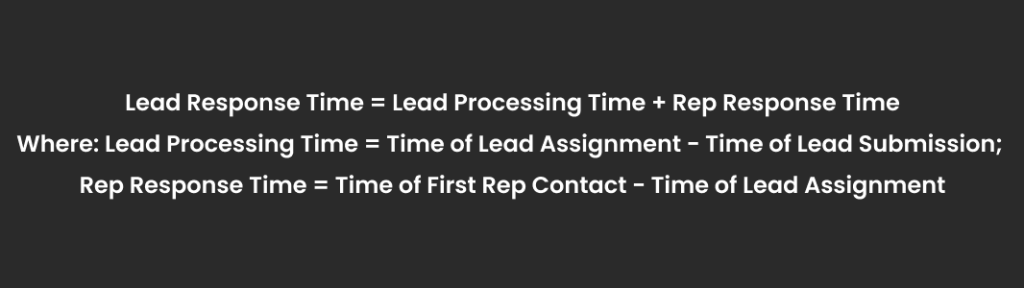
But most teams only ever measure the combined total, and that single number hides more than it reveals. In practice, lead response time breaks into two distinct phases, and treating them as one metric is the single biggest reason response-time initiatives stall:
Lead Processing Time covers everything that happens before a rep ever sees the record. It includes data enrichment, lead-to-account matching, territory assignment, deduplication, and routing logic. This phase is entirely a systems problem.
Rep Response Time is how long the assigned rep takes to make contact once the lead enters their queue. This is the only phase that’s actually a people problem.
Most CRMs report only the combined lead response time, so a team with a 40-minute “average response time” has no way of knowing whether 35 of those minutes were burned on a stuck routing rule during lead processing time or a rep who was in back-to-back meetings during rep response time. Split the two, and the fix becomes obvious.
This distinction also changes by lead source. Inbound lead response time — for leads that come to you through a form, a chat widget, or a demo request — carries the highest urgency because the buyer is actively comparing options in that exact moment. Outbound leads, sourced through prospecting or cold outreach, operate on a different clock entirely, since there’s no live buying signal to protect. Teams that apply the same SLA to both are misrouting efforts as much as they’re misrouting leads.
Why Is Lead Response Time Important?
The lead response time stats on this are not subtle, and they’ve held up across nearly two decades of research from different organizations and datasets.
7x more likely to qualify within the first hour
HBR’s 2011 audit of 2,241 U.S. firms found companies contacting a lead within an hour were nearly seven times more likely to qualify it than those that waited even 60 minutes.
60x less likely to qualify after 24 hours
The same HBR study found firms waiting 24 hours or longer were roughly 60 times less likely to qualify the lead versus responding within the first hour.
100x drop in contact odds, 30 minutes vs. five
The 2007 MIT/InsideSales.com study — the InsideSales lead response time 5 minutes study analyzed six companies, 15,000+ leads, and 100,000+ call attempts. Contact odds dropped 100x when the call came at 30 minutes instead of five.
21x drop in qualification odds, 30 minutes vs. five
The same study found qualification odds drop 21x over that window. This is the actual source of the “five-minute rule”—worth citing correctly, since it’s often misattributed to Harvard.
There’s also a competitive dimension: buyers frequently move forward with whichever vendor reaches them first, regardless of price or fit. Lag a competitor’s inbound lead response time by even 20 minutes, and you’re not delaying a conversation; you’re handing it to them.
What Is the 5-Minute Rule of Lead Response Time?
The five-minute rule asks you to contact a lead within five minutes of submission. Because it dramatically increases the odds of both reaching and qualifying them, compared to any longer delay. It originates from the InsideSales lead response time 5 minutes study. The 2007 MIT/InsideSales.com research cited above, sometimes referred to as the lead response time 5 minutes conversion study,” remains the standard benchmark in B2B speed-to-lead practice, even though the underlying data is nearly two decades old.
The decay curve below is drawn from the lead response time 5 minutes conversion study and corroborated by subsequent Harvard Business Review analysis:
| Response Window | Relative Qualification Likelihood |
|---|---|
| Under 5 minutes | Baseline — highest odds of qualifying |
| 5–10 minutes | Meaningfully reduced vs. baseline |
| 10–30 minutes | Odds of qualifying drop roughly 21x vs. under 5 minutes |
| 1 hour | Roughly 7x less likely to qualify than a response within the first hour |
| 24+ hours | Roughly 60x less likely to qualify vs. responding within the first hour |
Two points are worth making explicit. First, this is a systems benchmark, not a rep-effort benchmark. If a team can’t consistently hit five minutes, the diagnostic question isn’t whether reps are working hard enough—it’s whether a lead reaches an available rep, with full context, inside that window at all. In most misses, the cause sits in routing logic, not effort.
Second, the rule assumes business-hours submission, and much of B2B inbound doesn’t arrive during business hours. A demo request submitted at 9 PM or over a weekend needs fallback routing — time-based rules that hold the lead until a rep is available, rather than leaving it unclaimed until Monday. This after-hours gap is one of the most common and least visible reasons average response-time reporting looks better than the actual prospect experience.
How to Improve Your Lead Response Time?
When a company’s average response time exceeds 30 minutes, the cause is not the sales rep’s effort. It’s process design. Manual triage inserts a human decision point at every stage, and each one adds latency and variability. The solution to this is not working faster; it’s removing the manual steps entirely. That’s the underlying answer to how to reduce lead response time in b2b sales: treat it as an automation problem first and a coaching problem second.
1. Automate Lead Processing in Priority Order
Automate in this sequence: lead-to-account matching, enrichment, routing assignment, then rep notification. When these steps run natively inside the CRM, there’s no sync delay, no data leaving the system, and no API lag between platforms.
The payoff compounds: Velocify’s analysis of roughly 3.5 million leads found that calling within one minute of submission lifts conversion rates by 391% compared to a two-minute delay. Speed isn’t a marginal gain here — it’s the single highest-leverage variable in the funnel.
2. Start Routing by Intent
Treating every lead identically is itself a form of misrouting. Build intent tiers into your routing logic: high-intent leads—demo requests and pricing inquiries—route immediately, while mid-funnel leads, like content downloads or webinar registrants, follow a different SLA.
This is also the most direct answer to how to improve inbound lead response time specifically, since inbound volume is rarely uniform in urgency and shouldn’t be routed as if it were.
3. Build Fallback Logic for After-Hours and Rep Unavailability
Time-based routing with automatic reassignment. When the primary sales rep doesn’t respond within a set window, the lead moves to a backup or shared queue. This system closes the after-hours gap and the unavailable-rep gap in one move. This is configuration work, not a staffing problem.
4. Provide Complete Lead Context
A rep who has to research a company before calling is burning response-time budget that never shows up in reporting. Every lead reaching a rep should carry its source, intent signal, account history, and any open opportunities. This is where lead-to-account matching pays off twice: once for routing accuracy, once for the rep’s speed on the call.
5. Utilize SLA Data to Diagnose
SLA tracking is a diagnostic layer, not just a compliance metric. If breaches cluster at the routing stage, the problem is routing logic. If they cluster at the rep stage, the problem is workload or notification design. These require different fixes, and the difference is only visible if the breach location is tracked, not just the breach frequency.
The pattern across all five is consistent: every manual decision point between form submission and rep contact is where lead response time stats quietly get worse. The fix is architectural, not motivational.
How Can LeadAngel Help Improve Lead Response Time?
LeadAngel is an advanced lead distribution and account matching tool. It is built specifically to close the processing-time half of the lead response time equation. The platform natively works with Salesforce, HubSpot, and Microsoft Dynamics 365.
Let’s see how LeadAngel improves lead response time.
1. Lead-to-Account Matching
LeadAngel’s account matching follows a fuzzy-matching engine. It connects an incoming lead to the correct existing account even when the company name is abbreviated, misspelled, or filed under a subsidiary. The process is performed with 98% accuracy.
In practice, that solves the single biggest source of processing-time delay: a lead sitting in a manual review queue because nobody could confirm which account it actually belongs to.
2. On-the-Spot (OTS) Real-Time Routing
Once a lead is matched, LeadAngel assigns it immediately using the rules your team already runs on. Lead routing rules include territory, account ownership, rep availability, round-robin, or weighted capacity. Leads don’t leave the CRM because routing happens natively inside the CR
For teams asking how to reduce lead response time in b2b sales specifically, this native routing removes the manual assignment delay that most speed-to-lead research identifies as the single biggest bottleneck.
3. SLA Enforcement with Automatic Fallback
LeadAngel reassigns the lead to the next available sales rep in the queue when a rep doesn’t respond within a set window or is out of the office. Leads don’t sit unclaimed. Unavailability gaps and the after-hours are overcome, which most average-response-time reports never expose. And it’s a direct answer for teams asking how to improve inbound lead response time specifically.
4. Calendar Scheduling
LeadAngel checks the assigned rep’s real-time calendar availability and lets the prospect book a meeting instantly after form submission. This turns lead response into a booked meeting in one motion instead of a multi-step handoff.
5. Data Deduplication & Cleansing
LeadAngel merges, deletes, or standardizes duplicate records. Reps and routing rules always work from one accurate account record. Clean data means routing logic routes correctly the first time, instead of stalling on a record conflict.
- Native CRM Integrations
6. Native CRM Integrations
LeadAngel runs directly inside Salesforce, HubSpot, and Microsoft Dynamics 365 rather than as a disconnected external tool. Matching, routing, and scheduling all execute in the system reps already work in, so there’s no data lag between platforms adding minutes to the clock.
None of this replaces good sales execution. Reps still have to run the call well once they’re on it. But if your team is missing the five-minute window consistently, the fix usually isn’t a faster rep — it’s a matching and routing layer that gets the lead to the right person before the buyer’s intent has a chance to cool.
See How LeadAngel Can Transform Your Lead Management
Curious to experience the power of LeadAngel firsthand? We understand!
We're offering a complimentary trial so you can explore LeadAngel's features at your own pace. Once you request a free trial, we'll schedule a personalized onboarding session to ensure you maximize the value of LeadAngel.
Ready to take your lead management strategy to the next level? Request your LeadAngel trial today!
In addition to exploring the platform, we recommend visiting our LeadAngel Help Center for in-depth guidance. Our dedicated customer support team is also available to answer any questions you may have at sales@leadangel.com.
FAQs
Inbound lead response time demands a quick response, so speed determines the outcome. Outbound leads have no live signal, so the priority shifts to cadence and follow-up persistence rather than minutes-to-first-contact.
It varies widely: healthcare averages around 2 hours 5 minutes, telecom around 16 minutes, per Chili Piper's benchmark research citing HubSpot data. The broader B2B average sits near 42 hours, per Harvard Business Review.
Lead response time measures the gap to the first contact. Lead follow-up time measures the cadence of subsequent touches after that. Most leads don't answer on the first attempt, so both metrics matter for conversion.
Slow response times distort forecast accuracy. MQL-to-SQL conversion rates based on inconsistent response times introduce variability that reduces the reliability of forecasts. It also shrinks the addressable pipeline, since slow response leads to frequent conversion with whichever competitor answers first.
It resolves which account a lead belongs to instantly, instead of stalling in manual review or misrouting to the wrong rep. Automated fuzzy-logic matching, like LeadAngel's, lets routing rules fire immediately after submission.
Manual assignment, no after-hours fallback routing, poor lead-to-account matching, one blanket SLA for every lead type, and no separate reporting on processing time versus rep response time — so teams fix the wrong half.