
Let us tell you a little bit about how businesses grow.
No matter what you sell or which industry you’re part of, growth always depends on one thing: a steady stream of good leads.

But getting leads is just the start. The actual test comes in how you manage them. Not having a proper system in place, potential customers slip through the cracks. Additionally, follow-ups are often forgotten, and sales opportunities quietly slip away.
A lead management system allows you to save that. It keeps your leads organized, tracks every interaction, and guarantees no possibility is neglected.
In a time when speed, personalization, and smart decisions drive success, having reliable lead management software isn’t simply beneficial. It’s significant for any business that wants to grow.
Why Businesses Need a Lead Management System in 2026
In 2026, handling leads has become more complex than ever. Businesses deal with multi-channel lead assets, websites, social media, commercials, webinars, and events, each producing unique customer touchpoints. For each B2B and B2C company, tracking every interaction and nurturing potentialities through the sales funnel manually is no longer sensible.
Traditional spreadsheets and guide tracking structures fail to scale with developing lead volumes. They regularly lead to missed follow-ups, data duplication, and poor collaboration among marketing and sales groups. That’s where a lead management system becomes a priority.
The key benefits of a lead management system include centralized statistics storage for entire lead visibility, automated workflows that ensure no possibility is overlooked, and intelligent lead scoring that enables prioritizing brilliant potentialities. Moreover, a lead management system CRM offers seamless integration with your existing tools, ensuring a smoother handoff between groups.
Whether you’re using an easy lead management system or a strong business solution, having the right platform guarantees your sales system stays prepared, efficient, and growth-ready.
Key Features of an Effective Lead Management System
A lead management system is more than a digital contact list. It helps businesses capture, track, and convert leads faster. The best lead management system combines automation, analytics, and CRM integration to streamline your sales process.
Let’s explore the core features that make a system effective.
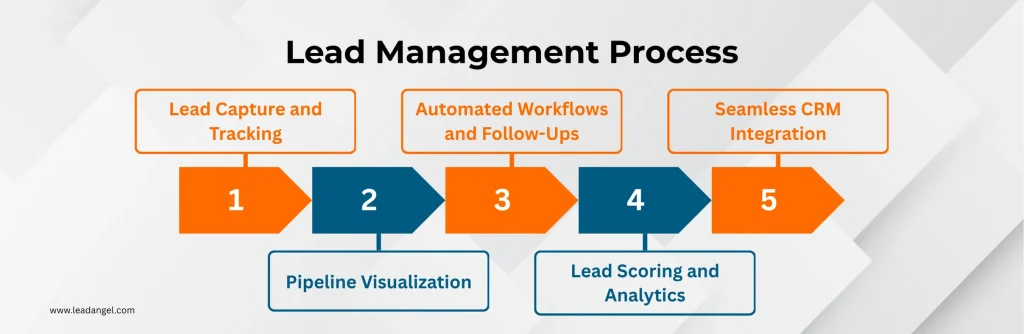
1. Lead Capture and Tracking
A good system collects leads from multiple channels, website forms, ads, chat, or social media.
It tracks every interaction and keeps all information in one place.
This ensures that no lead slips through the cracks.
2. Pipeline Visualization
A simple lead management system provides a clear sales pipeline view.
You can see where each lead stands, what actions are pending, and what deals are closing soon.
This helps sales teams stay organized and proactive.
3. Automated Workflows and Follow-Ups
Automation saves time.
The system sends reminders, follow-up emails, and updates automatically.
It ensures every lead gets attention at the right time, without manual effort.
4. Lead Scoring and Analytics
Not all leads are equal.
A strong lead management system software assigns scores based on engagement and intent.
This helps prioritize high-quality leads and close deals faster.
5. Seamless CRM Integration
A lead management system CRM connects easily with your existing tools.
It syncs data between marketing and sales teams.
This integration eliminates silos and improves collaboration across departments.
Up next, let’s explore the top 9 lead management systems that are helping businesses achieve exactly that in 2026.
9 Lead Management Systems for Businesses in 2026
To manage leads effectively, the right tools are key for organization, collaboration, and conversion. Now, let’s explore 9 must-have lead management systems that can help your business achieve these goals.
1. LeadAngel
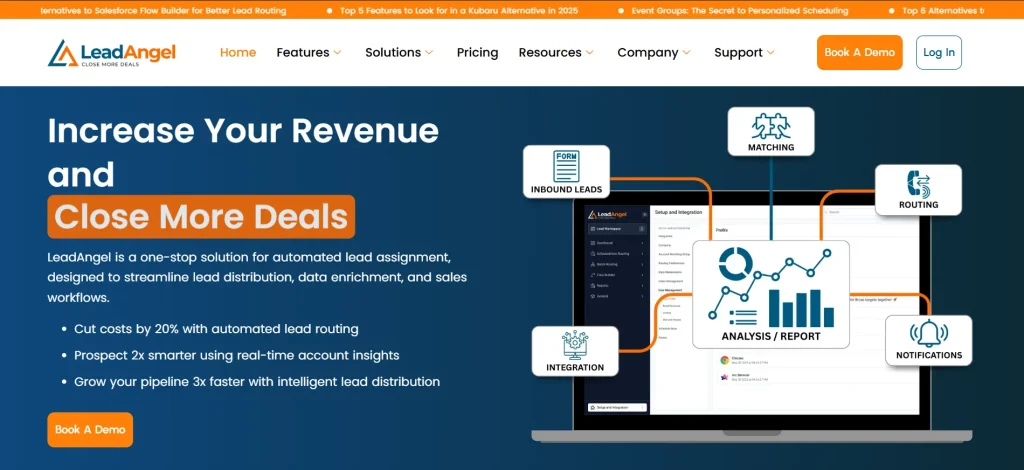
LeadAngel is a dynamic CRM lead management system built to help businesses handle leads efficiently and accurately.
It offers tools to organize lead distribution, automate routine processes, and improve data accuracy.
With LeadAngel, sales teams can focus more on engaging with prospects instead of getting bogged down by manual lead tracking.
Its features make it a go-to solution for businesses of all sizes, especially those looking to improve team collaboration and boost conversion rates.
Here are the key features that make LeadAngel stand out as a top lead management solution:
Lead-to-Account Matching
LeadAngel’s Lead-to-Account Matching makes sure that every lead is linked to the right account. This eliminates duplicate entries and gives sales reps a clearer understanding of the prospect’s history.
- Matches lead to accounts with over 99% accuracy.
- Provides detailed account insights for personalized and effective follow-ups.
- Saves time on manual data correction and enables teams to focus on converting leads into customers.
Smart Calendar Scheduling
Scheduling follow-ups and demos is made simple with LeadAngel’s integrated Calendar Scheduling feature.
- Allows sales reps to book meetings instantly, minimizing delays in outreach.
- Connects directly with CRM systems to maintain an updated sales pipeline.
- Helps teams capitalize on high-interest leads with timely engagements.
Advanced Lead Routing
LeadAngel’s customizable lead routing makes sure leads are assigned to the right person at the right time.
- Offers routing options such as round-robin, location-based, and product interest criteria.
- Improves response times by directing leads to available team members.
- Reduces follow-up delays and creates a more structured lead flow for sales teams.
Quick Hand-Offs for Better Collaboration
For fast-moving sales environments, LeadAngel provides a quick hand-off feature that guarantees no lead is left unattended.
- Enables instant reassignment of leads when needed.
- Supports team collaboration by allowing easy transitions between reps.
- Maximizes the chances of closing deals by maintaining consistent lead attention.
Offline Scheduling for Field Reps
LeadAngel’s Offline Scheduling helps teams remain productive even when internet access is unavailable.
- Allows remote teams to continue scheduling and updating lead activities offline.
- Automatically syncs data once the connection is restored.
- Perfect for field reps working in areas with inconsistent connectivity.
Data Deduplication
Managing duplicate data is no longer a challenge with LeadAngel’s Data Dedupe feature.
- Identifies and merges duplicate lead records to maintain a clean database.
- Improves CRM efficiency and maintains data accuracy across the system.
- Saves time on manual data cleanups, allowing sales teams to focus on nurturing leads.
Comprehensive Reporting and Analytics
LeadAngel provides detailed reporting tools that give managers insights into lead progress and team performance.
- Tracks metrics such as lead response times, conversion rates, and rep activity.
- Offers easy-to-read dashboards for monitoring sales pipeline health.
- Helps teams adjust strategies based on real-time data trends.
CRM Integration
LeadAngel integrates effortlessly with leading CRM platforms like Salesforce, HubSpot, and Dynamics 365.
- Maintains smooth workflows by syncing lead and account data across systems.
- Helps teams maintain a unified view of the sales pipeline for better decision-making.
Pricing Plans
- Lite plan – $99 per company per month, with free access for the first six months. Best suited for businesses handling up to 150,000 records.
- Enterprise plan – Custom pricing for businesses with higher lead volumes and advanced feature needs. Includes unlimited records and personalized support.
Sign up for free or book a demo today!
2. LeanData

Source: leandata.com
LeanData is a lead management platform that specializes in routing and lead-to-account matching.
Built for Salesforce users, it helps businesses organize their lead distribution process by using custom workflows.
Teams can assign leads based on rules that fit their sales strategy, improving organization and response times. LeanData is designed for businesses handling large lead volumes and complex sales pipelines.
Pros
- Custom lead routing – Visual workflow tools make it simple to set up routing rules tailored to specific business needs.
- Lead-to-account matching – Matches leads accurately to accounts, giving sales teams better insights for follow-ups.
- Salesforce compatibility – Works directly within Salesforce, leveraging existing CRM data for effective lead management.
Cons
- Complex onboarding – Advanced features require time to learn and fully utilize.
- Limited reporting tools – Dashboards and analytics could provide more customization and flexibility.
Pricing Plans
- Standard Plan – $39 per user per month; includes basic lead routing and matching features.
- Advanced Plan – $49 per user per month; adds more robust routing capabilities and detailed analytics.
- Premium Plan – $59 per user per month; includes all features, priority support, and customization options.
- Enterprise Plan – Custom pricing tailored to specific business needs.
3. Chili Piper

Source: chilipiper.com
Chili Piper is a scheduling and lead management tool designed to simplify meeting bookings and lead assignments.
The platform allows prospects to self-schedule meetings directly from web forms or emails, reducing delays in the follow-up process.
It supports lead assignment through configurable rules, making it a useful tool for improving team responsiveness.
Pros
- Flexible meeting scheduling – Allows prospects to book meetings directly, reducing delays.
- Lead assignment options – Routes leads based on criteria such as availability or expertise.
- Integration with calendars – Works with tools like Google Calendar and Outlook for smooth scheduling.
Cons
- Pricing – Costs can be high for smaller businesses or startups.
- CRM limitations – Works best with specific CRMs, which may limit compatibility for some users.
Pricing Plans
- Free Plan – Includes basic scheduling features, such as time zone detection and rescheduling options.
- Teams Plan – Starts at $22.50 per user per month; includes advanced scheduling, round-robin lead routing, and branding.
- Enterprise Plan – Custom pricing based on additional features and team size.
4. RevenueHero

Source: revenuehero.io
RevenueHero is a lead management and meeting scheduling platform focused on accelerating sales engagement.
The tool uses real-time lead scoring to identify high-value prospects and offers automated meeting booking features.
RevenueHero helps sales teams prioritize their efforts and reduce delays in engaging with potential customers.
Pros
- Real-time lead scoring – Identifies high-value leads, allowing sales teams to focus on top prospects.
- Automated scheduling – Offers instant meeting bookings for quicker follow-ups.
- CRM integrations – Works with popular CRMs to create smooth workflows.
Cons
- Limited advanced features – This may lack some functionalities for businesses with complex lead management needs.
- Scalability challenges – Stops short of enterprise needs.
Pricing Plans
- Lite Plan – $15 per user per month; includes basic lead qualification and scheduling features.
- Inbound Essentials Plan – $35 per user per month; provides advanced tools for lead scoring and inbound lead management.
- Outbound Enterprise Plan – $25 per user per month; designed for outbound-focused teams with lead distribution and scheduling capabilities.
5. HubSpot CRM
Source: hubspot.com
HubSpot CRM is one of the most popular that offers lead management system for free.
It combines marketing automation, email tracking, and sales pipeline management in one platform.
The interface is simple, intuitive, and ideal for scaling businesses starting their CRM journey.
Pros
- User-friendly and easy to set up
- Free plan with generous features
- Integrates with over 1,000 third-party apps
- Strong marketing and sales automation tools
Cons
- Advanced features are locked behind paid tiers
- Limited customization on the free plan
Pricing Plans
- Free Plan: $0 with core CRM features
- Starter Plan: Starts at around $20/month per user
- Professional Plan: From $450/month (includes automation and analytics)
- Enterprise Plan: Custom pricing for large teams
6. Zoho

Source: zoho.com
Zoho offers a flexible CRM lead management system with a focus on automation and omnichannel engagement.
It helps teams manage leads through email, phone, chat, and social channels — all in one place.
Zoho’s AI assistant, Zia, adds intelligence to lead scoring and forecasting.
Pros
- Highly customizable and scalable
- Affordable for small and medium-sized businesses
- Offers AI-powered insights and analytics
- Seamless integration with Zoho apps and external tools
Cons
- Interface can feel cluttered for new users
- Limited third-party integrations compared to HubSpot
Pricing Plans
- Free Plan: Up to 3 users
- Standard Plan: $14/user per month
- Professional Plan: $23/user per month
- Enterprise Plan: $40/user per month
- Ultimate Plan: $52/user per month
7. Bitrix24

Source: bitrix24.in
Bitrix24 is an open source lead management system that also functions as a collaboration suite.
It combines CRM, project management, communication, and automation tools.
Ideal for startups and small businesses looking for an all-in-one platform.
Pros
- Free self-hosted version available
- Strong internal communication tools (chat, video calls, task management)
- Suitable for teams that prefer full control over data
- Affordable for growing businesses
Cons
- Interface can be overwhelming due to multiple features
- Occasional performance lag on the free version
Pricing Plans
- Free Plan: Up to 5 GB storage
- Basic Plan: $49/month (for small teams)
- Standard Plan: $99/month (includes more CRM features)
- Professional Plan: $199/month (full automation and unlimited users)
8. Distribution Engine

Source: nc-sqaured.com
Distribution Engine is a lead routing tool designed for Salesforce users. It helps businesses assign leads and cases based on predefined rules such as geography, workload, or performance.
The tool focuses on organizing lead distribution processes to support more structured sales workflows.
Pros
- Custom routing options – Supports configurations to match different business needs for lead assignments.
- Salesforce integration – Operates entirely within Salesforce, using its existing data infrastructure.
- Performance analytics – Tracks lead routing activity and provides insights into team performance.
Cons
- Salesforce exclusivity – Only works for teams already using Salesforce as their CRM.
Pricing Plans
- Standard Plan – $45 per user per month; includes access to all lead routing features for administrators, managers, and representatives.
- Standard Support – Included at no additional cost; offers email support with a two-business-day response time.
- Premier Support – Available for an additional 20% of the total license fee; includes phone support, one-on-one coaching, and setup reviews with a four-hour response time.
9. LeadByte

Source: leadbyte.co.uk
LeadByte is a lead management and marketing automation platform designed for businesses handling high lead volumes. It offers tools for capturing, validating, and distributing leads in real time.
LeadByte is commonly used by lead generators, agencies, and businesses requiring precise data management and automated workflows.
Pros
- Real-time lead validation – Makes sure incoming leads meet quality standards before distribution.
- Flexible integrations – Connects with CRMs, email marketing tools, and other platforms.
- Custom workflows – Automates lead capture, follow-ups, and segmentation.
Cons
- Complex initial setup – Advanced features may require time to configure.
- Pricing transparency – Plans are customized, which can make cost comparisons challenging.
Pricing Plans
LeadByte offers custom pricing based on business needs. Interested users can request a quote directly from the company.
How the Best Lead Management Software Can “Repair” Your Sales System and Close More Deals
Even the strongest sales teams face hidden gaps:
1. Missed follow-ups
2. Poor lead qualification
3. Disconnected data between marketing and sales
Over time, these problems slow down conversions and weaken client relationships. This is where the pleasant lead management software program comes in.
A robust system acts like a repair package for your sales procedure. It automates follow-ups, making sure no potential lead is forgotten. It rates and categorizes leads based on engagement, helping sales reps focus on the simplest and highest-value possibilities. Most importantly, it bridges the distance between advertising and sales by maintaining data that is linked and up-to-date.
Tools like LeadAngel and HubSpot are exquisite examples. They deliver your teams onto one platform, automate repetitive responsibilities, and keep regular communication through a unified dashboard. With built-in analytics, in addition, they come up with a whole view of your sales’ overall performance.
When your CRM lead management software is aligned, your complete income workflow becomes quicker, smarter, and more predictable. Instead of solving troubles manually, your device continuously improves itself, supporting your enterprise to close more deals with much less effort.
How to Choose the Right Lead Management System for Your Business
Choosing the best lead management system workflow depends on your company’s size, sales process, and long-term goals.
Start by evaluating your business size and sales volume; larger teams need scalable solutions with automation, while smaller businesses may prefer simple, intuitive tools.
Check for CRM compatibility to ensure seamless data flow between marketing and the sales lead management system.
Look for customization options that let you tailor workflows, lead stages, and reports to your business model.
Your budget and scalability also matter; opt for a system that can grow with your business without costly upgrades.
Finally, use a quick checklist when comparing tools:
Is it cloud-based, does it support automation, offer detailed reporting, and integrate easily with your CRM? The right lead management system CRM enhances productivity, improves lead tracking, and ensures every opportunity is managed efficiently from capture to conversion.
Hope at last you completed your checklist while looking for simple lead management system software, so here is LeadAngel to follow the next step for you!
See How LeadAngel Can Transform Your Lead Management
Curious to experience the power of LeadAngel firsthand? We understand!
We're offering a complimentary trial so you can explore LeadAngel's features at your own pace. Once you request a free trial, we'll schedule a personalized onboarding session to ensure you maximize the value of LeadAngel.
Ready to take your lead management strategy to the next level? Request your LeadAngel trial today!
In addition to exploring the platform, we recommend visiting our LeadAngel Help Center for in-depth guidance. Our dedicated customer support team is also available to answer any questions you may have at sales@leadangel.com.
FAQs
A lead management system is a tool that helps businesses collect, track, and follow up with people who are interested in their products or services. It keeps all lead details in one place and helps sales teams turn leads into customers.
The four types of CRM systems are: Operational CRM: Helps manage daily sales, marketing, and service tasks. Analytical CRM: Studies data to understand customers better. Collaborative CRM: Shares customer information between teams. Strategic CRM: Focuses on building long-term customer relationships.
The best lead management software depends on your business size and needs. Popular options include LeadAngel, HubSpot, and Zoho CRM because they help capture, organize, and track leads easily.
Lead management software helps businesses by automating repetitive tasks like lead assignments and follow-ups, improving the accuracy of contact data, and reducing manual data entry. It enables teams to focus on nurturing and converting leads, resulting in faster response times, better organization, and higher conversion rates.
Yes, lead management is often a component of customer relationship management systems. While CRMs provide a broader scope for managing customer relationships, lead management focuses on capturing, organizing, and nurturing qualified leads before they become customers, reducing manual data entry and improving data accuracy.

